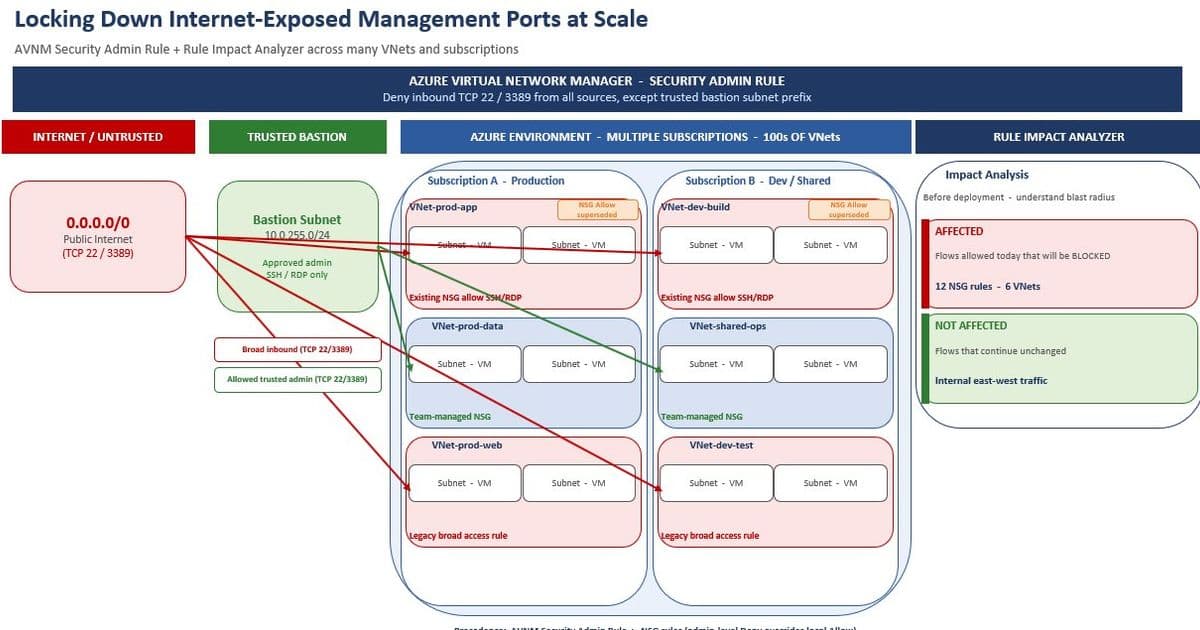
Azure's new Rule Impact Analyzer for Virtual Network Manager brings unprecedented visibility into security policy impact before deployment, addressing a critical gap in multi-cloud network governance strategies.
What Changed: Introducing the Rule Impact Analyzer
Microsoft recently unveiled the Rule Impact Analyzer for Azure Virtual Network Manager (AVNM), a capability that simulates proposed security admin rules against actual network traffic data. This addresses a fundamental challenge in cloud governance: understanding the real-world impact of security policies before they reach production environments.
The Rule Impact Analyzer evaluates proposed rules against observed traffic flows from VNet flow logs and Traffic Analytics, classifying each flow as:
- Affected — The rule would change the current evaluation outcome
- Not Affected — The flow would continue unchanged
- Indeterminate — Insufficient traffic data for conclusive evaluation
This capability transforms network security governance from reactive to predictive, allowing teams to validate policy intent against actual behavior. The integration with existing Azure infrastructure means no additional data collection or storage requirements—leveraging your current Traffic Analytics setup.
Provider Comparison: Azure vs. AWS vs. GCP Network Governance
While Azure advances with the Rule Impact Analyzer, let's examine how this positions Microsoft in the cloud governance landscape compared to other major providers:
Azure (Microsoft)
- Rule Impact Analyzer: Recent addition to AVNM
- Traffic Integration: Leverages existing Traffic Analytics and Network Watcher
- Scope: Cross-subscription and management group enforcement
- Analysis Depth: Flow-level visibility with drill-down capabilities
- Workflow Integration: Seamless with existing security admin rule lifecycle
AWS (Amazon Web Services)
- Network Firewall: Provides centralized firewall management
- Traffic Analysis: VPC Flow Logs with CloudWatch integration
- Policy Simulation: Limited native capability; requires third-party tools or custom scripting
- Governance: AWS Organizations with Service Control Policies (SCPs)
- Multi-account: Strong support but less granular traffic impact preview
GCP (Google Cloud Platform)
- VPC Service Controls: Security perimeters for resources
- Traffic Analysis: VPC Flow Logs with BigQuery integration
- Policy Testing: Limited native simulation capabilities
- Network Firewall: Centralized management but less comprehensive impact analysis
- Multi-project: Good support but lacks pre-deployment validation tools
Azure's Rule Impact Analyzer currently provides the most integrated approach to policy simulation and impact analysis among the major cloud providers. While AWS and GCP offer strong network governance capabilities, neither provides the same level of pre-deployment traffic impact visibility within their native management tools.
The architectural approach differs significantly: Azure leverages existing telemetry infrastructure (Traffic Analytics) rather than requiring separate data collection, while competitors often require additional tooling or custom solutions for similar functionality.
Business Impact: Strategic Advantages for Multi-Cloud Organizations
Risk Reduction and Outage Prevention
For organizations operating across multiple cloud environments, the Rule Impact Analyzer provides critical risk mitigation capabilities. In multi-cloud scenarios, maintaining consistent security policies becomes increasingly complex, with each provider offering different governance mechanisms.
Consider an enterprise with workloads distributed across Azure, AWS, and GCP:
- Azure's Rule Impact Analyzer allows centralized validation of security policies against actual traffic patterns
- AWS requires manual cross-referencing of VPC Flow Logs with firewall rules
- GCP demands analysis of VPC Flow Logs in BigQuery with custom validation scripts
This disparity creates operational inefficiencies and increases the risk of misconfiguration. Azure's integrated approach reduces the blast radius of potential policy changes, enabling safer deployments across complex environments.
Operational Efficiency Improvements
The time savings from implementing the Rule Impact Analyzer are substantial:
- Before: Manual NSG rule auditing across every subscription
- After: Self-service simulation with complete visibility in minutes
In the real-world scenario provided in the announcement, locking down internet-exposed management ports across hundreds of VNets transforms from a week-long manual audit to a self-service workflow. This acceleration of validation processes directly impacts business agility without compromising security posture.
For organizations with hybrid cloud strategies, this capability bridges the gap between on-premises network management and cloud governance, providing consistent validation approaches across different environments.
Cost Considerations
The Rule Impact Analyzer demonstrates a cost-effective approach to enhanced security governance:
Infrastructure Costs:
- No additional agents or data collection required
- Leverages existing Traffic Analytics and Log Analytics infrastructure
- No separate billing component—only standard query costs apply
Operational Costs:
- Reduced time spent on manual policy validation
- Fewer incidents from misconfigured security rules
- Lower compliance burden through improved policy visibility
Multi-Cost Impact:
- While Azure's solution is integrated, AWS and GCP customers may need to invest in third-party tools for similar capabilities
- This creates a total cost of ownership advantage for Azure-focused organizations
Migration and Adoption Considerations
For organizations considering migration to Azure or expanding their Azure footprint, the Rule Impact Analyzer influences several strategic decisions:
Migration Path:
- Existing Azure customers with Traffic Analytics can immediately benefit
- New Azure adoptees should prioritize enabling VNet flow logs and Traffic Analytics
- Migration from other platforms benefits from Azure's integrated governance approach
Integration with Existing Tools:
- Works with existing network monitoring and security tooling
- Complements Azure Sentinel for security operations
- Integrates with Azure Policy for broader governance automation
Skill Requirements:
- Teams need understanding of security admin rules in AVNM
- Familiarity with Traffic Analytics and KQL queries enhances analysis capabilities
- No new specialized training required for basic functionality
Strategic Implementation Recommendations
For organizations adopting the Rule Impact Analyzer in multi-cloud environments:
Start with Critical Workloads: Begin by analyzing security rules for most critical applications to establish baselines and validate the tool's effectiveness.
Establish Governance Workflows: Integrate the analyzer into existing change management processes for network security policies.
Cross-Cloud Documentation: Document differences between Azure's approach and other cloud providers' capabilities to maintain consistent governance standards.
Training Programs: Develop training for network teams on both the tool and the underlying security admin rule priority system.
Continuous Improvement: Use the analyzer's insights to refine security policies over time, creating a feedback loop between observed traffic patterns and policy design.
The Rule Impact Analyzer represents a significant advancement in cloud network governance, particularly for organizations with complex, multi-cloud environments. By providing visibility into policy impact before deployment, Azure addresses a critical gap that has historically existed between policy intent and operational reality.
For organizations evaluating cloud providers, this capability strengthens Azure's position in the governance and security space, offering a more integrated approach to network policy validation than currently available from competitors. As multi-cloud strategies become increasingly common, tools like the Rule Impact Analyzer will play a crucial role in maintaining security consistency across heterogeneous environments.
Learn more about Azure Virtual Network Manager, Azure Network Watcher, and Traffic Analytics to get started with this capability.
Comments
Please log in or register to join the discussion