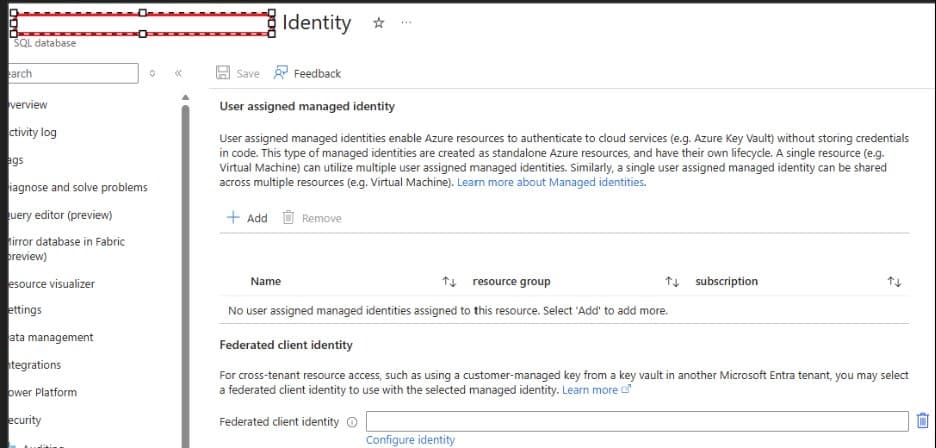
Renaming an Azure SQL Database encrypted with database-level customer-managed keys (CMK) can break access to your data, requiring identity reassignment and potentially disrupting disaster recovery configurations.
When managing Azure SQL Database instances, security teams often implement database-level customer-managed keys (CMK) for enhanced control over encryption. However, a critical operational issue has emerged that could catch many organizations off guard: renaming an encrypted Azure SQL Database can render it completely inaccessible.
The Core Problem
A recent incident highlighted this vulnerability when a customer's database became inaccessible after a simple rename operation. The database, encrypted with database-level CMK, displayed an error message in the Azure Portal: "Access to Azure Key Vault has been lost for this database. Existing data will be inaccessible until this issue is resolved."
When attempting to revalidate the key, administrators encountered another error: "AADSTS1000901: The provided certificate cannot be used for requesting tokens. The value of token_not_after on the certificate should be greater than the current time."
Understanding the Technical Root Cause
The issue stems from how Azure SQL Database handles managed identities. When you rename a database, the underlying resource identity changes. For databases encrypted with database-level CMK, the managed identity that grants access to the Azure Key Vault must be reassigned to the new resource.
This behavior is specific to database-level CMK in Azure SQL Database and does not affect:
- Server-level CMK implementations
- Other Azure managed database services like PostgreSQL Flexible Server, MySQL, or MariaDB
- Azure SQL Managed Instance (which doesn't support database-level CMK)
Immediate Mitigation Steps
If you've encountered this issue, follow these critical steps:
Validate Key Vault Configuration
- Ensure the key is active, enabled, and uses RSA 2048-bit encryption
- Verify the key has no expiration date
- Confirm the managed identity exists and has correct RBAC role assignments
- Check firewall and private endpoint configurations
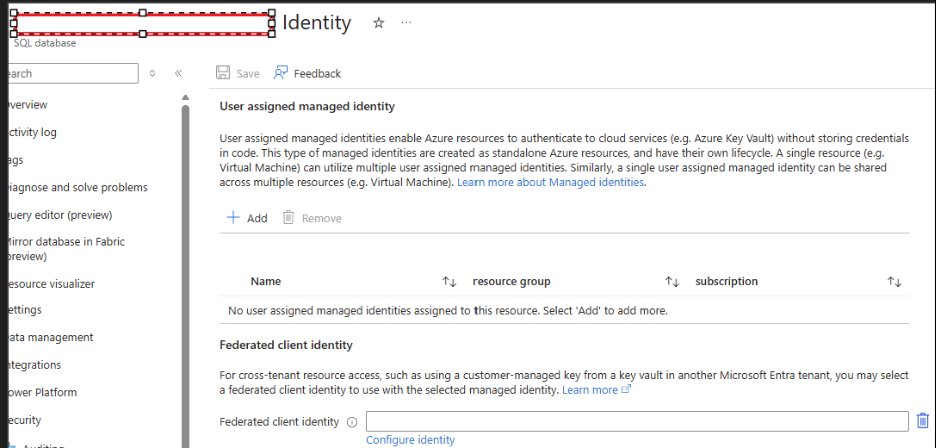
Reassign the Managed Identity After renaming the database, set the managed identity to "None" and then reapply the same user-assigned managed identity to the renamed resource.
Disaster Recovery Implications
One of the most significant impacts affects organizations using geo-disaster recovery (Geo-DR) configurations. After a database becomes inaccessible due to this issue, the 30-minute window for automatic recovery begins.
Once the primary database is back online, critical configurations are lost:
- Failover group configurations
- Tags and database-level settings
- Elastic pool configurations
- Read scale settings
- Auto pause configurations
- Point-in-time restore history
- Long-term retention policies
Rebuilding Geo-DR After 30 Minutes
If the 30-minute window expires, you must manually rebuild your disaster recovery setup:
- Delete the existing failover group
- Create a new geo-replica
- Create the secondary database
- Recreate the failover group
- Add the database to the failover group
This process can take considerable time and leaves your data vulnerable during the reconstruction period.
Proactive Monitoring and Prevention
To prevent unexpected downtime, implement these monitoring practices:
- Subscribe to Azure Key Vault alerts for key expiration and permission changes
- Set up notification systems to detect loss of encryption key access within 30 minutes
- Document all server and database level settings before making changes
- Test rename operations in non-production environments first
- Consider the impact on all dependent services before renaming encrypted databases
Best Practices for Azure SQL Database Management
The incident underscores the importance of understanding the full implications of operational changes in cloud environments. Before renaming any Azure SQL Database encrypted with database-level CMK:
- Plan the downtime - Expect at least 30 minutes of potential unavailability
- Document current configurations - Save all settings, including failover groups and retention policies
- Notify stakeholders - Ensure all dependent applications and teams are aware
- Validate after changes - Test all database functionality and disaster recovery capabilities
- Update documentation - Record the new resource names and updated configurations
The Broader Context
This issue highlights a fundamental challenge in cloud database management: the tight coupling between resource identity, encryption keys, and access controls. While database-level CMK provides enhanced security by giving organizations direct control over encryption keys, it also introduces operational complexity that must be carefully managed.
Organizations should weigh the security benefits against the operational overhead and ensure their teams are trained on these specific behaviors before implementing database-level CMK in production environments.
For more detailed technical guidance, refer to Microsoft's official documentation on Transparent Data Encryption with database level customer-managed keys and Managed Identity in Microsoft Entra for Azure SQL.
The key takeaway is clear: in Azure SQL Database, renaming isn't just a cosmetic change when database-level CMK is involved. It's a significant operational event that requires careful planning, execution, and validation to maintain both security and availability.
Comments
Please log in or register to join the discussion