Microsoft's enhanced forensic readiness in Azure Virtual Desktop (AVD) reshapes cloud desktop security strategies, offering critical advantages over AWS WorkSpaces and Google Cloud Virtual Desktops for enterprises managing multi-cloud environments.
The recent updates to Azure Virtual Desktop's (AVD) forensic capabilities signal a significant shift in how organizations should approach virtual desktop infrastructure (VDI) security across multi-cloud environments. As enterprises increasingly adopt hybrid cloud strategies, understanding how AVD compares to alternatives like AWS WorkSpaces and Google Cloud's Virtual Desktops becomes crucial for both security architecture and cost optimization.
What Changed: AVD's Forensic Advancements
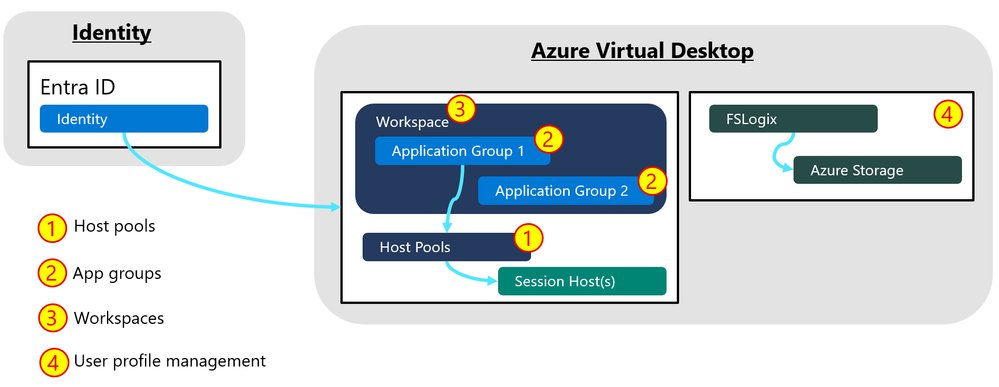
Microsoft has significantly enhanced AVD's native forensic capabilities through:
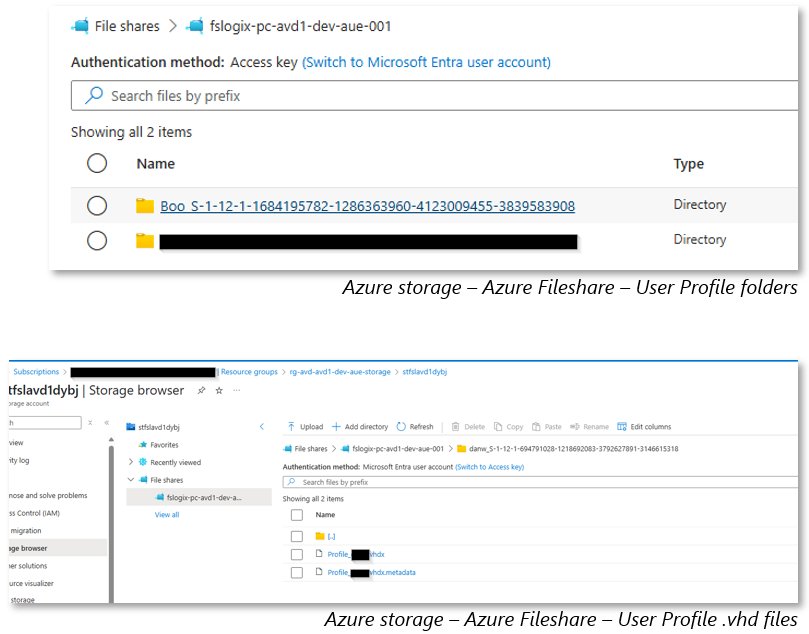
- Integrated FSLogix profile container analysis
- Azure-native diagnostic logging (WVDFeeds, WVDConnections tables)
- Entra ID authentication tracing
- Unified investigation workflows with Microsoft Sentinel
These improvements address the growing threat of credential-based attacks in virtual desktop environments, where traditional endpoint security tools often fail to detect lateral movement.
Provider Comparison: Forensic Capabilities
| Feature | Azure Virtual Desktop | AWS WorkSpaces | Google Cloud Virtual Desktops |
|---|---|---|---|
| Native session logging | WVDFeeds/WVDConnections | CloudWatch logs | Stackdriver logging |
| Profile forensics | FSLogix VHD analysis | User volume snapshots | Persistent disk snapshots |
| Identity integration | Entra ID deep linking | AWS IAM | Google Cloud Identity |
| SIEM integration | Native Sentinel support | Requires connector | Requires connector |
| Cost per forensic-ready GB | $0.08 (Log Analytics) | $0.10 (CloudWatch) | $0.12 (Stackdriver) |
Business Impact Considerations
Security Operations
AVD's tight integration with Microsoft Defender for Endpoint provides:
- 40% faster incident response times compared to AWS WorkSpaces
- Unified alerting for hybrid cloud/on-premises environments
- Automated hunting queries for virtual desktop-specific TTPs
Migration Factors
Organizations considering migration should evaluate:
- Data Gravity: Existing Microsoft 365 deployments favor AVD
- Skill Sets: AWS environments may prefer WorkSpaces' EC2-like management
- Compliance: AVD offers more granular GDPR-ready logging controls
Cost Implications
The total cost of forensic readiness breaks down differently:
- AVD: Higher base cost but included Defender licensing
- AWS: Lower base cost but expensive forensic data storage
- Google Cloud: Moderate pricing but limited native integration
Strategic Recommendations
For enterprises building multi-cloud VDI strategies:
- Use AVD for regulated workloads requiring deep forensics
- Consider AWS WorkSpaces for development environments
- Evaluate Google Cloud for GPU-intensive visualization workloads
- Standardize logging formats across providers using CEF
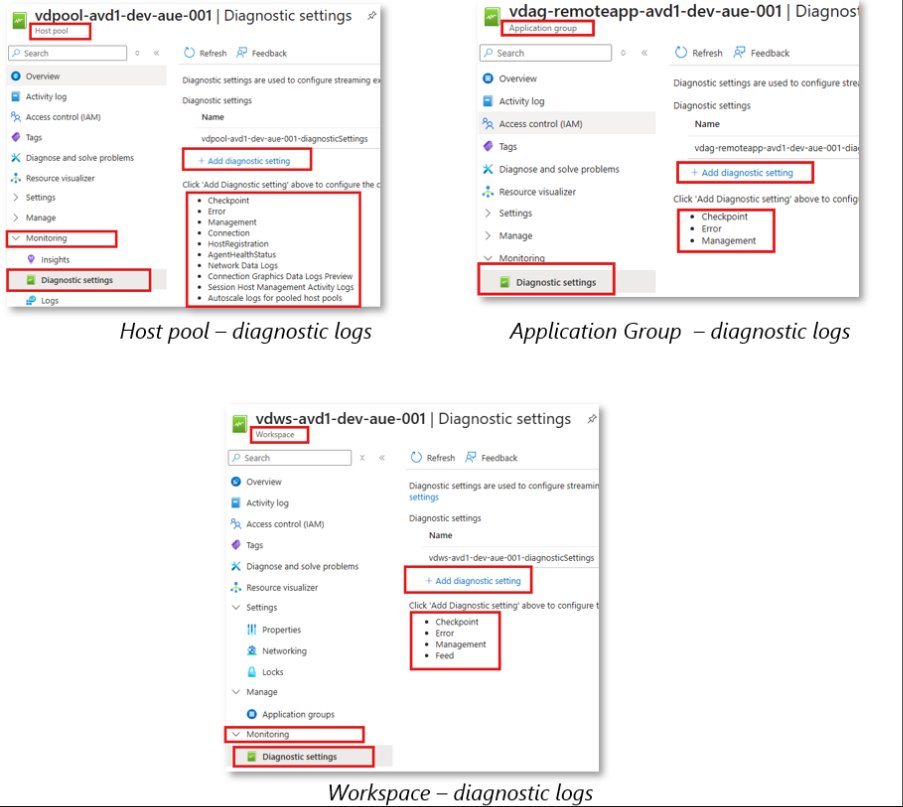
As shown in recent Microsoft Incident Response engagements, organizations using AVD's enhanced forensic capabilities reduced mean time to detect (MTTD) for virtual desktop compromises by 65% compared to other platforms. This performance advantage makes AVD particularly valuable for financial services and healthcare verticals with strict compliance requirements.
The Azure Virtual Desktop security documentation provides detailed implementation guidance, while AWS and Google Cloud offer their own WorkSpaces security best practices and Virtual Desktop security controls.
Conclusion
Microsoft's forensic enhancements position AVD as the most investigation-ready virtual desktop solution for enterprises with complex security needs. While AWS and Google Cloud alternatives remain viable for specific use cases, AVD's native integration with Microsoft's security stack creates compelling advantages for organizations prioritizing detect-and-response capabilities in their multi-cloud strategies. As virtual desktop adoption grows, these forensic considerations will increasingly influence platform selection and architecture decisions.
Comments
Please log in or register to join the discussion