A new community-built CRM Copilot Agent Accelerator reframes the Dynamics 365 AI conversation, moving from case summaries to predictive routing and agentic execution while sidestepping additional Copilot licensing. For organizations weighing Microsoft's native AI stack against bolt-on alternatives, the pattern is a useful template for what you can build with Dataverse, Power Automate, and AI Builder you already pay for.
What changed
Most AI work inside Dynamics 365 begins and ends in the same place: a Copilot-generated case summary. It saves agents a few minutes of reading, then stops. A new accelerator pattern documented on the Microsoft Developer Community blog by Microsoft's Sachin Das argues that summarization, while genuinely useful, never touches the structural cost of running a service desk. The proposed alternative is a modular CRM Copilot Agent Accelerator built entirely on the Microsoft Power Platform, designed to progress through three stages: AI-generated insight, predictive intelligence, and autonomous execution.
The distinction matters for anyone budgeting AI capability. The accelerator treats Copilot output as data, persisting AI summaries and recommended next actions in Dataverse rather than rendering them once and discarding them. That single design choice, storing enrichment as reusable structured fields, is what lets the rest of the architecture build predictive and agentic behavior on top without re-running expensive model calls or buying additional seats.
How the architecture is layered
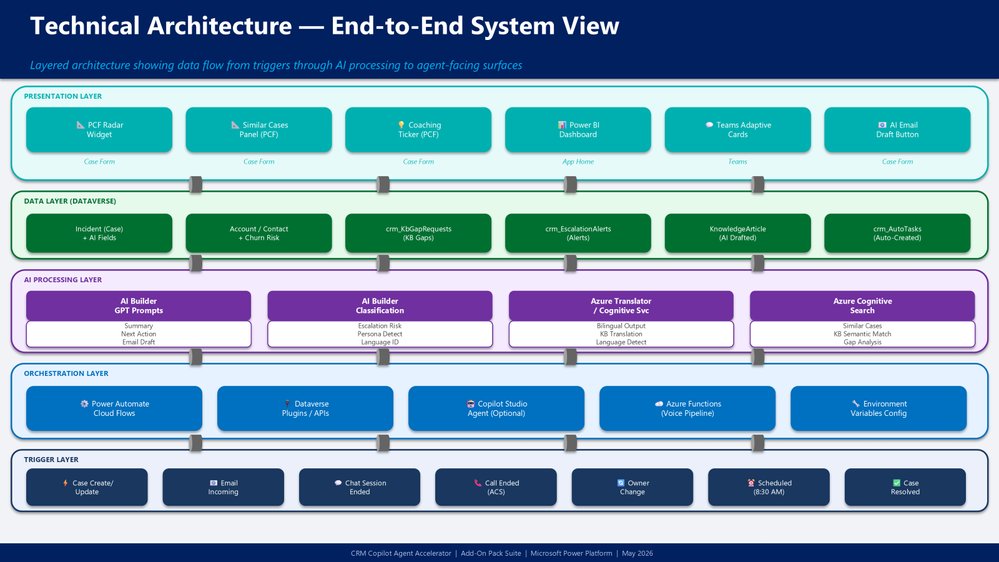
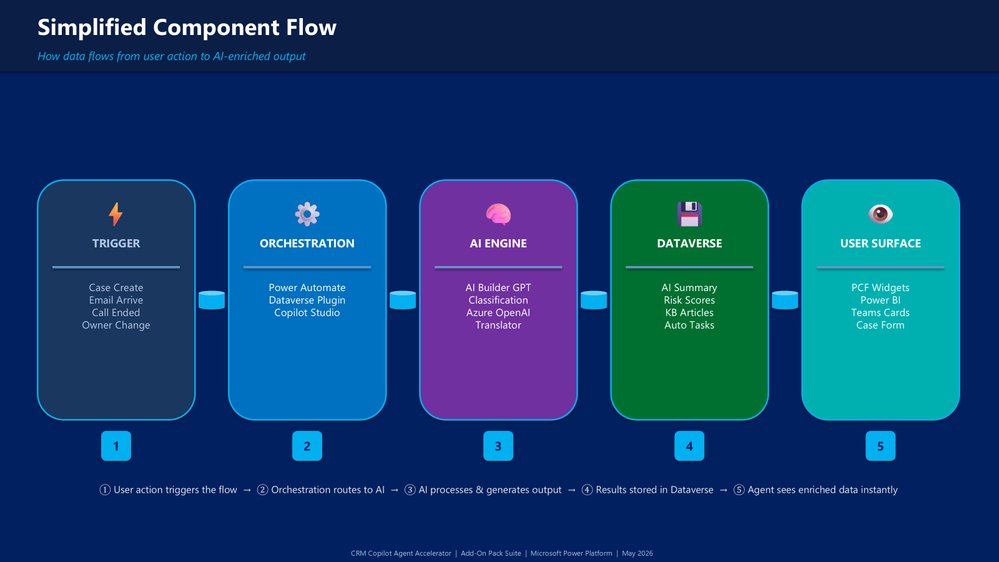
The solution follows a conventional enterprise layering model, which is part of why it is worth studying as a reference design rather than a one-off demo. Triggers fire on case create and update events, inbound email, chat, call events, and SLA checkpoints. Orchestration runs through Power Automate flows, Dataverse plugins, and optional Copilot Studio agents. The intelligence layer leans on AI Builder prompts for summarization and classification, plus sentiment detection and risk prediction.
The data layer is the quiet center of gravity. Standard Case, Account, and Knowledge Base tables gain AI-enriched fields alongside dedicated analytics tables. The experience layer then surfaces all of it through model-driven apps, PCF controls, Teams Adaptive Cards, and Power BI dashboards. Nothing in that stack requires custom AI infrastructure, which is the strategic point: the capability lives inside services a Microsoft-committed organization is already licensed for.
The modular add-on model
The accelerator's actual differentiator is not its base summarization but eight independently deployable add-on packs. That modularity is what separates this from a monolithic AI feature you either adopt wholesale or skip. Teams can deploy the predictive engine for SLA and escalation forecasting without committing to voice and omnichannel summarization, or add Customer 360 persona and churn intelligence without rolling out multilingual support.
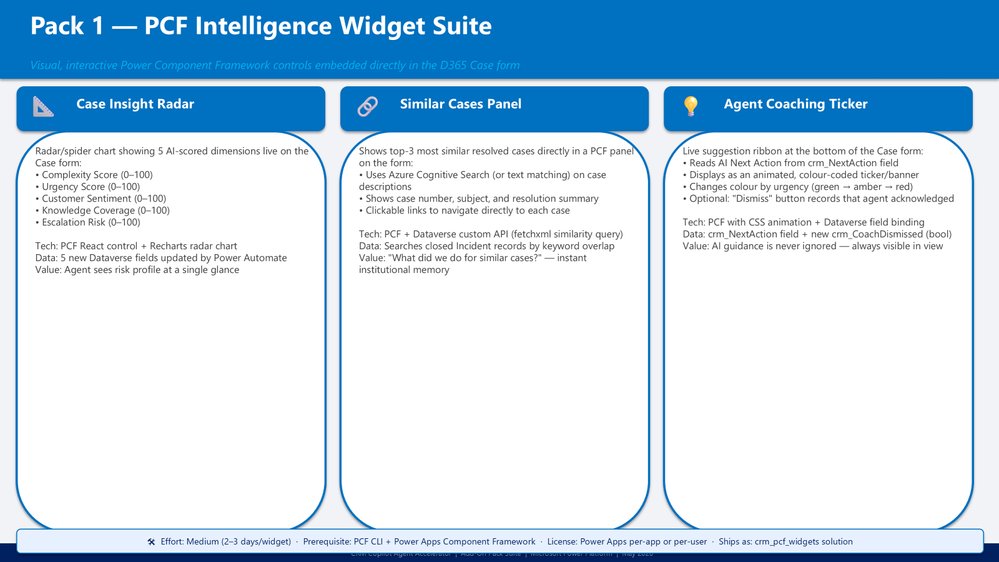
The pack categories span PCF widgets for visual insight such as risk radars and similar-case panels, a predictive engine, Teams integration that pushes insights into the channels where agents already work, knowledge intelligence that closes the loop on the knowledge base, multilingual handling, voice and omnichannel summarization through Omnichannel for Customer Service, and agentic automation where the system takes action on its own. The author positions these as addressing more than ten gaps not covered by stock D365 Copilot.
From reactive to predictive
The most defensible business case in the writeup is the shift from reactive to predictive operations. Rather than discovering an SLA breach after it occurs, the predictive engine calculates breach risk in real time and estimates escalation probability before a case deteriorates, routing proactive alerts to supervisors. The post claims escalation reductions of 25 to 40 percent.
Treat those figures as vendor-optimistic until validated against your own baseline, because escalation rates depend heavily on case mix and staffing. The mechanism, though, is sound and well within reach of AI Builder prediction models trained on historical Dataverse case data. The self-improving knowledge base follows similar logic: the system detects coverage gaps, drafts candidate articles for human review, and feeds usage back into the loop, a pattern that addresses the chronic problem of knowledge bases that are consumed but never maintained.
The agentic progression
The accelerator frames a five-stage maturity curve worth borrowing for your own roadmap planning regardless of platform. AI Informs delivers summaries and insights. AI Suggests produces recommendations. AI Drafts generates emails and knowledge articles. AI Acts executes tasks and routing. AI Orchestrates coordinates multiple agents. Each stage is a deliberate increase in delegated authority, and each demands a corresponding increase in guardrails, audit logging, and human review that the post understandably glosses over.
This is where strategic caution is warranted. Autonomous action against customer records carries real operational and compliance exposure, and the jump from "AI drafts" to "AI acts" is the point where governance, not technology, becomes the constraint. The architecture supports it; whether your organization should enable it depends on regulatory context and risk tolerance.
Business impact and the licensing angle
The claimed outcomes are aggressive: 90 percent reduction in case triage time, 40 percent fewer misrouted cases, 60 to 70 percent improvement in handling efficiency, and new-agent onboarding compressed to under a day. The headline strategic argument, though, is cost structure. By building enrichment on AI Builder and Power Automate rather than per-seat Copilot licenses, organizations can extend AI capability across the case lifecycle while leaning on existing Power Platform investment.
That tradeoff deserves scrutiny in any platform comparison. AI Builder consumes credits and capacity that carry their own pricing, so "no additional Copilot licensing" does not mean free. For high-volume operations, the metered consumption of AI Builder prompts can rival or exceed seat-based Copilot costs, and the right answer depends on your case throughput. The accelerator's value is that it gives you the architectural option to choose, rather than defaulting to per-user licensing because it is the path of least resistance.
Where this fits in a multi-vendor strategy
For teams standardized on Microsoft, this pattern is a strong argument for consolidating CRM intelligence inside the Power Platform rather than integrating a separate AI vendor. The native path keeps data in Dataverse, avoids data egress, and inherits the Power Platform Well-Architected governance model. The roadmap points toward Copilot Studio multi-agent orchestration, vector-based retrieval through Azure AI Search RAG patterns, and Microsoft Fabric for analytics, all reinforcing the single-ecosystem bet.
Organizations running heterogeneous stacks should weigh that gravitational pull carefully. The accelerator's tight Microsoft coupling is its strength for committed shops and its lock-in risk for everyone else. The reusable lesson, independent of vendor, is the layered progression: persist AI output as structured data, build prediction on that data, and gate autonomous action behind governance. That sequence transfers to any cloud CRM strategy, even if the specific Dynamics 365 Customer Service components do not.
Comments
Please log in or register to join the discussion