dith transforms your webcam or image files into live ASCII art using five classic dithering algorithms, all rendered in the terminal with zero dependencies.
The command line has always been a space for creative expression, often hiding sophisticated graphics capabilities behind text-based interfaces. NishantJoshi00's dith brings a particularly elegant form of this tradition to modern systems by implementing real-time image dithering directly in the terminal. Built in Zig with native macOS camera integration, it demonstrates how systems programming languages can create responsive, dependency-free tools that feel almost magical in their simplicity.
The Art of Dithering in the Terminal
Dithering is a technique that dates back to the early days of computing, when limited color palettes forced developers to simulate gradients through strategic pixel placement. The core idea involves distributing quantization errors across neighboring pixels to create the illusion of more colors than are actually available. dith implements five distinct algorithms, each with its own visual character and computational trade-offs.
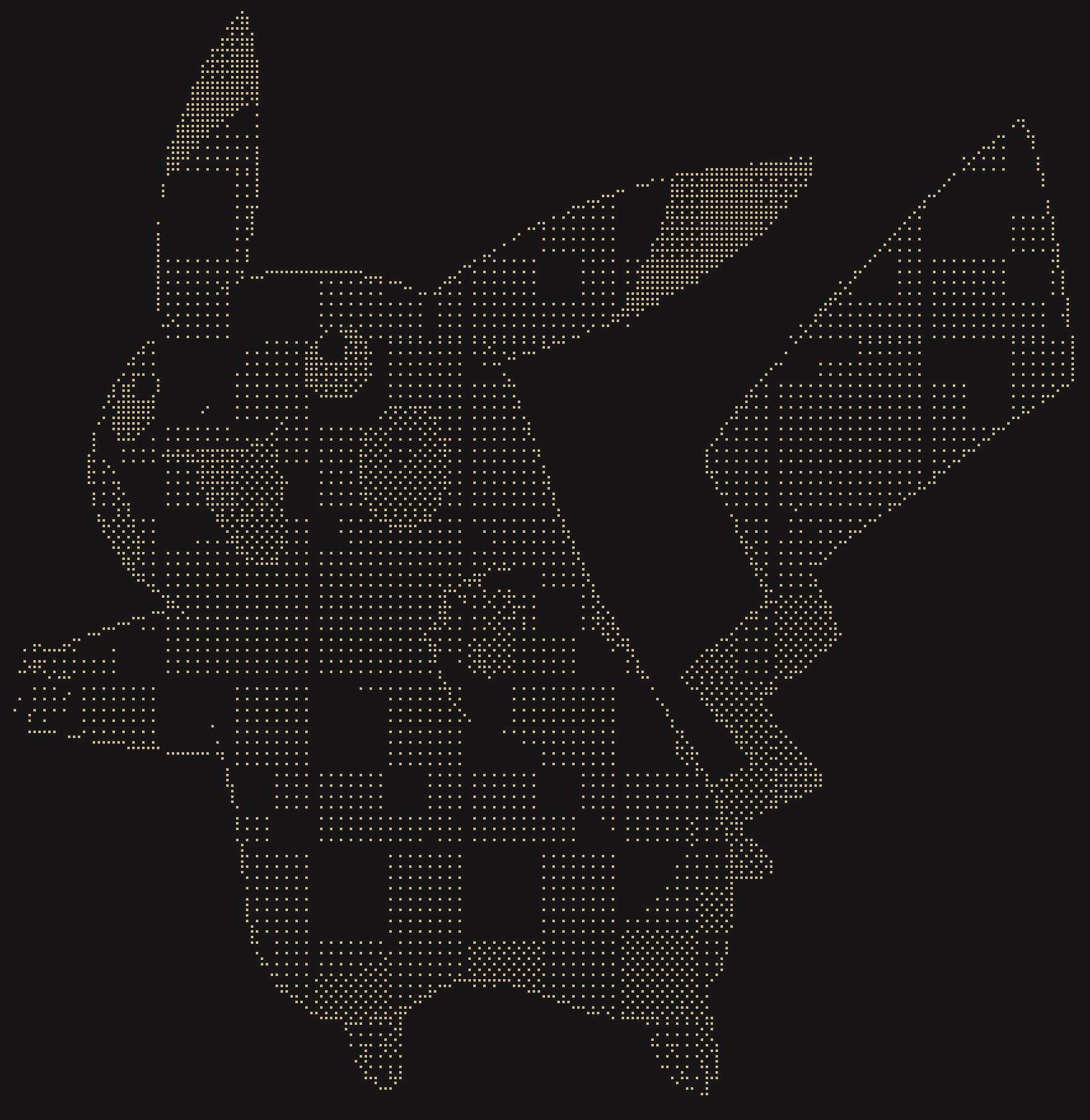
The Atkinson algorithm, named after Bill Atkinson's work on the original Macintosh, produces high-contrast results with a classic aesthetic that preserves highlights well. It's particularly suited for line art and sketches where you want to maintain crisp edges while reducing visual noise. Floyd-Steinberg, the most common dithering algorithm, uses a weighted error distribution to create smooth gradients, making it ideal for photographs. Bayer dithering creates a deterministic crosshatch pattern reminiscent of 8-bit graphics, while blue noise dithering produces an organic, film-grain appearance that feels more natural to the human eye. The edge detection mode essentially creates a line drawing by applying dithering to gradient information rather than color values.
What makes dith particularly interesting is its real-time capability. The tool can capture webcam frames, process them through any of these algorithms, and render the results as Braille characters in the terminal at a surprisingly interactive frame rate. The Braille character set provides a high-resolution canvas because each character contains eight dots, effectively giving you a 2x4 grid per character cell. This allows for much more detailed output than traditional ASCII art using characters like @, #, or *.
Architecture and Implementation
dith is written in Zig, a modern systems programming language that combines C's performance with safer memory management and better compile-time capabilities. The choice of Zig is significant here because it enables the creation of a truly dependency-free binary. Zig's standard library includes everything needed for terminal manipulation, image parsing, and camera access on macOS.
The macOS camera integration uses native AVFoundation APIs through Zig's FFI capabilities, avoiding the need for external libraries like OpenCV. This is a deliberate design choice that keeps the binary small and self-contained. When you build dith with zig build -Doptimize=ReleaseFast, you get a single executable that doesn't require any runtime dependencies or dynamic libraries.
The rendering pipeline is designed for efficiency. In "pipelined" strategy (the default), the tool continuously captures frames, processes them, and renders to the terminal. The "direct" strategy processes each frame individually, which can be useful for debugging or when you want to avoid any buffering. The warmup parameter addresses a common issue with webcam capture: the first few frames are often dark or blurry as the camera adjusts to lighting conditions. dith skips these frames by default, but you can adjust the warmup count.
Practical Usage Patterns
The command-line interface uses a flag-based syntax that feels both Unix-like and expressive. Sources and modes are specified with +source and +mode parameters, while options like +threshold and +invert modify behavior. This design makes the tool composable - you can pipe its output or chain it with other commands.
For creative workflows, dith opens several possibilities. Photographers can preview how images will look in low-color environments. Developers can create live terminal dashboards that show webcam feeds as ASCII art. Artists can use it for real-time installations or as a component in larger creative coding projects. The tool also serves educational purposes, making abstract concepts like error diffusion and quantization visible and interactive.
The threshold parameter is particularly powerful for edge detection mode. A low threshold like +threshold=5 produces delicate, sketch-like lines, while higher values create bolder, more graphic results. Inverting colors with +invert can transform the aesthetic completely, especially with algorithms like Bayer that have strong directional patterns.
Broader Implications
dith represents a growing movement toward "single-file" tools that do one thing well and require no installation overhead. In an era where many development tools require Docker containers, npm packages, or complex dependency trees, a 2MB binary that runs standalone feels refreshingly simple. This approach aligns with Unix philosophy while embracing modern systems programming capabilities.
The project also demonstrates how Zig's compile-time features can optimize for specific use cases. The build system can conditionally include camera support only on macOS, or optimize the rendering loop for different CPU architectures. The ReleaseFast optimization flag produces code that's competitive with C++ while maintaining Zig's safety guarantees during development.
From a visual culture perspective, dith bridges the gap between retro computing aesthetics and contemporary technology. The Braille output format is both practical (providing high resolution) and inclusive (screen readers can interpret Braille characters). The tool's visual style evokes nostalgia for early computer graphics while using modern algorithms and hardware.
Contributing and Extending
The project welcomes contributions with a standard Zig workflow: zig build test for testing, zig build for debug builds, and zig build run -- +source=cam +mode=edge for quick iterations. The codebase structure follows Zig conventions, making it accessible to developers familiar with the language's patterns.
Potential extensions might include additional dithering algorithms (like Sierra or stucki), support for video files, or network streaming capabilities. The architecture's clean separation between source capture, algorithm processing, and terminal rendering makes these additions straightforward.
Conclusion
dith succeeds by focusing on a narrow but creative problem: making real-time image processing accessible and beautiful in the terminal. It proves that sophisticated graphics don't require heavy frameworks, and that the command line remains a fertile ground for tools that blend utility with artistry. Whether you're exploring image processing algorithms, building terminal applications, or just want to see your webcam feed rendered in Braille, dith offers a compelling demonstration of what modern systems programming can achieve.
The tool is available on GitHub at NishantJoshi00/dith, where you can find the source code, build instructions, and examples of the different modes in action.
Comments
Please log in or register to join the discussion