
This guide walks through creating custom automation playbooks from scratch in Microsoft Sentinel, covering trigger selection, identity management with managed identities, built-in tool usage, and HTTP/REST API integration for comprehensive security operations automation.
Microsoft Sentinel's automation capabilities extend far beyond pre-built solutions. While the Content Hub offers numerous ready-made playbooks, many organizations require custom automation tailored to their specific security workflows. This guide provides a comprehensive walkthrough for building playbooks from the ground up, addressing common challenges and best practices for production deployments.
Creating Your First Custom Playbook
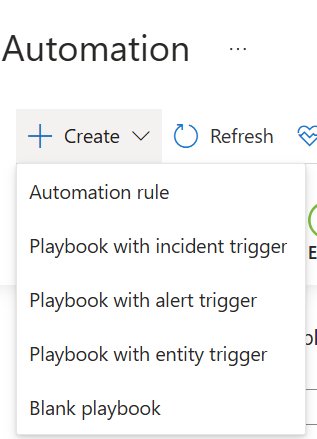
The process begins in the Automation blade, where you'll select "Create" and choose between incident, alert, or entity triggers. Each trigger type serves distinct purposes:
- Incident Triggers: Fire when new incidents are created, ideal for end-to-end response workflows
- Alert Triggers: Activate when alerts are generated, useful for immediate triage actions
- Entity Triggers: Respond to specific entity types (IP addresses, users, files) for targeted investigations

Identity Management: Why Managed Identities Matter
When configuring your playbook, you must choose between running as a managed identity or as the current user. The managed identity approach is strongly recommended for several critical reasons:
Security and Least Privilege: Managed identities operate with scoped permissions, reducing the attack surface compared to user accounts that may have broader organizational access.
Operational Reliability: Consider what happens when a playbook runs under a user account and that user leaves the organization. Their account gets disabled, and all dependent playbooks fail. With managed identities, there's no dependency on individual user lifecycles.
Audit and Compliance: Managed identities provide clearer audit trails for automated processes, separating human actions from system actions.
To implement this properly, you'll need to assign appropriate permissions to the managed identity. The system will flag this requirement during creation, as managed identities don't automatically receive Sentinel access rights.
Understanding Playbook Architecture
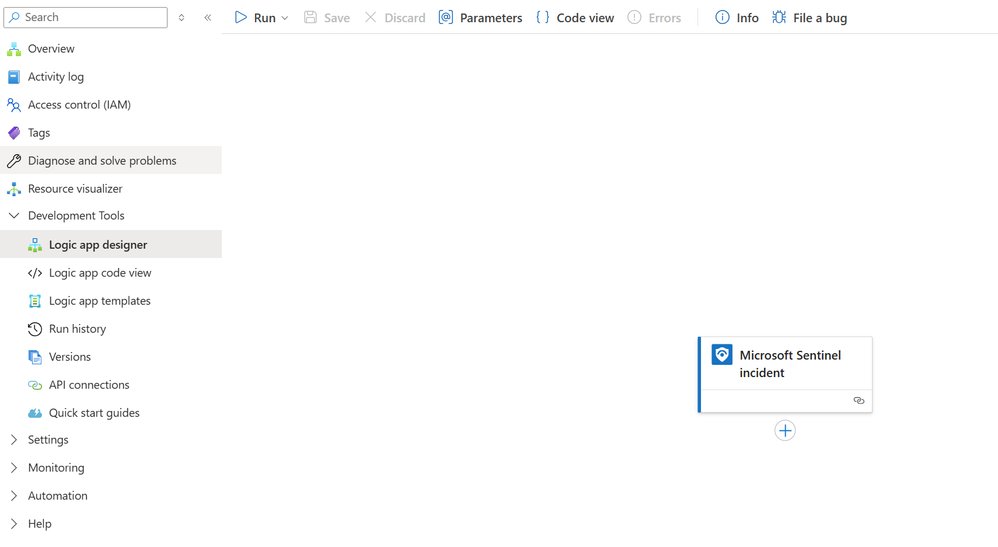
A playbook consists of a trigger and subsequent actions that execute in sequence. The trigger provides the initial data packet about the incident, alert, or entity that initiated the workflow. This data becomes available as tokens that subsequent actions can reference.
Adding Actions and Building Logic
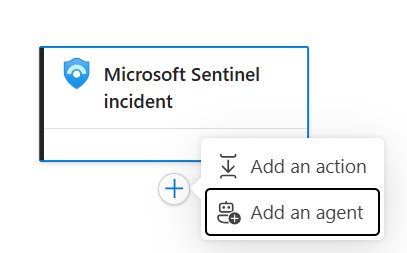
Clicking the "+" symbol under the trigger reveals options to add actions or agents. For most security automation scenarios, actions are the primary building blocks.
The action library is extensive, with over 1,575 connectors available at the time of writing. These are categorized for easier navigation:
Built-In Tools: These form the core automation toolkit, divided into four key areas:
- Control: Flow control statements for branching logic
- Date Time: Temporal operations and scheduling
- Data Operations: Data manipulation and transformation
- HTTP: Direct API calls and webhook integration
Third-Party Connectors: Pre-built integrations with services like ServiceNow, Slack, and other security tools.
Implementing Conditional Logic
Let's examine a practical example: creating different response paths based on incident severity. The Condition action in the Control section enables this branching logic.
When you add a Condition action, you configure it through a parameters panel. The "choose a value" field presents two options:
- Data from preceding steps: Access tokens from the trigger or previous actions
- Expressions: Write custom logic using Azure Logic Apps expressions
For severity-based routing:
- Select the data token option
- Choose from the incident data fields (154 available fields)
- Search for "Incident Severity"
- Configure the evaluation (equals, contains, etc.)
- Set the comparison value ("High")

The Condition action creates two branches: True and False. Each branch can contain additional actions, creating sophisticated decision trees for incident response.
Integrating External Services via HTTP/REST
Not all systems have pre-built connectors. For services communicating via HTTP/REST, Sentinel provides the HTTP action with multiple options:
Direct HTTP Calls: Execute REST API requests with custom headers, authentication, and body content. This is ideal for:
- Proprietary security tools
- Legacy systems without official connectors
- Custom internal applications
Webhooks: Set up inbound triggers from external systems, enabling bidirectional automation.
HTTP + Swagger: For APIs with OpenAPI specifications, Sentinel can generate action templates automatically.
Practical HTTP Integration Example
Consider integrating with a custom threat intelligence platform that lacks a pre-built connector:
- Configure the HTTP Action: Select the HTTP action from Built-In Tools
- Set Endpoint: Provide the API URL (e.g.,
https://threat-intel.example.com/api/v1/indicator) - Authentication: Configure API keys, OAuth, or other authentication methods
- Request Body: Structure the JSON payload using incident data tokens
- Response Handling: Parse the returned JSON and use it in subsequent actions
This approach enables integration with virtually any web-accessible system, making Sentinel's automation capabilities nearly limitless.
Production Considerations
Error Handling and Resilience
While not covered in detail here, production playbooks should include:
- Try-catch patterns for error handling
- Retry logic for transient failures
- Logging and monitoring for playbook execution
- Circuit breakers for external service failures
Performance Optimization
- Parallel Execution: Some actions can run concurrently to reduce execution time
- Action Count Limits: Be mindful of action limits per playbook
- Data Size: Large payloads can impact performance; consider filtering early
Security Best Practices
- Least Privilege: Grant managed identities only the permissions they need
- Secret Management: Use Azure Key Vault for storing credentials, not hardcoded values
- Input Validation: Sanitize data from triggers before using in actions
- Network Security: Consider private endpoints for sensitive integrations
Extending Beyond Built-In Tools
The HTTP action is your gateway to custom code and advanced scenarios. When pre-built connectors don't exist, HTTP calls enable integration with:
- Custom APIs: Internal security tools
- Legacy Systems: On-premises applications via reverse proxy
- Specialized Services: Industry-specific platforms
- Emerging Technologies: New tools without official connectors
This flexibility means Sentinel automation can evolve with your security stack, rather than being limited by available connectors.
Next Steps in Your Automation Journey
This foundation enables building sophisticated security workflows. The next phase involves incorporating custom code through Azure Functions for complex logic that exceeds Logic Apps' capabilities. Functions provide:
- Full Programming Language Support: Python, C#, JavaScript, etc.
- Advanced Data Processing: Complex algorithms and machine learning
- External Library Integration: Use specialized security libraries
- Performance Optimization: Compute-intensive operations
Conclusion
Building custom playbooks from scratch transforms Microsoft Sentinel from a detection platform into an automated response engine. By mastering triggers, managed identities, built-in tools, and HTTP integrations, you create resilient, secure automation tailored to your organization's specific needs.
The key principles—choosing appropriate triggers, implementing managed identities for security and reliability, leveraging built-in tools for common patterns, and using HTTP for custom integrations—provide a robust foundation for any automation requirement.
As you develop more complex scenarios, remember that the combination of Logic Apps' visual workflow design with Azure Functions' computational power creates a comprehensive automation platform capable of handling virtually any security operations challenge.
Resources:
- Microsoft Sentinel Documentation
- Azure Logic Apps Documentation
- Sentinel Automation Best Practices
- Azure Managed Identities
This article is part of a series on automating Microsoft Sentinel. Previous posts covered introduction to automation, automation rules, and playbook fundamentals. Future posts will explore Azure Functions, custom code integration, and a comprehensive capstone project.
Comments
Please log in or register to join the discussion