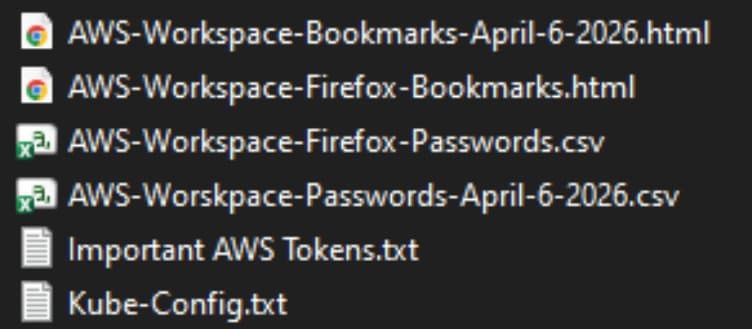
A CISA contractor’s public GitHub repo leaked privileged AWS GovCloud credentials, plaintext passwords, and internal build artifacts. Security experts explain why the breach happened, what it reveals about internal practices, and concrete steps organizations can take to avoid similar exposures.
CISA Contractor Exposed AWS GovCloud Keys on Public GitHub – What Went Wrong and How to Prevent It
A public GitHub repository maintained by a contractor for the Cybersecurity & Infrastructure Security Agency (CISA) inadvertently disclosed privileged AWS GovCloud keys, plaintext passwords, and internal build pipelines. The leak, first flagged by GitGuardian researcher Guillaume Valadon, is being called one of the most serious government data exposures in recent memory.
The incident in brief
- Repository name:
Private-CISA - Owner: Contractor employed by Nightwing (a Dulles‑based government contractor)
- Exposure window: Repository created 13 Nov 2025; taken down after notification, but AWS keys remained active for ~48 hours.
- What was exposed:
- Administrative credentials for three AWS GovCloud accounts
- CSV files with dozens of plaintext usernames and passwords for internal CISA systems (e.g., the “LZ‑DSO” Landing Zone DevSecOps environment)
- Backups of internal Artifactory repositories and CI/CD scripts
- Git commit history showing the GitHub secret‑detection feature had been deliberately disabled
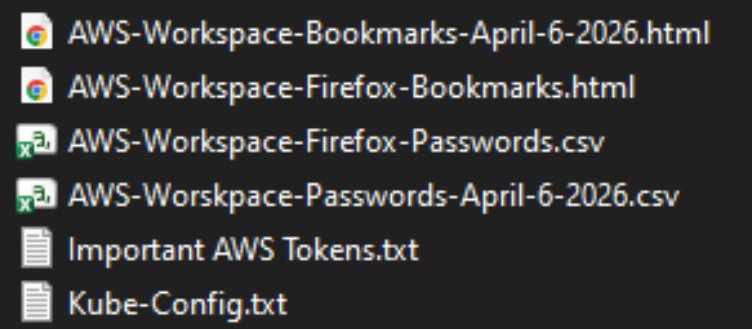
The breach was discovered when Valadon’s automated scanning platform flagged the repo for hard‑coded secrets. The contractor never responded to the alert, prompting the researcher to notify CISA directly.
Expert analysis
Poor security hygiene
Philippe Caturegli, founder of the security consultancy Seralys, described the repo as a classic “scratchpad” used to sync files between a work laptop and a home machine. The commit logs reveal:
- Disabling of GitHub’s built‑in secret‑detection feature
- Storage of passwords in plain‑text CSV files
- Backups of internal Artifactory packages committed to Git
“The use of both a CISA‑associated email address and a personal email address suggests the repository was used across differently configured environments,” Caturegli wrote.
Real‑world impact
Caturegli tested the leaked AWS keys and confirmed they could still authenticate to the three GovCloud accounts at a high‑privilege level. Access to those accounts would allow an attacker to:
- Enumerate and exfiltrate sensitive data stored in S3 buckets.
- Spin up additional EC2 instances for command‑and‑control.
- Modify IAM policies to grant broader access across the agency’s cloud estate.
- Insert malicious packages into the internal Artifactory, giving the attacker a persistent foothold whenever CISA builds new software.
Why it matters for any organization
Even though the breach involved a federal agency, the underlying mistakes are common in private‑sector environments:
- Treating a public repo as a personal file‑sync service
- Turning off automated secret‑scanning tools to avoid false positives
- Reusing simple passwords (e.g.,
service2025) across multiple systems
Practical takeaways
Below are concrete steps that security teams can implement immediately to avoid a repeat of this scenario.
1. Enforce never commit secrets policy
- Git hooks: Deploy a pre‑commit hook that runs tools like git‑secret or TruffleHog locally.
- Server‑side checks: Enable GitHub’s secret scanning for all repositories, and block pushes that contain known patterns (AWS keys, private keys, passwords).
- Policy as code: Use tools such as OPA or GitHub Advanced Security to enforce compliance automatically.
2. Centralize secret storage
- Store credentials in a dedicated secret manager (e.g., AWS Secrets Manager, HashiCorp Vault, or Azure Key Vault).
- Configure CI/CD pipelines to retrieve secrets at runtime, never hard‑coding them into source files.
- Rotate secrets regularly; automate rotation where possible.
3. Harden privileged cloud accounts
- Apply least‑privilege IAM policies; avoid using admin‑level keys for routine tasks.
- Enforce MFA for all privileged users.
- Use AWS Organizations service control policies (SCPs) to limit what GovCloud accounts can do.
- Enable CloudTrail and GuardDuty alerts for any usage of newly created keys.
4. Secure development environments
- Prohibit the use of personal devices for official work. Provide company‑managed laptops with encrypted disks and endpoint detection and response (EDR) agents.
- Deploy Zero‑Trust network access to restrict where code can be pushed from.
- Regularly audit SSH keys and other credentials stored on developer machines.
5. Incident response readiness
- Maintain an inventory of all secret locations (cloud, on‑prem, code repos) so you can revoke them quickly.
- Test key revocation procedures quarterly; simulate a breach to ensure you can invalidate credentials within minutes.
- Log all secret‑related events and integrate them into a SIEM for real‑time detection.
What CISA says
A CISA spokesperson confirmed the agency is investigating and has “implemented additional safeguards” but noted there is “no indication that any sensitive data was compromised as a result of this incident.” The agency’s response underscores the need for continuous monitoring—even after a leak is patched, attackers may have already harvested usable credentials.
Bottom line
The Private‑CISA GitHub leak is a stark reminder that human error combined with disabled security controls can expose critical infrastructure. By treating source control as a trusted storage location, disabling automated defenses, and reusing weak passwords, an organization essentially hands attackers a master key.
Implementing the safeguards outlined above—secret‑scanning hooks, centralized secret management, strict IAM hygiene, and a disciplined development environment—will dramatically reduce the risk of a similar exposure. As the CISA case shows, the cost of a single careless commit can be measured in national‑level security implications.
For further reading on securing cloud credentials, see the AWS guide on Managing Access Keys and the GitHub documentation on Secret Scanning.
Comments
Please log in or register to join the discussion