Microsoft has made computer‑using agents in Copilot Studio generally available, enabling AI‑driven bots to interact with any UI just like a human. The release adds global availability, secure authentication, enterprise governance, and observability, and it supports OpenAI and Anthropic models. A Graebel case study shows how the new capability replaces brittle RPA and costly integration projects, delivering faster, more reliable processing of unstructured service‑order emails.
What changed
Microsoft announced that computer‑using agents (CUAs) in Copilot Studio are now generally available and have been rolled out to all commercial Power Platform geographies. The feature lets a Copilot Studio agent control a browser or desktop application with vision, keyboard, and mouse—essentially giving the AI the same interaction surface a human operator uses. Key additions include:
- Global rollout respecting tenant data‑residency and compliance boundaries.
- Secure sign‑in via built‑in credentials and Azure Key Vault.
- Enterprise‑grade governance: DLP policies, environment isolation, audit trails, and whitelist/blacklist of target applications.
- Human‑in‑the‑loop checkpoints for low‑confidence steps.
- Full run‑history and observability, with logs flowing to Purview and Dataverse.
- Choice of large language models from OpenAI and Anthropic.
{{IMAGE:2}}
Provider comparison
| Feature | Microsoft Copilot Studio CUA | Traditional RPA (UiPath, Automation Anywhere) | Low‑code integration platforms (MuleSoft, Dell Boomi) |
|---|---|---|---|
| Interaction model | Vision‑guided UI control, reasoning on screen content | Selector‑based UI automation, fragile when UI changes | API‑centric, requires exposed services |
| Governance | Integrated with Power Platform admin center, DLP, audit logs, Purview | Separate governance consoles, limited native DLP integration | Governance at the integration layer, not UI actions |
| Security | Azure Key Vault credentials, tenant‑wide auth policies | Credential stores often external, variable encryption | |
| Scalability | Runs as part of Power Automate flows, auto‑scales with Azure resources | Requires dedicated orchestrators, scaling can be complex | |
| Model flexibility | Switch between OpenAI and Anthropic LLMs per agent | Typically static rule‑based bots, no LLM support | |
| Cost model | Pay‑as‑you‑go Power Platform licensing + LLM usage | License per bot + infrastructure overhead | |
| Maintenance | Agents adapt to UI changes via vision, reducing selector churn | Frequent selector updates needed | |
| Human‑in‑the‑loop | Built‑in checkpoints, confidence scoring | Often custom‑built, not native |
The comparison shows that CUAs combine the flexibility of vision‑based UI interaction with the governance and security that enterprise IT expects from the Power Platform, while traditional RPA still struggles with UI drift and separate security silos.
Business impact
Reducing integration friction
Many legacy line‑of‑business applications expose no API, forcing enterprises to choose between costly redevelopment or brittle RPA scripts. CUAs eliminate the redevelopment step: an agent can log into the web portal, read fields, and submit forms exactly as a human would, but with the speed and consistency of automation. This directly lowers total cost of ownership (TCO) for automation projects and shortens time‑to‑value from months to weeks.
Governance at scale
Because the feature lives inside the Power Platform admin center, IT can enforce Data Loss Prevention (DLP) policies, restrict which domains or desktop apps agents may access, and retain a complete audit trail in Microsoft Purview. This satisfies audit requirements for regulated industries (finance, healthcare) without adding a separate monitoring stack.
Human‑in‑the‑loop safety net
Agents surface a confidence score for each step. When the score falls below a configurable threshold, the workflow pauses and routes the task to a human operator. This pattern preserves operational safety while still automating the majority of high‑confidence actions.
Real‑world ROI: Graebel case study
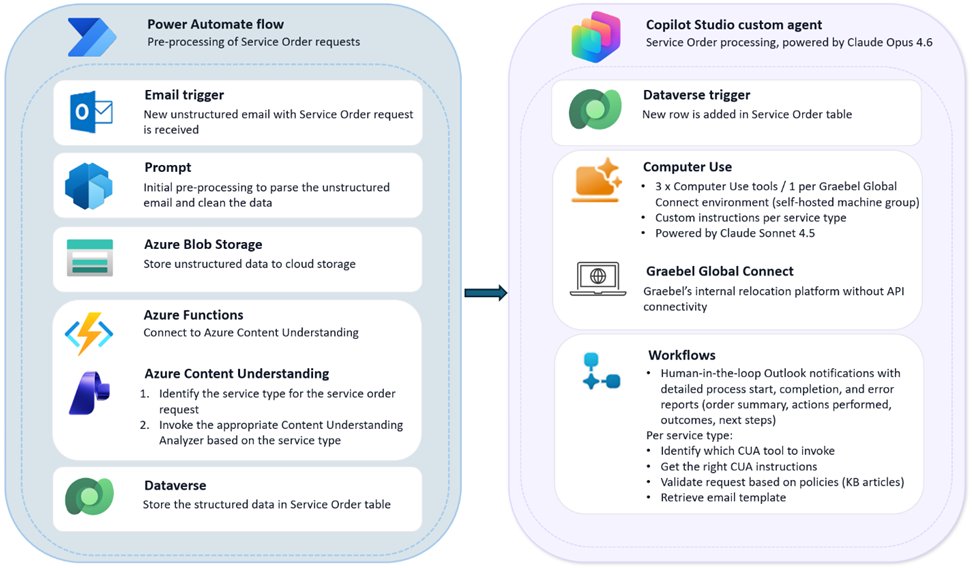
Graebel, a talent‑mobility firm, used CUAs to automate the processing of unstructured service‑order emails. Their legacy Global Connect platform lacked an API, and prior RPA attempts failed due to UI variability. By combining Azure Content Understanding for email parsing with a Copilot Studio agent that drives the Global Connect UI, Graebel achieved:
- 30‑40% reduction in manual data‑entry effort.
- 15% faster order turnaround.
- Consistent data quality across 30+ service categories.
- A reusable blueprint for extending intelligent automation to other business units.
Migration considerations
- Identify UI‑only processes – Target workflows that lack APIs or have high‑frequency UI changes.
- Define governance boundaries – Use Power Platform DLP policies to whitelist target domains and configure Azure Key Vault for credential storage.
- Select the appropriate LLM – OpenAI models excel at natural‑language understanding; Anthropic may be preferred for higher compliance contexts.
- Plan for observability – Enable run‑history logging and integrate with Purview for long‑term auditability.
- Pilot with human‑in‑the‑loop – Start with a low‑confidence threshold to capture edge cases before moving to full automation.
Getting started
- Open Microsoft Copilot Studio and create or edit an agent.
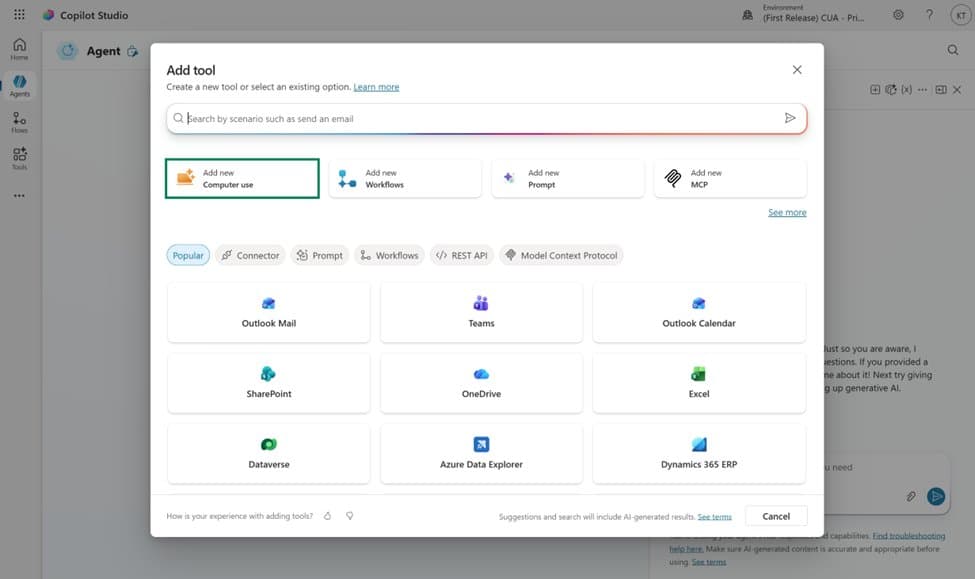
- Navigate to Tools → Add tool → Add new computer use.
- Describe the desired task in natural language; the system will generate the necessary vision‑and‑action prompts.
- Review the generated flow, configure authentication via Azure Key Vault, and set DLP policies.
- Test in a sandbox environment, then promote to production once confidence thresholds are met.
For detailed configuration steps, see the official computer‑use documentation.
Strategic takeaway: The GA of computer‑using agents marks a shift from chat‑only AI assistants to agents that can act across any application. For enterprises, this means faster automation of legacy UI‑bound processes, tighter security and governance, and a clearer path to scaling AI‑driven work across the organization.
Comments
Please log in or register to join the discussion