Microsoft's KB5075912 Extended Security Update patches 58 vulnerabilities including actively exploited flaws while gradually deploying replacement Secure Boot certificates ahead of June expiration.
Microsoft has released the Windows 10 KB5075912 Extended Security Update (ESU), addressing 58 security vulnerabilities including six actively exploited zero-day flaws. This update comes as part of Microsoft's February 2026 Patch Tuesday cycle and initiates crucial preparations for expiring Secure Boot certificates that protect boot processes.
Key Security Fixes The update patches vulnerabilities across Windows components, with notable fixes including:
- Mitigations for six zero-day vulnerabilities actively exploited in attacks
- Resolution of system shutdown failures affecting devices with System Guard Secure Launch enabled
- Correction of folder renaming issues in File Explorer when using desktop.ini
- Stability improvements for graphics processing units
- Chinese font updates for GB18030-2022A compliance
Secure Boot Certificate Transition A critical component of this update involves the phased rollout of new Secure Boot certificates to replace expiring credentials first issued in 2011. These certificates validate Windows boot components and third-party bootloaders. Without replacement:
- Expired certificates could allow attackers to bypass Secure Boot protections
- Systems might become vulnerable to bootkit malware installations
- Secure Boot revocation updates would fail to apply
Microsoft is deploying certificates incrementally using "targeting data" that identifies device readiness. Official documentation confirms the rollout will expand as devices demonstrate successful update compatibility.
Installation Requirements This update is exclusively available to:
- Windows 10 Enterprise LTSC 2021 systems
- Devices enrolled in the Extended Security Update program
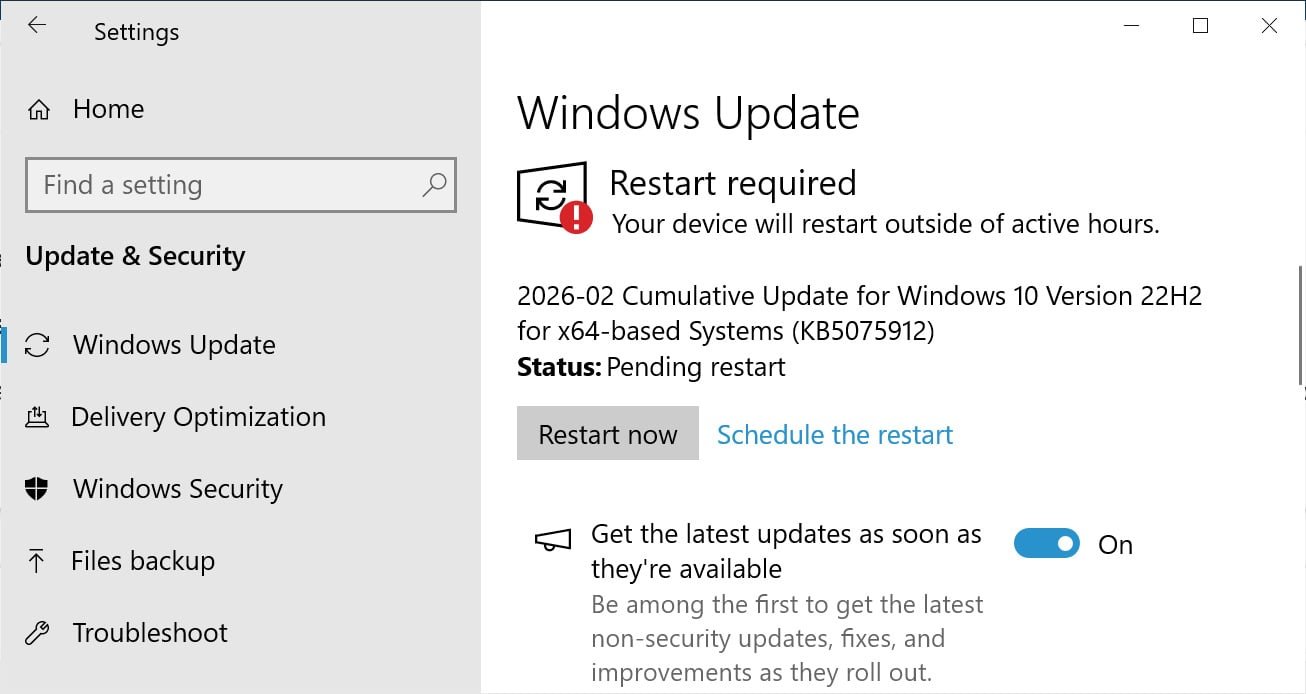
Eligible users can install KB5075912 through Windows Update:
- Open Settings > Update & Security
- Select Windows Update
- Click Check for Updates
Post-installation, systems will show build numbers 19045.6937 (standard) or 19044.6937 (LTSC 2021). Microsoft confirms no known issues with this update and recommends immediate installation given the active exploitation of patched vulnerabilities.
Comments
Please log in or register to join the discussion