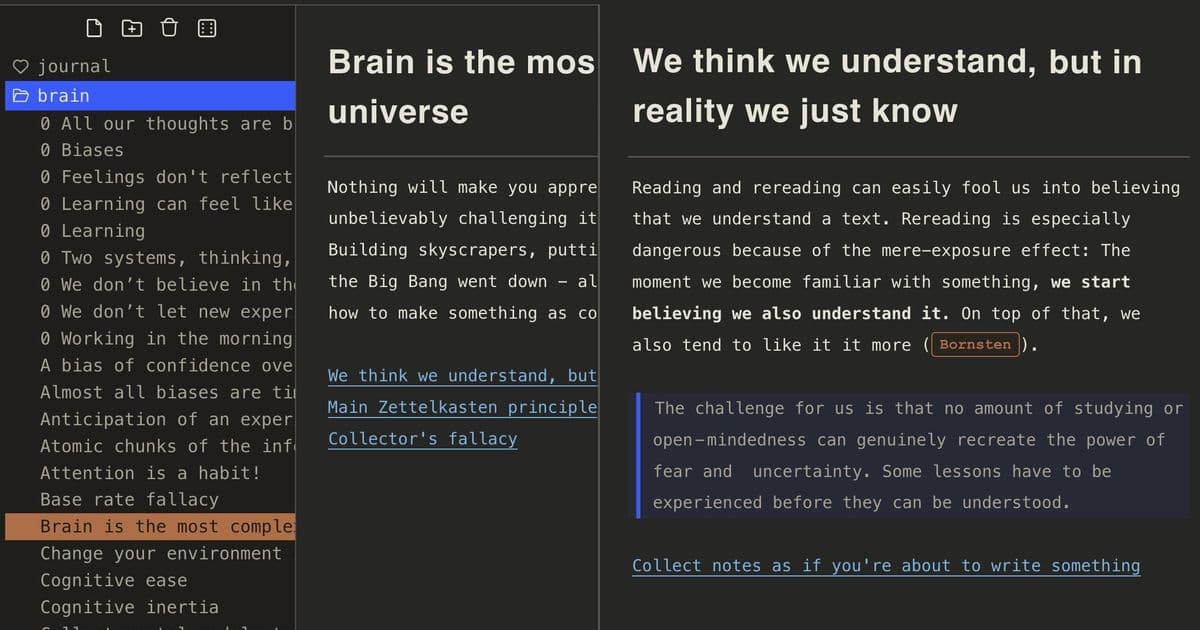
The open‑source files.md project offers a browser‑based, offline‑first personal knowledge base built on plain Markdown files. Its claim to simplicity translates into a tiny codebase, native OS file access, and optional sync via a single Go binary or cloud storage. The approach avoids heavy plugins and proprietary formats, but the trade‑offs include limited nesting, manual conflict resolution, and a reliance on user discipline for organization.
What files.md claims
- All data lives in plain
.mdfiles stored locally, with optional cloud sync via a tiny Go server or any folder‑sync service (iCloud, Dropbox, Google Drive). - Zero‑install UI – open
web/index.htmlin a browser, click Install files.md and you have a progressive web app that works offline. - LLM‑friendly – because the knowledge base is just text, large language models can read and write without adapters.
- Extensible yet tiny – the entire front‑end is a single HTML file, the back‑end is a single Go binary, and the repository ships with no external dependencies.
- Built‑in chat – a minimal Telegram bot lets you dump notes from anywhere; everything lands in a single
Chat.mdlog.
The project’s README frames these features as a reaction to “feature‑bloat” in tools like Obsidian, promising that restraint will foster creativity.
What is actually new?
1. A truly local‑first data model
Most modern note‑taking apps store data in proprietary SQLite databases or rely on a cloud‑only backend. files.md stores every piece of information as an individual Markdown file in a user‑controlled folder. The folder structure is fixed to a single level of nesting (e.g., journal/2024.08 August.md, habits/Ate consciously.md). This design makes the data instantly portable: you can git clone the folder, move it to a USB stick, or serve it through any static‑file host.
2. Minimal runtime dependencies
The front‑end loads CodeMirror‑style editing from a bundled web/lib folder; there is no Node.js build step, no Webpack, no npm install. The back‑end is a Go program that provides a tiny HTTP sync API and a Telegram bot. Because the Go binary is self‑contained, you can run it on any platform that supports Go 1.22+ without pulling in external services.
3. Simple synchronization strategy
Two sync modes are offered:
- Stateless content sync – the server compares file hashes and modification times (
mtime) to decide whether to push updates. No persistent state is stored on the server, which reduces the attack surface. - Append‑only log sync – all incoming messages from the Telegram bot are appended to
Chat.md. Renames and deletions are tracked via a separate log that records the originalctimeof a file. This log‑based approach avoids race conditions that plagued earlier implementations.
4. Integrated chat workflow
Instead of a separate note‑taking UI, files.md treats the chat interface as the primary ingestion point. When you send a message to the bot, you are prompted to choose a destination folder (or defer the choice). The message is written verbatim to a Markdown file, preserving any links or checkboxes you include. The UI mirrors this flow: pressing Enter in the web chat creates a new line in Chat.md.
5. Developer‑friendly conventions
The repo includes a collection of Go scripts (cmd/) for common maintenance tasks:
whoop/go– enrich journal entries with Whoop metrics.tomdlinks/go– convert[[wikilinks]]to standard Markdown links.backlink/go– generate backlinks automatically.shifttime/go– adjust timestamps after timezone changes.
These scripts illustrate the project’s philosophy: keep the tooling close to the data format and avoid pulling in heavyweight libraries.
Limitations and practical concerns
| Area | Observation |
|---|---|
| Nesting depth | Only one level of sub‑folders is supported. Complex hierarchies must be flattened, which can be cumbersome for large PKM collections. |
| Conflict resolution | Sync is optimistic; if two devices edit the same file simultaneously, the later write wins. There is no built‑in merge UI, so users must manually reconcile conflicts. |
| Feature set | The UI provides only basic editing, link insertion, and checklist toggling. Advanced features such as graph view, tag queries, or embedded PDFs are deliberately omitted. |
| Scalability | Because every note is a separate file, directories with thousands of files can degrade performance on some file systems. The project’s own benchmark shows directory reads on SSDs at ~150 µs per file, which is acceptable for typical personal use but may become a bottleneck for very large vaults. |
| Mobile ergonomics | The PWA works on mobile browsers, but the chat‑first workflow can feel cramped on small screens. The developers plan to switch to a “window‑size‑aware” UI, but it is not yet released. |
| Ecosystem integration | No plugin system means you cannot add community extensions like task‑automation or AI‑assisted summarization without forking the repo. However, the plain‑text format makes it easy to write external scripts that operate on the same files. |
How it fits into the broader PKM conversation
files.md is a deliberate counter‑point to the “plugin‑rich” approach of tools such as Obsidian, Notion, or Roam. By stripping away everything that is not essential—databases, proprietary sync, UI frameworks—it forces the user to think about the structure of their knowledge rather than the features of the app. This can be advantageous for:
- Researchers who need reproducible, version‑controlled notes (the folder can be a Git repo).
- LLM‑augmented workflows where a model reads the raw Markdown, generates a summary, and writes back to the same file without any API translation layer.
- Privacy‑conscious users who want to keep data on their own hardware and avoid SaaS lock‑in.
On the flip side, teams that rely on real‑time collaboration, rich media embedding, or complex task‑management may find the minimalist model too limiting.
Quick start guide
- Clone the repo:
git clone https://github.com/zakirullin/files.md - Open
web/index.htmlin Chrome or Edge. - Click the Install files.md button that appears in the address bar to add the PWA.
- Choose a local folder when prompted; this folder will hold all your Markdown files.
- (Optional) Run the Go server for sync:
go run ./cmd/server/main.goand point the web app tohttp://localhost:8080. - Install the Telegram bot by following the instructions in
server/bot.goand start sending messages.
Verdict
files.md delivers on its promise of a bare‑bones, local‑first Markdown workspace. The codebase is intentionally tiny, the data model is transparent, and the optional Go sync server is easy to self‑host. The trade‑offs are clear: you give up deep hierarchy, collaborative editing, and a rich plugin ecosystem. For users who value ownership of their notes and want a platform that stays out of the way of their thinking, files.md is a compelling option.
Resources
- GitHub repository: https://github.com/zakirullin/files.md
- Live demo (PWA): https://app.files.md (beta)
- Telegram bot setup guide: see
server/bot.goin the repo - Documentation and configuration schema: https://github.com/zakirullin/files.md/blob/main/README.md
Comments
Please log in or register to join the discussion