
Mozilla faces user criticism as Firefox 141's new AI-powered tab grouping feature triggers unexpectedly high CPU usage and battery drain. The privacy-focused local AI implementation, while avoiding cloud processing, strains system resources during tab clustering operations.
When Mozilla launched Firefox 141 three weeks ago, its headline feature—AI-driven tab grouping—promised smarter organization through local machine learning. Instead, it’s ignited a firestorm of user complaints about crippling CPU spikes and rapid battery depletion. On Reddit, frustrated users documented the browser’s new "Inference" process consuming excessive resources, with one calling it "garbage bloating my browser" and "absolutely humiliating for Firefox to be jumping on this bandwagon."
The Mechanics Behind the Mayhem
Firefox’s approach processes tab data entirely on-device for privacy, unlike Chrome’s cloud-based experiments. The system works in two phases:
- Embedding Generation: An embedding model converts page titles into numerical vectors
- Clustering: Algorithms group tabs by vector similarity before Mozilla’s T5-based model suggests names
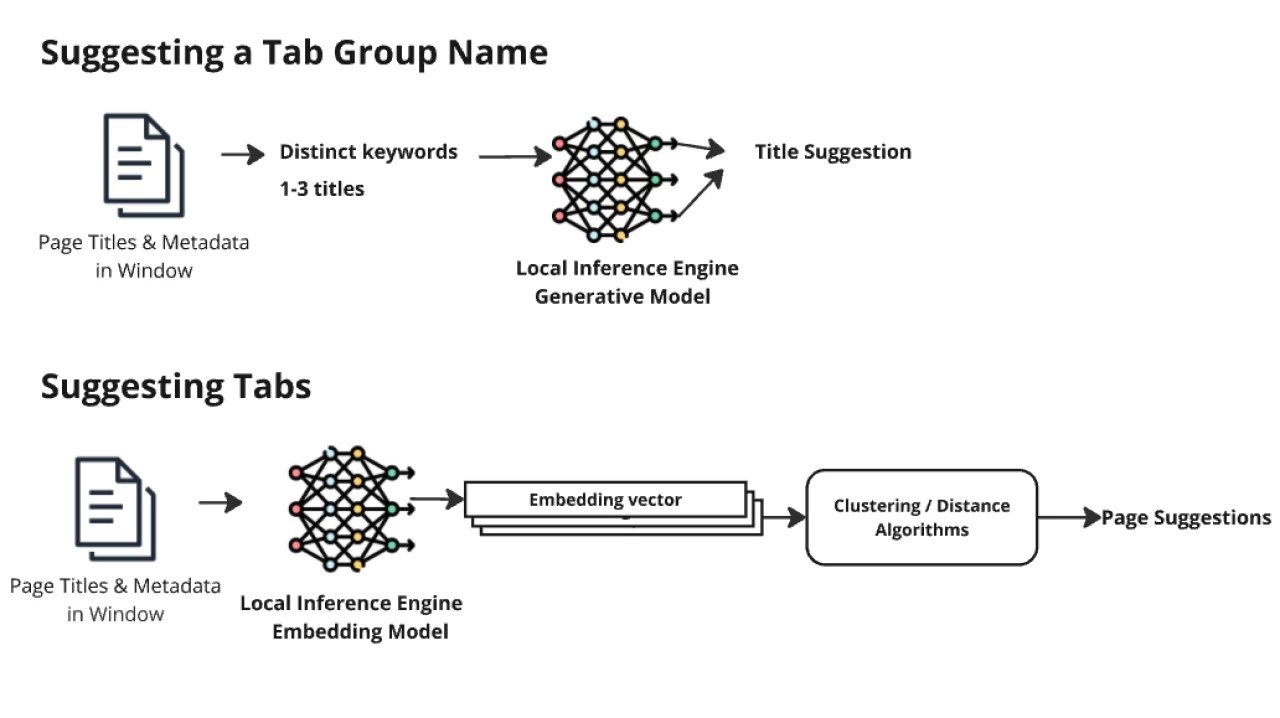 Smart Tab grouping basic architecture (Image: Mozilla)
Despite the technical sophistication, users report the feature—enabled by default—grinds machines to a halt. Killing the "Inference" process crashes Firefox, forcing restarts. Some speculate the choice of Microsoft's ONNX runtime over leaner alternatives like GGUF may exacerbate inefficiencies.
Privacy vs. Performance: A Losing Tradeoff?
Mozilla positioned local AI as a privacy-safe alternative to Google's cloud processing. Yet the backlash highlights a harsh reality: on-device AI isn't free. As one Reddit user bluntly stated: "The point of a browser is to DOWNLOAD AND RENDER WEB PAGES." The incident reflects broader industry tension as vendors rush to embed AI into core tools, often prioritizing trends over user experience.
Disabling the Drain
For affected users, mitigation is straightforward but buried:
- Enter
about:configin the address bar - Search
browser.tabs.groups.smart.enabledand set tofalse - Search
browser.ml.chat.enabledand set tofalsefor AI chat
While AI features can be hidden via Settings, they may reappear after updates—prompting calls for Mozilla to add clearer opt-in controls. As browsers become battlegrounds for AI integration, this episode serves as a cautionary tale: even well-intentioned innovations must respect resource constraints and user choice.
Source: Neowin
Comments
Please log in or register to join the discussion