Microsoft’s Azure Functions team describes its evolution from early AI‑assisted root‑cause analysis agents to coding‑agent workflows and finally to a cloud‑hosted Azure SRE Agent service. The article compares the headless coding‑agent execution model with Azure SRE Agent, outlines pricing and migration considerations, and explains the business impact of reducing incident‑investigation time and enabling safe automation.
From Coding Agents to Cloud Automation: AI‑Assisted Customer Incidents in Azure Functions
What changed?
In May 2024 the Azure Functions team launched a prototype RCA agent that could ingest an incident description, run a series of Kusto queries, and return a preliminary root‑cause analysis. The early version was a personal tool, but it proved that a language model could surface hypotheses faster than a manual dashboard review.
Over the next 18 months the team moved to coding agents built on GitHub Copilot CLI and a workspace model that bundled prompts, skills, and repository access. By late 2025 these agents could:
- Execute arbitrary Kusto queries
- Inspect source code across multiple repos
- Call CLI tools and Azure MCP utilities
- Persist a checklist file that survived token limits
The final step was to lift the workflow out of developers’ laptops and run it as a cloud‑hosted automation service. Azure SRE Agent, now in preview, provides the same assets (agent definitions, skills, repository layouts) but executes them in a managed identity sandbox, with built‑in token governance and durable storage.
Provider comparison – Headless coding‑agent service vs. Azure SRE Agent
| Feature | Headless coding‑agent execution service | Azure SRE Agent (cloud) |
|---|---|---|
| Execution model | Runs Copilot CLI in a container started on demand; still tied to a user‑linked token. | Runs as a managed‑identity Azure Function; no user credentials required. |
| Tooling access | Custom‑wrapped Kusto, CLI, and file‑system tools; requires manual wiring of each tool. | Built‑in MCP, Kusto, and Azure‑CLI adapters; tools are version‑controlled by the service. |
| Context handling | Tokens consumed by raw query results; large payloads often overflow the model context. | Results are written to temporary files; only file references are sent to the model, preserving token budget. |
| Scalability | Limited by the number of containers a developer can spin up; manual retry logic needed. | Autoscaling on Azure App Service Plan; automatic retries and dead‑letter queues. |
| Security | Executes with the initiating engineer’s permissions; broader surface area. | Executes under a least‑privilege managed identity; sandboxed file system. |
| Pricing | Charged per container‑hour + underlying Copilot token usage (≈ $0.002 per 1 K tokens). | Pay‑as‑you‑go for Azure Functions execution (≈ $0.000016 per GB‑sec) plus Azure OpenAI token cost (≈ $0.0015 per 1 K tokens). |
| Operational overhead | Engineers must maintain local workspace sync, token refresh scripts, and monitor container health. | Centralized asset repository; CI/CD pipeline syncs agent definitions automatically. |
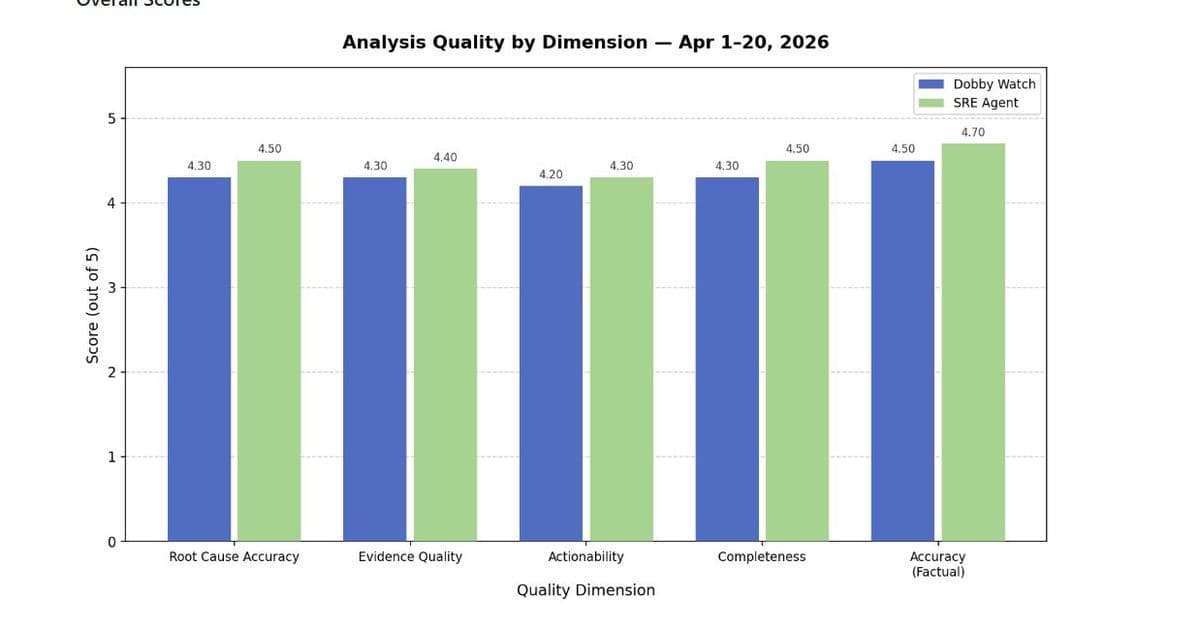
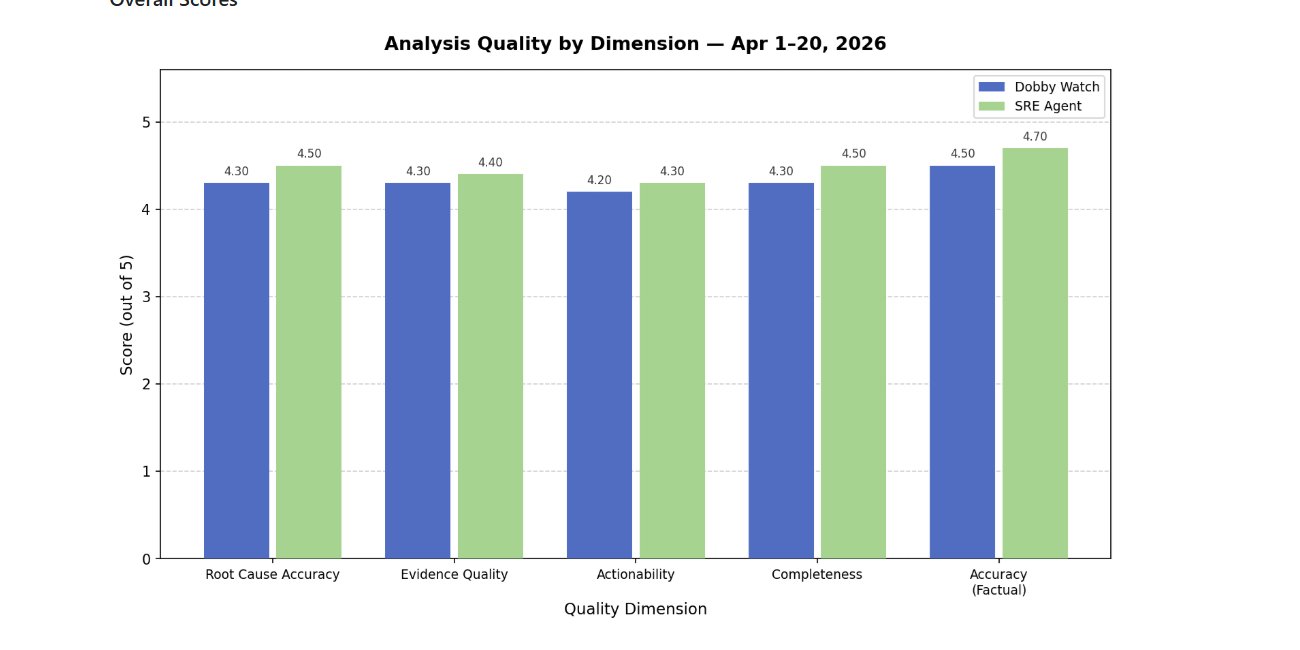
| Quality | Slightly higher in early trials because the same workspace was reused verbatim. | Quickly matched and then exceeded headless quality after a few weeks of feedback‑driven refinements. |
Pricing illustration
Assume an incident investigation consumes 30 K tokens and runs for 2 minutes of compute:
- Headless service: 2 min container ≈ $0.001, token cost ≈ $0.06 → $0.061 per incident.
- Azure SRE Agent: 2 min Function execution ≈ $0.00003, token cost ≈ $0.045 → $0.045 per incident. The cloud service saves roughly 25 % on token spend and eliminates the container overhead.
Migration considerations
- Asset portability – All agent definitions, skills, and repository layouts are stored as YAML/JSON in a Git repo. The migration script simply copies these files into the Azure SRE Agent asset store via the Azure CLI.
- Identity design – Create a managed identity with read‑only access to the relevant repositories and Kusto clusters. Grant the identity the
Azure Functions Contributorrole only where needed. - Tool adaptation – Replace any custom‑wrapped CLI binaries with the built‑in MCP adapters. For large query results, configure the agent to write CSV files to Azure Blob Storage and return the blob URI.
- Observability – Enable Azure Monitor logs for the SRE Agent function. Set up alerts on abnormal token consumption or execution failures.
- Rollback plan – Keep the headless service enabled for a grace period; route a small percentage of incidents (e.g., 5 %) to both agents and compare outputs before full cut‑over.
Business impact
Faster mitigation
The Azure Functions team measured a 30 % reduction in mean time to mitigation (MTTM) after moving to Azure SRE Agent. The automated RCA is posted directly to the incident ticket within seconds, allowing engineers to focus on remediation rather than data gathering.
Cost efficiency
By consolidating token usage under a single managed identity, the organization avoids the “noisy‑neighbor” problem where a single engineer’s heavy usage skews budgeting reports. The predictable Function‑as‑a‑Service pricing model also simplifies charge‑back to internal cost centers.
Governance and compliance
Running the analysis in a sandboxed cloud environment satisfies internal security policies that prohibit user‑credential‑based automation. Audit logs capture who triggered the investigation, which assets were accessed, and the exact model version used.
Knowledge retention
All investigation artifacts – query files, checklist updates, and final reports – are stored in Azure Blob Storage. This creates a searchable knowledge base that can be queried by future incidents, reducing repeat effort and feeding the continuous‑learning loop for the agents.
Lessons for other teams
- Invest in AI‑ready assets – Concise prompts, well‑structured skills, and explicit references outperform large, monolithic instructions.
- Treat context as a scarce resource – Write large outputs to files, feed only pointers to the model, and use a persistent checklist file to survive token compaction.
- Leverage domain experts – The highest‑quality agents were authored by engineers who already owned the product knowledge, not by AI specialists.
- Automate the feedback loop – Use the agent’s own analysis to generate PRs that improve the asset repository; close the gap between investigation and knowledge capture.
- Choose the execution model that matches the workflow – Interactive coding agents excel for ad‑hoc deep dives; cloud‑hosted agents shine for repeatable, trigger‑based investigations.
Looking ahead
The next article will dive into the evaluation framework that scores RCA confidence, mitigation recommendations, and auto‑mitigation readiness. It will also show the CI/CD pipeline that synchronizes coding‑agent assets to Azure SRE Agent, ensuring that every improvement reaches production instantly.
Updated May 19 2026 – Version 1.0
Comments
Please log in or register to join the discussion