Roku’s annual Streaming Day sale drops prices on dozens of channels, with offers like Apple TV for $5.99, Starz for $1.99, and MGM+ for $0.99. The discounts apply only to new U.S. subscribers and typically last about two months, ending Sunday, May 24.
Roku has rolled out its Streaming Day promotion, a limited‑time sale that slashes the cost of many popular streaming channels by as much as 90 percent. The offers are live now on the Roku Channel Store and will expire at midnight on Sunday, May 24.
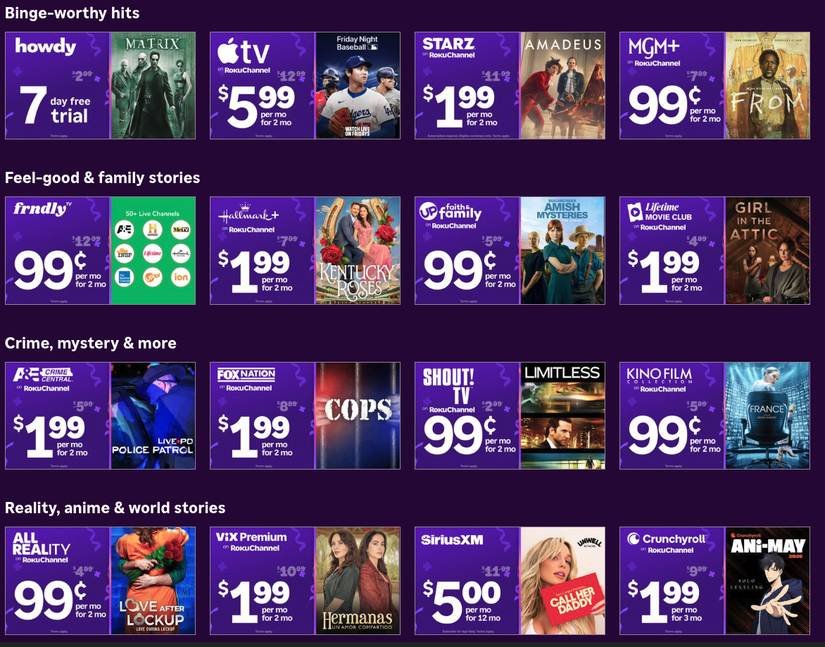
What’s on sale?
| Channel | Discounted price | Regular price |
|---|---|---|
| Apple TV | $5.99 | $9.99 |
| Starz | $1.99 | $11.99 |
| MGM+ | $0.99 | $7.99 |
| Showtime | $4.99 | $10.99 |
| Paramount+ | $3.99 | $9.99 |
| … | (dozens more) |
The list on Roku’s site includes over 30 channels, ranging from premium movie services to niche lifestyle networks. Each deal is clearly marked with a “Streaming Day” badge in the store.
Who can use the discounts?
- New subscribers only – existing Roku channel members must cancel and re‑sign up to qualify.
- U.S. residents – the promotion is limited to accounts with a billing address in the United States.
- Roku device owners – you need a Roku TV, streaming stick, or a compatible TV with Roku built‑in to add the channels.
If you meet those criteria, the discounted rate is applied automatically at checkout and remains in effect for the promotional period, which is usually about two months. Some channels, such as Hallmark Movies Now, extend the discount for up to three months, but the exact length is shown on each channel’s detail page.
Why the short window?
Roku uses Streaming Day as a way to attract new users to its ecosystem and to boost the visibility of the Roku Channel Store. By offering steep price cuts, the company hopes to convert trial users into long‑term subscribers. After the promotion ends, the price reverts to the standard monthly fee, and Roku will automatically charge the regular amount unless you cancel before the next billing cycle.
How to claim the offers
- Open the Roku Home screen and select Streaming Channels.
- Browse or search for the channel you want.
- Tap Add channel – the discounted price will appear if the promotion is still active.
- Complete the checkout with a valid payment method.
- Mark the start date in your calendar; most deals run for 60 days from the activation date.
If you decide the channel isn’t worth keeping after the discount period, you can cancel it from My account → Manage subscriptions before the next billing date to avoid the full price.
What to watch for
- Auto‑renewal – Roku will automatically renew the subscription at the regular rate once the promotional period ends. Set a reminder to review your active channels.
- Multiple devices – a single subscription can be used on any Roku device linked to the same account, but the discount applies only once per account.
- Bundled offers – some channels, like Hulu + Live TV, have separate streaming‑day pricing for the base service and the add‑on packages. Check each component carefully.
Bottom line
If you’ve been eyeing a premium channel but hesitated because of cost, Streaming Day provides a narrow window to test it at a fraction of the price. The key is to act quickly, verify that you qualify as a new subscriber, and set a calendar reminder to either continue at the regular rate or cancel before the discount expires. With the deadline just a few days away, now is the time to add those must‑watch services to your Roku lineup.
For the full list of deals and terms, see Roku’s official Streaming Day page.
Comments
Please log in or register to join the discussion