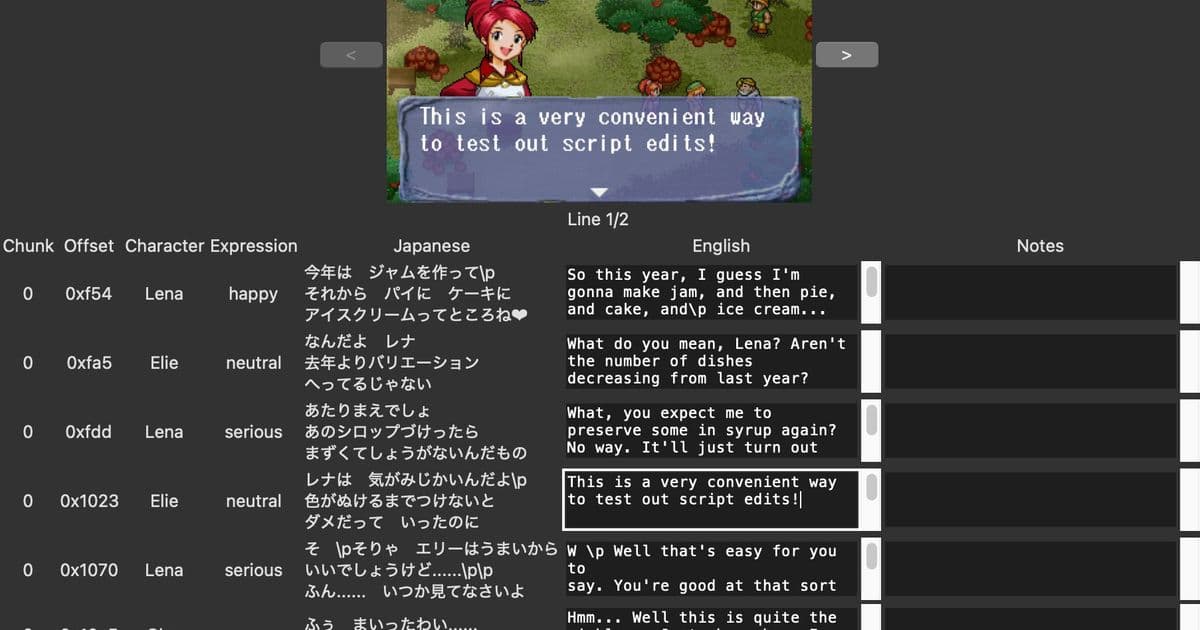
A programmer's journey from spreadsheet fatigue to creating a custom Tk-based visual script editor that renders real-time in-game screenshots while editing text, revolutionizing the fan translation workflow.
When tackling the monumental task of fan translating a classic Sega Saturn RPG, most would resign themselves to the traditional spreadsheet workflow—juggling original text, translations, and metadata across endless rows and columns. But for one programmer working on Magic School Lunar, the spreadsheet approach quickly revealed its limitations when dealing with strict character limits and precise text box constraints. What began as frustration with conventional tools evolved into an innovative solution: a custom visual script editor that renders real-time in-game screenshots as you type.
The Problem With Traditional Localization Workflows
The standard approach in both professional localizations and fan translations typically involves working in spreadsheets where translators can reference original text alongside their translations. While functional, this method presents significant challenges when dealing with technical constraints. Magic School Lunar imposes strict character limits per line and a maximum of three lines per text box—constraints that are difficult to visualize when working purely in text form. The disconnect between spreadsheet cells and in-game text boxes creates a workflow where translators must constantly imagine how their words will actually appear on screen, leading to inefficiencies and potential formatting errors.
Why Build a Custom Tool?
As the programmer discovered, the solution became obvious once they reframed the problem: "I am a programmer. Why don't I just write my own?" This moment of clarity transformed a workflow challenge into a development opportunity. The foundation already existed in CSV files containing both the script and metadata for every line of text in the game, including information about which character is speaking. This metadata provided the necessary data to mock up what any given line should look like in-game.
The goal was ambitious yet straightforward: reproduce the familiar spreadsheet workflow while adding real-time screenshot visualization. This hybrid approach would combine the organizational benefits of tabular data with the visual feedback needed to make informed aesthetic decisions about text formatting.
Technical Implementation: Python, Tk, and Pillow
Several technology choices shaped the project's development. The decision to create a desktop application rather than a web app stemmed from personal preference for native applications. For the windowing toolkit, Tk was chosen for its cross-platform compatibility, making the tool accessible beyond macOS. Python emerged as the programming language due to excellent Tk bindings, existing CSV processing workflows, and the ability to minimize formatting changes in version control.
Working with Tk proved surprisingly approachable. Despite being newer than some alternatives, the grid manager provided an intuitive way to layout UI elements in a table format—perfectly matching the spreadsheet-like requirements. The integration between Tk and Pillow, Python's imaging library, enabled seamless display of generated screenshots within the application interface.
The Screenshot Generation Challenge
The core innovation lies in the screenshot generation system. Using Pillow's image compositing capabilities, the tool simulates authentic in-game screenshots by combining three key elements: the base scene without text or character portraits, the game's fixed-width font with precise positioning data, and character portraits when applicable. The fixed-width font simplified positioning calculations significantly—each character occupies a predictable space, eliminating complex inter-character spacing calculations.
This process involved extracting raw font and portrait images from the translation process, determining exact text positioning through careful analysis of real screenshots, and rendering new text over existing text to verify perfect alignment. The result is a preview that accurately represents how text will appear in the final game.
Overcoming UI Performance Challenges
Not all technical hurdles were easily overcome. Initial plans to load entire script files and implement scrolling viewports encountered significant performance issues with Tk when rendering hundreds of elements. Rather than implementing complex dynamic loading systems, a pragmatic solution emerged: pagination. By limiting the number of rows displayed onscreen at once and adding back/forward navigation, the tool maintains responsiveness while still providing the necessary workflow functionality.
The Impact on Translation Workflow
The results speak for themselves. The visual script editor has already proven invaluable for catching text overflow issues and making aesthetic formatting decisions. Where traditional spreadsheets required mental translation from text to visual layout, this tool provides immediate visual feedback, dramatically reducing the cognitive load on translators. The ability to see exactly how text will appear in-game while editing transforms the localization process from a guessing game into a precise, confidence-inspiring workflow.
Looking Forward
This project exemplifies how domain-specific tools can revolutionize creative workflows. By identifying pain points in existing processes and leveraging programming skills to address them, the developer created something that not only solves their immediate problem but could potentially benefit other translators working on similar projects. The source code's availability on Codeberg opens the possibility for others to adapt or extend the tool for their own localization needs.
The Broader Implications
Beyond its immediate utility, this project raises interesting questions about the future of creative tools. As more creators possess programming skills, we may see an increase in bespoke tools designed for specific workflows rather than general-purpose applications. This trend toward specialized, context-aware tools could lead to significant productivity gains across creative fields, from game localization to content creation and beyond.
The journey from spreadsheet frustration to custom visual editor demonstrates that sometimes the best solution isn't finding a better existing tool, but building exactly what you need. In an era where software increasingly mediates creative work, the ability to customize and extend our tools becomes not just a technical skill, but a creative one.
Comments
Please log in or register to join the discussion