
Threat actors are actively exploiting misconfigured security testing applications like DVWA and OWASP Juice Shop to compromise cloud environments of major corporations. Pentera Labs discovered nearly 2,000 exposed instances, many with default credentials and over-privileged access, leading to crypto mining and webshell deployments.
Security testing applications, designed to be intentionally vulnerable for training and penetration testing, have become a significant attack vector for threat actors targeting Fortune 500 companies and security vendors. According to an investigation by automated penetration testing company Pentera Labs, hackers are exploiting misconfigured web applications such as DVWA, OWASP Juice Shop, Hackazon, and bWAPP to gain unauthorized access to cloud environments, deploy crypto miners, plant webshells, and pivot to sensitive systems.

Pentera researchers identified 1,926 live, vulnerable applications exposed on the public internet, often linked to overly privileged Identity and Access Management (IAM) roles deployed on AWS, GCP, and Azure. The exposed instances belong to multiple Fortune 500 companies, including Cloudflare, F5, and Palo Alto Networks, which have since remediated the issues after being notified by Pentera.
The Root Cause: Misconfiguration and Over-Privileged Access
The core problem lies in how these testing applications are deployed. Many instances exposed cloud credential sets, failed to follow 'least-privilege' recommended practices, and in more than half of the cases, still used default credentials, making them trivial to compromise. The credentials discovered could grant attackers full access to S3 buckets, GCS, and Azure Blob Storage, read and write permissions to Secrets Manager, interaction with container registries, and admin access to the cloud environment.
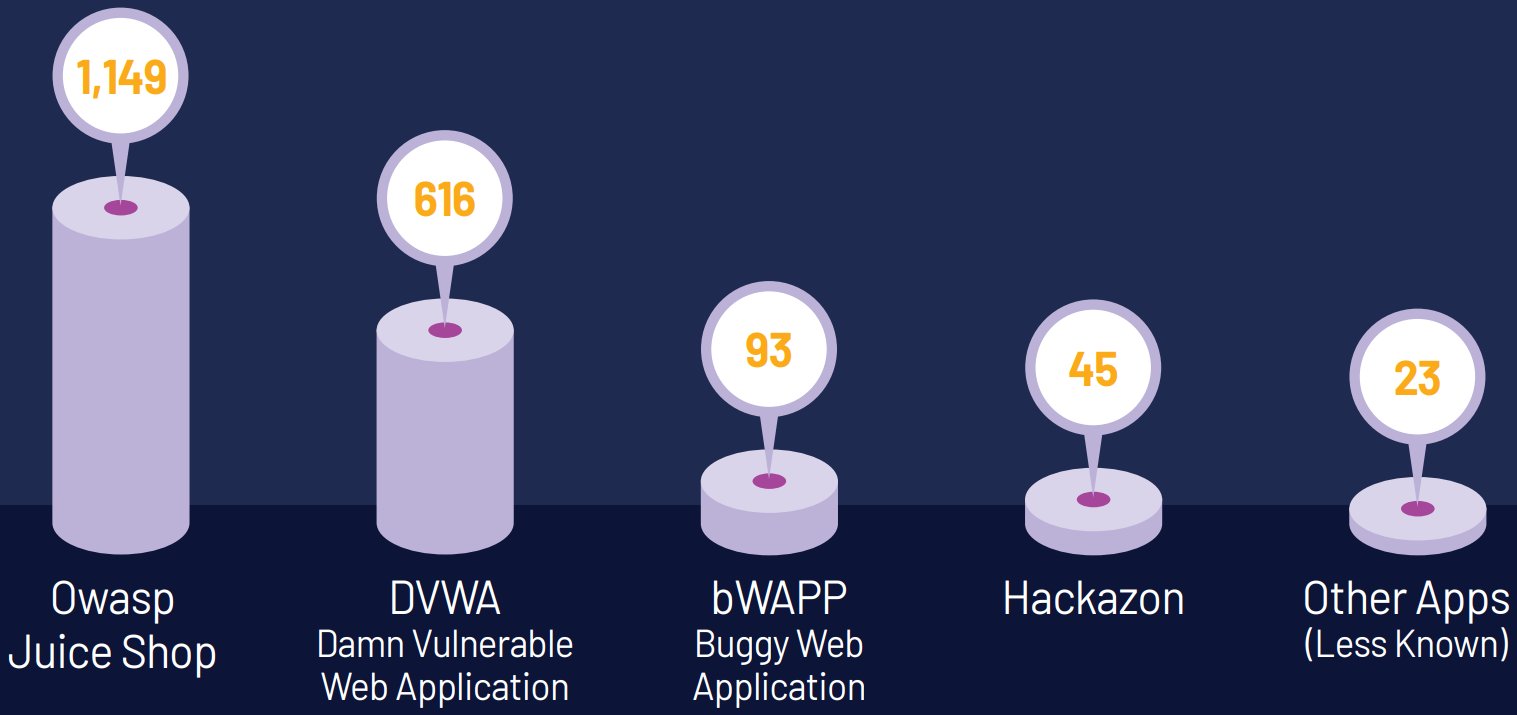
This is not a theoretical risk. Pentera Labs confirmed active exploitation in the wild. "During the investigation, we discovered clear evidence that attackers are actively exploiting these exact attack vectors in the wild – deploying crypto miners, webshells, and persistence mechanisms on compromised systems," the researchers stated.
Active Exploitation: Crypto Miners and Webshells
Out of 616 discovered DVWA instances, approximately 20% contained artifacts deployed by malicious actors. The investigation revealed:
Cryptocurrency Mining: Attackers deployed the XMRig tool to mine Monero (XMR) cryptocurrency in the background. The mining operation was sophisticated, using a script named 'watchdog.sh' as a persistence mechanism. If deleted, the script would restore itself from a base64-encoded backup and re-download XMRig from GitHub.
Advanced Persistence: The watchdog script also downloaded additional tools from a Dropbox account, encrypted with AES-256 cipher, and killed competing miners on the compromised host.
Webshell Deployment: In other cases, attackers deployed a PHP webshell named 'filemanager.php' that supported file actions (read, write, delete, download, upload) and command execution. The webshell contained hardcoded authentication credentials and had a timezone set to Europe/Minsk (UTC+3), potentially indicating the origin of the operators.
Technical Analysis: How These Vulnerabilities Work
Security testing applications like DVWA (Damn Vulnerable Web Application) and OWASP Juice Shop are intentionally designed with security flaws for educational purposes. They include common vulnerabilities such as:
- SQL injection vulnerabilities
- Cross-site scripting (XSS)
- Broken authentication
- Insecure direct object references
- Security misconfigurations
When these applications are deployed in production-like cloud environments without proper isolation and security controls, they become prime targets. The investigation found that many organizations failed to:
Isolate testing environments: These applications were often deployed in the same cloud account as production systems.
Apply least-privilege principles: IAM roles granted excessive permissions, such as full S3 bucket access or Secrets Manager read/write capabilities.
Change default credentials: Many instances still used default usernames and passwords like 'admin/admin' or 'dvwa/dvwa'.
Implement proper network segmentation: Exposed applications were accessible from the public internet without adequate firewall rules or security groups.
Practical Recommendations for Organizations
Pentera's investigation highlights several critical security practices that organizations must implement:
1. Maintain Comprehensive Cloud Inventory
Organizations should maintain a complete inventory of all cloud resources, including testing applications. This inventory should be automated and regularly updated to identify exposed or forgotten instances.
2. Isolate Testing Environments
Testing applications should never be deployed in production cloud accounts. Use separate AWS accounts, GCP projects, or Azure subscriptions for testing environments. Implement network segmentation using VPCs, subnets, and security groups to restrict access.
3. Enforce Least-Privilege IAM Roles
Non-production systems should have IAM roles with minimal permissions. For example, a testing application might only need read access to a specific S3 bucket, not full administrative access to the entire cloud environment.
4. Change Default Credentials
All applications should have unique, strong credentials. Consider using secrets management services like AWS Secrets Manager, Azure Key Vault, or HashiCorp Vault to store and rotate credentials automatically.
5. Implement Automatic Expiration
Temporary resources, including testing applications, should have automatic expiration policies. This prevents forgotten instances from remaining exposed indefinitely.
6. Regular Security Assessments
Conduct regular penetration tests and vulnerability assessments on all cloud environments, including testing applications. Use tools like Pentera's automated penetration testing platform to identify exposed instances before attackers do.
7. Monitor for Cryptomining Activity
Implement monitoring for unusual CPU usage patterns, unexpected network connections, and unauthorized process executions that could indicate crypto mining activity.
Broader Implications and Industry Response
This incident underscores a growing trend where attackers target development and testing infrastructure as a gateway to production systems. The security community has responded with several recommendations:
- Cloud Security Posture Management (CSPM): Tools that continuously monitor cloud configurations for misconfigurations and compliance violations.
- Infrastructure as Code (IaC) Security: Scanning Terraform, CloudFormation, or ARM templates for security issues before deployment.
- DevSecOps Integration: Building security into the CI/CD pipeline to catch misconfigurations early.
Companies like Cloudflare, F5, and Palo Alto Networks have demonstrated good practice by promptly addressing the issues once notified. However, the incident raises questions about how many other organizations might have similar exposures without knowing it.
Conclusion
The exploitation of security testing applications represents a significant shift in attacker tactics. By targeting intentionally vulnerable applications, attackers can bypass traditional security controls and gain access to high-value cloud environments. Organizations must recognize that any internet-facing application, regardless of its purpose, requires proper security hardening.
The key takeaway is that security testing tools are not exempt from security best practices. In fact, their inherent vulnerabilities make them even more critical to secure properly. As cloud adoption continues to grow, the attack surface expands, and misconfigured testing environments will remain a lucrative target for threat actors.
For organizations using these testing applications, the time to act is now. Conduct an inventory, review IAM policies, isolate testing environments, and implement the recommended security controls. The cost of remediation after a breach far exceeds the investment in preventive measures.
Related Resources:
Comments
Please log in or register to join the discussion