A new terminal emulator reimagines workspace organization with an infinite canvas approach, challenging decades of tabbed and tiled interfaces.
The terminal interface, a relic of computing's past, has remained remarkably unchanged for decades. While applications have evolved from command-line to graphical user interfaces and now to spatial computing, developers continue to organize their work in either tabbed or tiled terminal windows. Horizon, a new open-source project from developer peters, challenges this paradigm by introducing GPU-accelerated spatial terminal management on an infinite canvas.
The Spatial Computing Approach
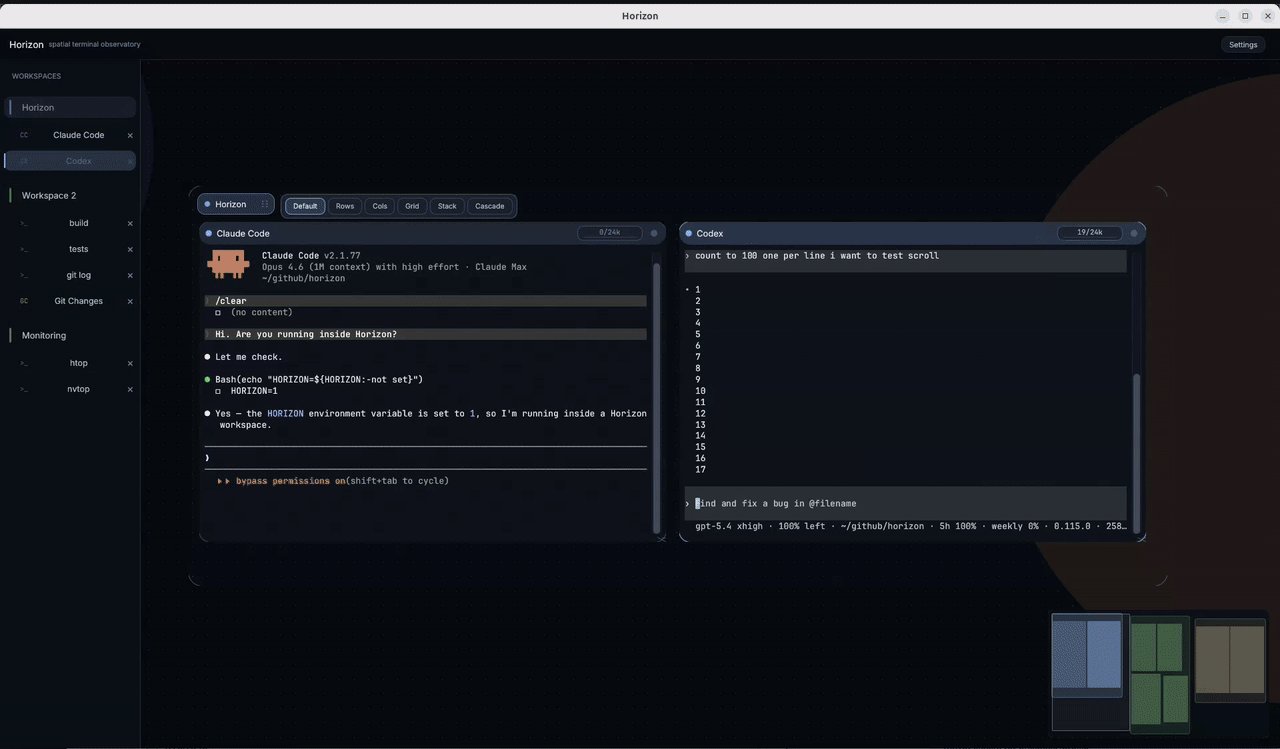
Horizon presents a fundamentally different approach to terminal management. Traditional solutions force developers into one of two paradigms: tabbed interfaces that hide work behind a single view, or tiled windows that impose rigid geometric constraints. Horizon breaks free from both limitations by treating each terminal as a panel that can be placed anywhere on an infinite 2D workspace.
"Tabbed terminals hide your work. Tiled terminals box you in. Horizon gives you a canvas — an infinite 2D surface where every terminal lives as a panel you can place, resize, and group however you want," the project's README explains. This spatial approach mirrors how developers often think about their work - as related components that exist in relation to each other rather than in isolated containers.
The infinite canvas implementation leverages GPU acceleration through wgpu, supporting Vulkan, Metal, DX12, and OpenGL backends. This technical choice enables smooth panning, zooming, and rendering of potentially dozens of terminal panels without performance degradation. The project builds upon Alacritty's terminal emulation engine, known for its performance characteristics.
Technical Architecture
Horizon's implementation reveals several interesting technical decisions that contribute to its capabilities:
Rust and Performance: Written in Rust 2024 edition, the application prioritizes memory safety and performance. The choice of Rust aligns with the trend of system-level tools adopting the language for its safety guarantees without sacrificing speed.
UI Framework: Using eframe/egui, an immediate-mode UI framework, provides a responsive interface that can handle the dynamic nature of an infinite canvas. This contrasts with retained-mode frameworks that might struggle with the fluid spatial interactions Horizon enables.
Terminal Emulation: By integrating alacritty_terminal, Horizon inherits battle-tested terminal emulation capabilities including 24-bit color, mouse reporting, scrollback, and alt-screen support. This ensures compatibility with existing terminal applications and workflows.
Configuration System: A YAML-based configuration system allows users to define workspaces, panel presets, and feature flags. This declarative approach enables complex workspace setups to be version controlled and shared across teams.
The project's GitHub repository provides detailed build instructions for Linux, macOS (both ARM and Intel), and Windows, with precompiled binaries available for easy adoption without compilation dependencies.
Integration with Modern Development Workflows
Horizon distinguishes itself through thoughtful integrations with contemporary development tools and workflows:
AI Agent Panels
Perhaps Horizon's most innovative feature is its first-class integration with AI coding assistants. The application provides dedicated panels for Claude Code and Codex sessions with persistent state and auto-resume capabilities. This integration goes beyond simple terminal access by providing a dedicated workspace for AI-assisted development.
A live usage dashboard tracks token spend across multiple AI agents, addressing one of the practical concerns of heavy AI tool usage - cost management. This feature positions Horizon not just as a terminal emulator, but as a comprehensive development environment that acknowledges AI's growing role in software development.
Git Integration
The built-in git status panel represents another thoughtful integration. Rather than requiring developers to switch contexts to check repository status, Horizon provides inline diffs and hunk-level detail directly within the workspace. This reduces context switching and maintains flow during development sessions.
The Git integration exemplifies how Horizon aims to be more than just a terminal emulator - it's attempting to become a complete development interface that consolidates multiple tools into a single spatial workspace.
Potential Benefits and Adoption Signals
The spatial approach to terminal management offers several potential advantages over traditional interfaces:
Reduced Context Switching: By keeping multiple terminals visible simultaneously, developers can maintain context across different parts of their application without constantly switching views.
Visual Organization: The ability to place related terminals near each other creates a visual map of the development environment that mirrors mental models of system architecture.
Scalability: As projects grow in complexity, the infinite canvas approach theoretically scales better than tabbed interfaces, which become unwieldy with many open terminals.
Early adopters in the Rust community have shown interest, with the repository gaining attention on platforms like Hacker News and Reddit. The project's MIT license and open-source nature encourage experimentation and customization.
Counter-Perspectives and Limitations
Despite its innovative approach, Horizon faces several challenges and limitations:
Learning Curve: Spatial interfaces require a mental shift from traditional tabbed or tiled approaches. Some developers may find the initial adjustment period outweighs the long-term benefits.
Resource Usage: GPU acceleration, while enabling smooth performance, also increases resource consumption compared to terminal emulators that rely solely on CPU rendering. This could be a concern for users with limited hardware capabilities.
Niche Appeal: The spatial computing approach may appeal most to power users and those working on complex systems. For simpler workflows or beginners, traditional interfaces might remain more practical.
Ecosystem Maturity: As a relatively new project, Horizon lacks the plugin ecosystem and community extensions that more established terminal emulators have developed over years.
The Future of Terminal Interfaces
Horizon represents one approach to modernizing the terminal interface, but it's part of a broader trend of rethinking developer tools. Other projects are exploring different directions:
- WezTerm focuses on cross-platform compatibility and advanced terminal features
- Kitty emphasizes performance and GPU acceleration within a traditional terminal paradigm
- VS Code and other IDEs continue to integrate terminal functionality directly into development environments
The success of Horizon will depend on whether its spatial computing approach provides tangible productivity benefits for developers beyond the novelty factor. As AI tools become more integrated into development workflows, applications that thoughtfully incorporate these capabilities may gain an edge.

Conclusion
Horizon challenges developers to reconsider how they organize their terminal workspaces. By treating terminals as spatial elements on an infinite canvas rather than discrete windows or tabs, it offers a fundamentally different approach to managing development environments.
The project's technical implementation demonstrates how modern graphics APIs and system programming languages can breathe new life into decades-old interfaces. Its integrations with AI tools and Git show awareness of contemporary development workflows.
While adoption remains to be seen, Horizon represents an interesting experiment in spatial computing for developer tools. Whether it becomes a mainstream solution or remains a niche alternative depends on its ability to demonstrate clear productivity advantages over existing approaches.
For developers interested in experimenting with spatial terminal management, Horizon offers an accessible entry point with precompiled binaries and clear documentation. The project's GitHub repository provides the latest updates, and the MIT license ensures it remains open for experimentation and extension.
Learn more about Horizon on GitHub or try it yourself by downloading a binary release.
Comments
Please log in or register to join the discussion