
Microsoft Defender uses asset-aware protection to detect and block sophisticated threats targeting critical systems like domain controllers and web servers, leveraging context from Microsoft Security Exposure Management to distinguish normal activity from high-risk behavior.
As cyberthreats continue to grow in scale, speed, and sophistication, organizations must pay close attention to the systems that form their backbone: High-Value Assets (HVAs). These assets include the servers, services, identities, and infrastructure essential for business operations and security. Examples include domain controllers that manage authentication and authorization across the network; web servers hosting business-critical applications such as Exchange or SharePoint; identity systems that enable secure access across on-premises and cloud environments; and other components such as certificate authorities and internet-facing services that provide access to corporate applications.
This reinforces a simple but important idea: not all assets carry the same risk, and protections should reflect their role and impact. To support this, Microsoft continues to expand differentiated protections for the assets that matter most. These efforts focus on helping organizations reduce risk, disrupt high-impact attack paths, and strengthen overall resilience.
How Microsoft Defender Applies Asset-Aware Protection
Microsoft Defender already provides enhanced protection for critical assets through capabilities such as automatic attack disruption. The system incorporates a critical asset framework to enrich detection with contextual intelligence powered by Microsoft Security Exposure Management, where critical assets, attack paths, and cross-workload relationships provide the context needed to distinguish normal administrative activity from high-risk behavior.
This approach also enables automatic identification of critical assets in customer environments and applies deeper, context-aware detections based on each asset's risk profile. The protection works through several key mechanisms:
- Asset classification: Security Exposure Management builds a high-confidence inventory and exposure graph of an organization's assets across devices, identities, cloud resources, and external attack surfaces
- Real-time differentiated intelligence: HVA-aware anomaly detection extends cloud-delivered protection by continuously learning what normal looks like for critical assets
- Endpoint-delivered protections: Targeted protections that prioritize high-impact TTPs on High-Value Assets, incorporating device role context and critical asset intelligence
Real-World Attack Scenarios and Defense Techniques
Focused Protection for Domain Controllers
Domain controllers are the backbone of on-premises environments, managing identity and access through Active Directory (AD). Because of their central role, threat actors frequently target domain controllers seeking elevated privileges. One common technique involves extracting credential data from NTDS.DIT, the Active Directory database that stores password hashes and account information for users across the domain.
On systems identified as domain controllers, Defender can apply stronger prevention powered by critical assets and attack paths, combining multiple behavioral signals that would otherwise appear benign in isolation.
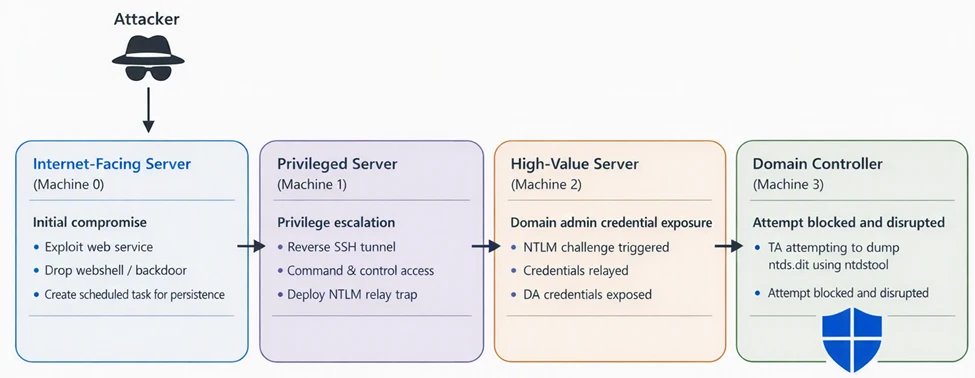
In one observed incident, the activity begins with the compromise of Machine 0, an internet-exposed server. The threat actor gained a foothold and established persistence to maintain access. This system served as the initial entry point into the environment, allowing the threat actor to begin reconnaissance and identify systems with broader access inside the network.
The threat actor then laterally moved to Machine 1, a server with broader access within the network. On this system, the actor established a reverse SSH tunnel to threat actor-controlled infrastructure while bypassing inbound firewall restrictions and setting up an NTLM relay trap. This positioned the machine to intercept or relay authentication attempts originating from other machines in the network.
Subsequently, authentication activity originating from Machine 2, a high-value system with Domain Admin privileges, interacted with the relay setup. By leveraging the captured NTLM authentication exchange, the actor was able to authenticate with elevated privileges within the domain.
Using the leaked Domain Admin access, the threat actor then authenticated to Machine 3, a domain controller. With privileged access to the DC, the actor attempted to extract Active Directory credential data by using ntdsutil.exe to dump the NTDS.DIT database.
Protections designed specifically for high-value assets prevented the command-line attempt, stopping execution before the database could be accessed. The activity also triggered automated disruption, resulting in the Domain Admin account being disabled, effectively stopping the threat actor from proceeding further with credential extraction and limiting the potential impact to the domain.
In this attack, the adversary remotely created a scheduled task on a domain controller that executed ntdsutil.exe to generate a backup containing the Active Directory database. The task was configured to run as SYSTEM and then deleted shortly afterward to reduce forensic visibility.
Individually, both behaviors—remote scheduled task creation and execution of ntdsutil.exe—can occur in administrative scenarios across enterprise environments. However, by analyzing historical activity within the environment, these activities appear as outliers when combined, making it a high-confidence indicator of credential theft preparation on a domain controller.
By incorporating asset role, attack path context, historical correlations, and the blast radius of the activity, Defender can deterministically block credential theft preparation on domain controllers.
Early Detection of Webshells and IIS Compromise
When Defender identifies a high-value asset running the IIS role, it applies targeted inspection to locations that are commonly exposed and frequently abused during server compromise. This includes focused scanning of web-accessible directories and application paths for suspicious or unauthorized script files.
In several investigations involving SharePoint and Exchange servers, this approach surfaced previously unknown and highly targeted webshells with poor detection coverage. In many cases, the malicious logic was inserted directly into legitimate web application files, allowing threat actors to blend into normal application behavior and maintain stealthy access to the server.
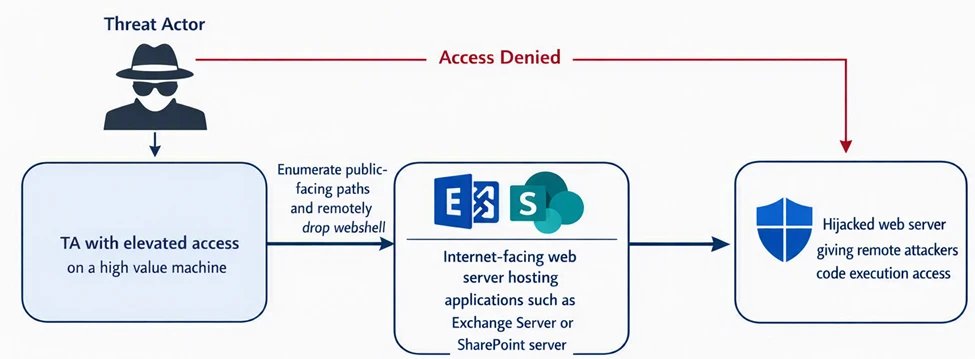
Protection tech like AMSI for Exchange and SharePoint helps block malicious code and incoming exploitation attempts. However, if a threat actor already has elevated access inside the organization, they can target these internet-facing High-Value Assets directly.
In one scenario, the threat actor had already gained access inside the organization with elevated privileges. From another compromised system, the actor remotely drops a highly customized, previously unseen webshell into EWS directory of Exchange Server. The webshell has file upload, download and in-memory code execution capabilities.
Because the device was identified as an Exchange server hosting internet-facing content, the risk profile was significantly higher. Leveraging this role context, Defender immediately remediated the file upon creation, preventing the threat actor from establishing control over the Exchange workload.
Expanded Protection from Remote Credential Dumping
High-Value Assets (HVAs) hold the most sensitive credentials in an organization, making them a primary target for adversaries once initial access is achieved. Threat actors often attempt to access credential stores remotely using administrative protocols, directory replication methods, or interactions with identity synchronization systems such as Microsoft Entra Connect.
These activities can involve the movement or staging of sensitive artifacts, including Active Directory database files, registry hives, or identity synchronization data. Suspicious patterns such as creation of credential-related files in non-standard locations or unexpected transfers between systems may indicate attempts to compromise credentials.
Incorporating device role context enables stronger protections on the systems where credential exposure poses the highest risk, such as domain controllers and identity infrastructure servers. By considering the process chains and access patterns involved, Defender can more effectively prevent exfiltration of sensitive credential data.
Protecting Your High-Value Assets
While Microsoft's Security Exposure Management continues to improve automatic identification and classification of high-value assets (HVAs) in customer environments, organizations can take several concrete steps today to strengthen protection outcomes:
- Ensure coverage across all critical assets: Review environments to confirm that all truly high-value assets are identified, including assets that may not be obvious by type alone
- Prioritize security posture improvements and alert response for HVAs: Focus first on implementing security posture recommendations that apply to high-value assets, as these systems represent the greatest potential impact if compromised
- Triage vulnerabilities with HVA context: When reviewing vulnerabilities, prioritize remediation on HVAs before lower-impact assets
By implementing these strategies and leveraging Microsoft Defender's asset-aware protection capabilities, organizations can significantly reduce their risk exposure and strengthen their overall security posture against sophisticated cyber threats targeting their most critical infrastructure.
Comments
Please log in or register to join the discussion