LastPass alerts users about a phishing campaign impersonating official maintenance notifications, urging immediate vault backups to steal credentials.
Password manager LastPass is alerting users about an ongoing phishing campaign that mimics official service notifications, pressuring recipients to create 'encrypted backups' of their password vaults within 24 hours. The fraudulent emails, detected by LastPass's Threat Intelligence, Mitigation, and Escalation (TIME) team starting January 19, use convincing branding and urgent language to trick users into clicking malicious links.
Attackers sent messages from domains like 'support@lastpass[.]server8' and 'support@sr22vegas[.]com' with subject lines designed to trigger immediate action:
- 'LastPass Infrastructure Update: Secure Your Vault Now'
- 'Your Data, Your Protection: Create a Backup Before Maintenance'
- 'Important: LastPass Maintenance & Your Vault Security'
The emails falsely claim that users must locally back up their vaults due to "upcoming infrastructure maintenance," stating: "While your data remains fully protected at all times, creating a local backup ensures uninterrupted access to your credentials during the maintenance window. In the unlikely event of unforeseen technical difficulties, having a recent backup guarantees your information remains secure."
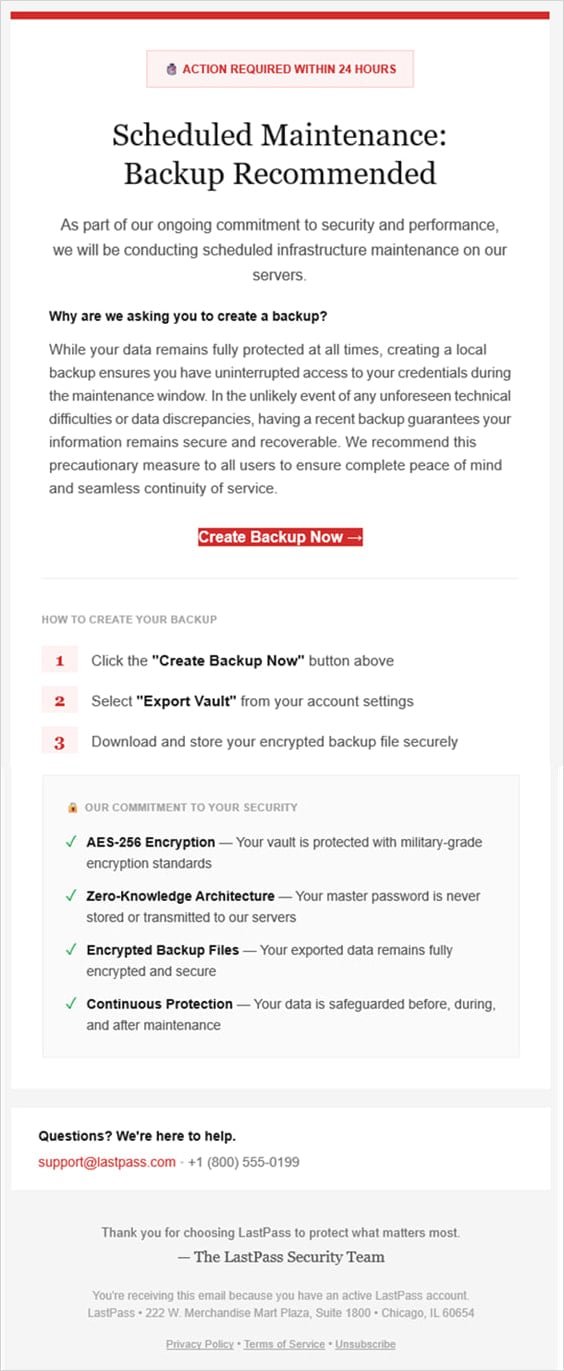
Clicking the 'Create Backup Now' button redirects victims to phishing domains like 'mail-lastpass[.]com,' which was offline at the time of LastPass's advisory. The company notes attackers timed this campaign during a U.S. holiday weekend to exploit reduced security team staffing.
Critical Security Implications: This attack exploits password managers' core security promise – encrypted vault protection. By mimicking legitimate maintenance alerts, attackers bypass standard skepticism. LastPass confirms: "We never ask customers for master passwords. Any request for immediate action regarding vault backups should be treated as suspicious."
Practical Protection Steps:
- Verify sender addresses: Official LastPass communications only come from '@lastpass.com' domains
- Ignore time-pressure tactics: Legitimate services don't impose 24-hour deadlines for backups
- Never click embedded links: Manually navigate to LastPass via your bookmarked login page
- Enable multi-factor authentication: Adds critical protection even if credentials are compromised
- Report suspicious emails to LastPass at
[email protected]
This incident continues a pattern of targeted attacks against password manager users. In October 2025, scammers used fake death claims and breach alerts to harvest LastPass credentials. These repeated campaigns highlight how threat actors exploit trusted security tools through psychological manipulation rather than technical exploits.
For official updates, monitor the LastPass blog. Security teams recommend reviewing NIST's phishing awareness guidelines for employee training frameworks.
Comments
Please log in or register to join the discussion