
Scammers are targeting LinkedIn users with fake reply comments impersonating platform notifications, using LinkedIn's own branding and URL shortener to steal credentials.

Security researchers have identified a sophisticated phishing campaign targeting LinkedIn users through fake reply comments that convincingly impersonate platform notifications. These fraudulent comments appear beneath users' posts, displaying LinkedIn's official branding and warning recipients about alleged policy violations that never occurred.
How the Scam Operates
The attack begins when fake LinkedIn-themed accounts post replies beneath users' content. These replies appear as official notifications bearing LinkedIn's logo and branding, falsely claiming: "We've detected activities not in compliance with our policies. Access to your account is temporarily restricted."
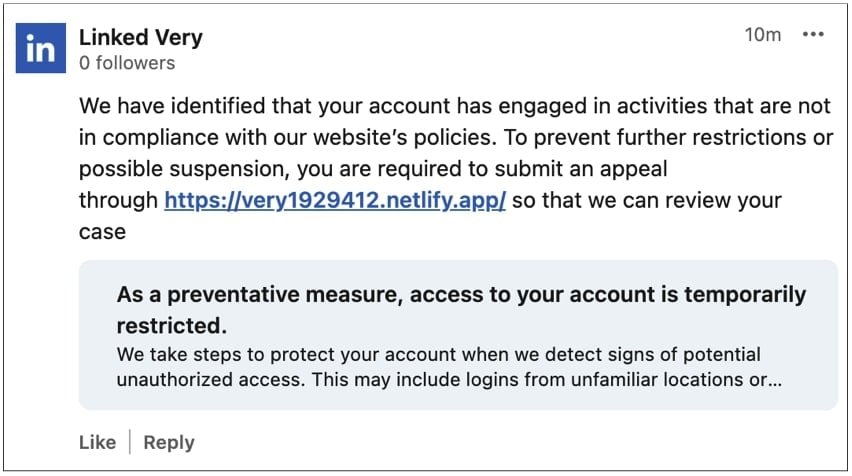
What makes these scams particularly dangerous is their abuse of LinkedIn's own infrastructure. Some phishing messages use LinkedIn's legitimate lnkd.in URL shortener, making malicious links appear trustworthy. As Candyce Edelen, a cybersecurity awareness specialist targeted by the scam, noted: "The use of official branding creates false legitimacy that bypasses many users' skepticism."
The phishing flow involves two stages:
- Initial landing page (e.g., very1929412.netlify.app) displaying fake suspension notices
- Credential harvesting page (e.g., very128918.site) mimicking LinkedIn's login screen
Scammers Abuse LinkedIn Company Pages
Attackers create fake company pages using LinkedIn's logo and slight name variations like "Linked Very" to establish false credibility. These pages then post the fraudulent replies across the platform. As researcher Ratko Ivekovic observed: "The company page impersonation adds another layer to the deception, making the comments appear as official communications."
LinkedIn's Response
When contacted about the campaign, a LinkedIn spokesperson confirmed: "We're aware of this activity and our teams are working to take action. LinkedIn never communicates policy violations through public comments. We encourage members to report suspicious behavior via our official Safety Center so we can investigate."
Practical Protection Measures
- Verify notification sources: LinkedIn only sends policy notifications through private messages in the Messages tab, never via public comments
- Hover before clicking: Check link destinations by hovering over shortened URLs
- Enable two-factor authentication: Add an extra security layer to your account
- Report immediately: Use LinkedIn's "Report this comment" feature for suspicious activity
- Watch for urgency cues: Phishing often uses time-sensitive language like "immediate action required"
This tactic mirrors similar scams observed on X (formerly Twitter) in 2023, where fake bank support accounts replied to customer complaints. As Jocelyn M., a cybersecurity analyst who documented the attacks, warned: "Platforms' public engagement features create new attack surfaces. Always verify through official channels before taking action."
For additional protection guidance, visit LinkedIn's official Account Security page.
Comments
Please log in or register to join the discussion