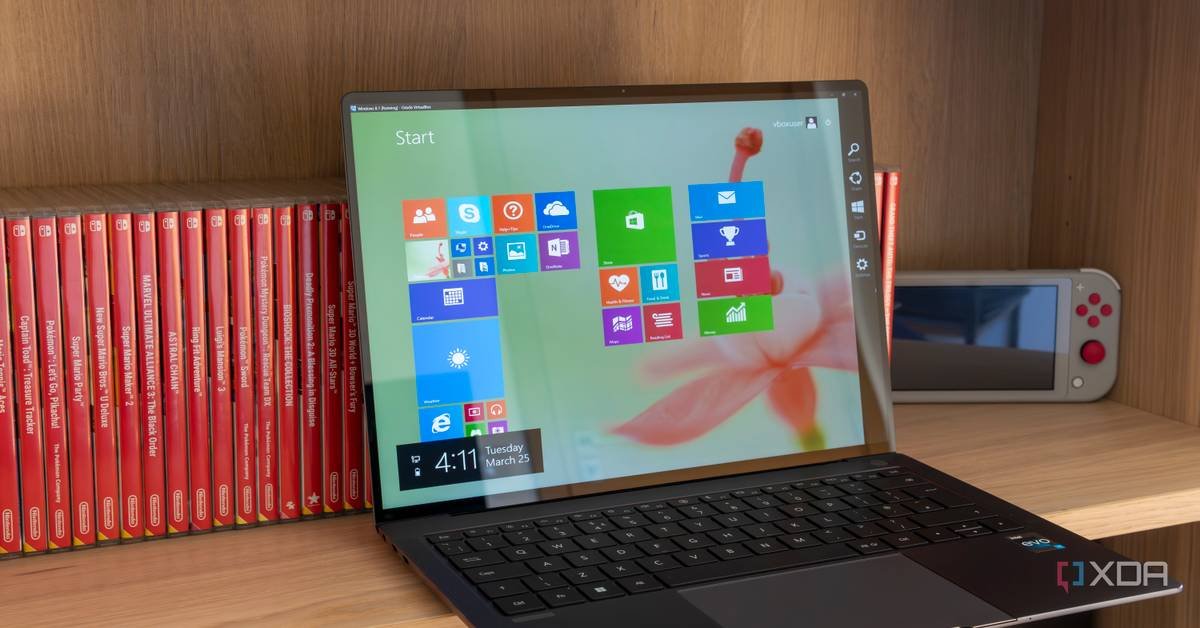
A developer has ported the Windows 8 Metro interface to Linux, bringing back the divisive tile-based launcher that Microsoft abandoned years ago. This isn't just a visual theme—it's a functional desktop environment that reimagines how Linux users interact with their systems.
The Windows 8 Start Screen was one of the most polarizing interfaces in desktop computing history. Microsoft's decision to replace the traditional Start Menu with a full-screen tile interface in 2012 sparked outrage, confused users, and arguably accelerated the company's retreat back to familiar territory in Windows 10. Now, that same controversial design philosophy has found an unlikely new home: Linux.
A developer known as "Metro for Linux" has created a functional port of the Windows 8 Metro interface that runs on modern Linux distributions. This isn't merely a visual skin or icon pack—it's a complete shell replacement that brings the tile-based launcher, Charms bar, and full-screen app experiences to Linux systems. The project, available on GitHub, demonstrates how Microsoft's abandoned UI concepts can find second lives in open-source ecosystems.
What Actually Works
The Linux port replicates the core Windows 8 experience with surprising fidelity. Users get a tile-based Start Screen that replaces their traditional desktop environment, complete with live tiles that can display dynamic information. The implementation includes:
- Dynamic Tiles: Applications can register tiles that update with real-time data, similar to Windows 8's weather, mail, and calendar tiles
- Charms Bar Integration: A right-edge swipe or corner hover brings up the search, share, settings, and devices panel
- Full-Screen App Model: Applications launch into the Metro-style full-screen view by default
- Touch Gestures: Multi-touch support for tablets and convertible devices
- Traditional Desktop Fallback: Users can still access a conventional desktop environment when needed
The project uses GTK3 as its foundation, making it compatible with most modern Linux distributions including Ubuntu, Fedora, and Arch Linux. The developers have created a custom window manager that handles the tile layout and transitions, while leveraging existing Linux subsystems for application launching and system integration.
Why This Matters for Linux
This project arrives at an interesting moment for Linux desktop environments. GNOME and KDE have both been exploring touch-friendly interfaces, but neither has fully committed to the tile-based paradigm that Windows 8 pioneered. The Metro for Linux port offers a completely different approach to Linux UI that prioritizes:
Information Density: Live tiles can show more information than traditional icons without opening applications Touch-First Design: A UI built around gestures and touch targets rather than mouse precision Visual Distinction: A clear departure from the icon-grid standard that dominates most desktop environments
For Linux users with touchscreen devices, this provides a genuinely touch-optimized interface that most Linux desktops lack. The tile system also works well on high-DPI displays, where larger touch targets and information-rich tiles make better use of screen real estate than tiny icons.
The Ecosystem Challenge
Porting the UI is only half the battle. Windows 8's success or failure depended on Microsoft's ability to get developers to create Metro apps. The Linux version faces a similar challenge: it needs applications that embrace the tile paradigm to reach its full potential.
The project includes a compatibility layer that can wrap traditional Linux applications into Metro-style windows, but the experience feels bolted-on rather than native. True integration would require developers to:
- Create tile definitions that update with live data
- Design for full-screen, touch-first interactions
- Implement the Charms bar sharing protocols
- Support the snap multitasking view
Without native Metro-style Linux applications, the interface remains a novelty rather than a productivity environment.
Technical Implementation Details
The Metro for Linux project is built on several open-source components:
Window Management: Uses a custom Wayland compositor that handles the tile animations and transitions Application Launching: Integrates with XDG desktop entries but presents them in the tile grid System Integration: Connects to NetworkManager, PulseAudio, and other Linux subsystems through standard APIs Theme Engine: CSS-based styling that allows for custom tile colors and layouts
The developers have also created a Linux version of the Windows Runtime (WinRT) API that applications can target, enabling features like live tiles and background tasks. This API layer is incomplete but growing, with community contributions adding new functionality.
Practical Considerations
Installing Metro for Linux requires more technical knowledge than typical desktop environments. The project provides packages for major distributions, but users need to:
- Install dependencies including GTK3, Wayland, and several development libraries
- Configure their display manager to use the Metro shell instead of GNOME or KDE
- Manually configure tile layouts and application associations
- Accept that some system management tasks still require traditional desktop tools
Performance is generally good on modern hardware, though the tile animations can feel sluggish on older systems without GPU acceleration. The interface supports both X11 and Wayland, though Wayland provides smoother touch gesture recognition.
The Bigger Picture
This project represents a fascinating trend in open-source development: the resurrection and reimagining of abandoned proprietary interfaces. Just as there are Linux themes that mimic Windows XP or macOS, Metro for Linux shows how controversial designs can find enthusiastic niche audiences in the Linux world.
It also highlights Linux's flexibility. Where Windows users were stuck with Metro whether they liked it or not, Linux users can choose to adopt it—or ignore it entirely. The modular nature of Linux means this interface exists alongside dozens of alternatives, creating a true marketplace of ideas rather than a top-down mandate.
For users who genuinely liked Windows 8's vision but wanted more control over their system, Metro for Linux offers the best of both worlds. For everyone else, it's a reminder that in the Linux ecosystem, even the most divisive UI concepts can find a home—provided someone is willing to build it.
The project continues active development, with the roadmap including better application sandboxing, improved touch gesture customization, and deeper integration with Linux's notification system. Whether it remains a curiosity or grows into a serious desktop alternative depends on whether the community embraces its vision of tile-based computing.

Comments
Please log in or register to join the discussion