
Microsoft has released a public VS Code extension that brings Copilot Studio agent development directly into the developer's primary workflow, enabling version control, collaborative editing, and CI/CD integration for AI agents.
Microsoft has officially launched its Copilot Studio extension for Visual Studio Code, moving AI agent development from a web-based interface into the standard code editor used by millions of developers. This release marks a significant shift in how teams build and manage AI agents, treating them with the same rigor as traditional software components.
The extension allows developers to pull entire agent definitions from Copilot Studio into a local workspace, making the full context of an agent available for inspection and modification. Once in VS Code, agent components can be edited using a structured definition format. The IDE provides familiar features like syntax highlighting and IntelliSense-style completion, which help reduce errors during development. Teams can preview changes and compare them against the cloud version, making it easier to resolve conflicts and prevent overwriting each other's work. Updates can be synced back to the cloud for testing agent behavior and evaluating iterations.
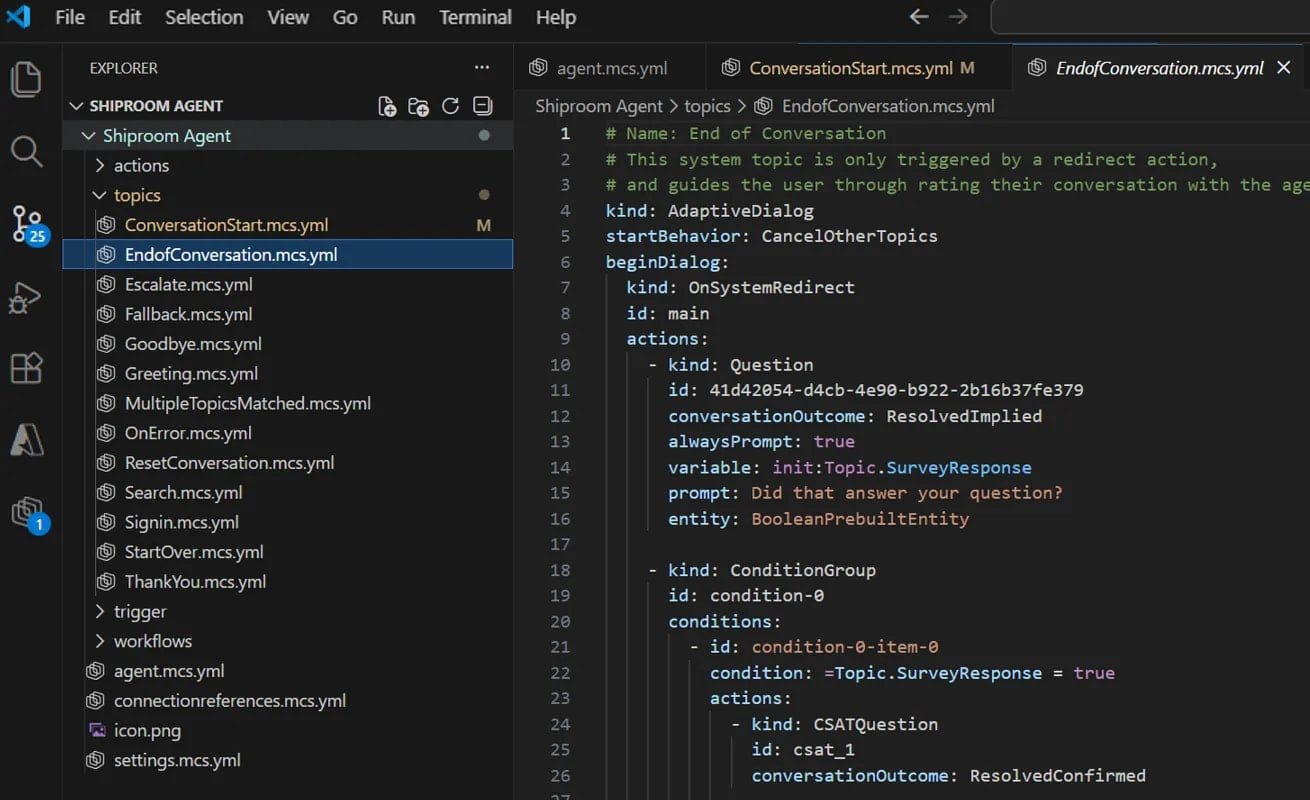
One of the most powerful aspects of this approach is version control. Agent definitions can be versioned in Git and integrated into standard deployment pipelines, allowing agents to move through development, staging, and production environments with the same rigor as code. This is particularly valuable for development teams managing complex or collaborative agent projects, as it supports standard Git integration, request-based review processes, modification history, and commonly used keyboard shortcuts.
The extension also integrates with AI coding assistants like GitHub Copilot and Claude Code, enabling faster drafting, updating, and troubleshooting of agent definitions. This creates a cohesive development environment where AI assists in both writing application code and building AI agents.
This release follows Microsoft's July 2025 announcement that it would open-source the GitHub Copilot Chat extension for VS Code, giving developers access to the full implementation of the chat-based coding assistant, including its "agent mode." While Copilot Chat focuses on AI-assisted coding inside the editor, Copilot Studio targets the development and lifecycle management of AI agents. Together, these moves reinforce VS Code's role as Microsoft's primary surface for AI-driven development workflows, moving away from browser-centric AI tools.
The extension is available for free on the VS Code Marketplace and has already been downloaded more than 13,000 times since its public release.
Why This Matters for Development Teams
For organizations already using Copilot Studio, this extension provides a more familiar and powerful development environment. Instead of managing agents through a web interface, teams can now:
- Apply software engineering practices: Use Git for version control, code reviews for collaboration, and CI/CD pipelines for deployment
- Improve developer experience: Leverage IDE features like syntax highlighting, error detection, and code completion
- Maintain consistency: Treat agent definitions as code artifacts that follow the same lifecycle as application code
- Enhance collaboration: Use standard Git workflows for team-based agent development
Getting Started
To use the extension:
- Install the Copilot Studio extension from the VS Code Marketplace
- Connect to your Copilot Studio workspace
- Pull agent definitions into your local workspace
- Edit, test, and deploy agents using standard development workflows
This approach represents a maturation of AI agent development, bringing it into the established practices that have made modern software development so productive and reliable.
Comments
Please log in or register to join the discussion