Microsoft Entra Agent ID brings identity management to AI agents, giving organizations visibility, control, and security for autonomous agents across their lifecycle.
As organizations deploy more AI agents across their environments, a critical challenge emerges: how do you manage and secure these autonomous entities that can access sensitive data and systems? Microsoft's solution is Entra Agent ID, which treats AI agents like real identities with their own built-in identities, permissions, and lifecycle management.
The Agent Identity Problem
AI agents are becoming ubiquitous in enterprise environments. From Microsoft Copilot Studio to custom-built agents using APIs and SDKs, these autonomous entities can perform tasks, access resources, and make decisions independently. But unlike human users, agents don't have traditional identity management, creating blind spots in security and governance.
"As more AI agents become active in your environment, you need control over them and what they can access," explains Leandro Iwase, Microsoft Entra Senior Product Manager. "That's where Microsoft Entra Agent ID comes in. It lets you treat agents like you would treat human users with their own built-in identities."
Complete Visibility and Control
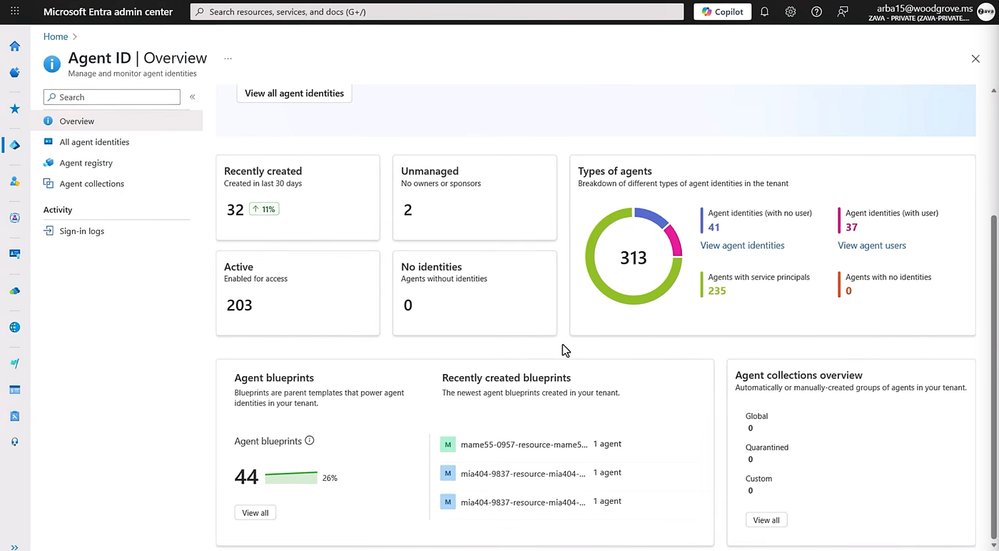
The foundation of Entra Agent ID is visibility. In the Microsoft Entra admin center, administrators can see a new "Agent ID" section that provides a comprehensive overview of all agents in the tenant. This includes:
- Total number of agents
- Recently created agents
- Active versus unmanaged agents
- Early signs of agent sprawl
The Agent Registry serves as a central hub, showing every agent regardless of platform—whether Microsoft-built, custom agents in Microsoft Foundry, Copilot Studio, or Security Copilot. Each agent with an Agent ID receives an immutable object ID, just like user or app registrations.
Least Privilege by Design
Security starts with proper permissions. Entra Agent ID introduces agent blueprints—templates that define how agent identities are created and what permissions they receive. These blueprints ensure consistency and alignment with organizational policies.
For example, an HR self-service agent might be granted Application.ReadWrite.All permissions in Microsoft Graph. But what if that's over-permissioned? The system flags potential risks, allowing administrators to disable agents that have excessive access before they become security liabilities.
Scoped Access with Entitlement Management
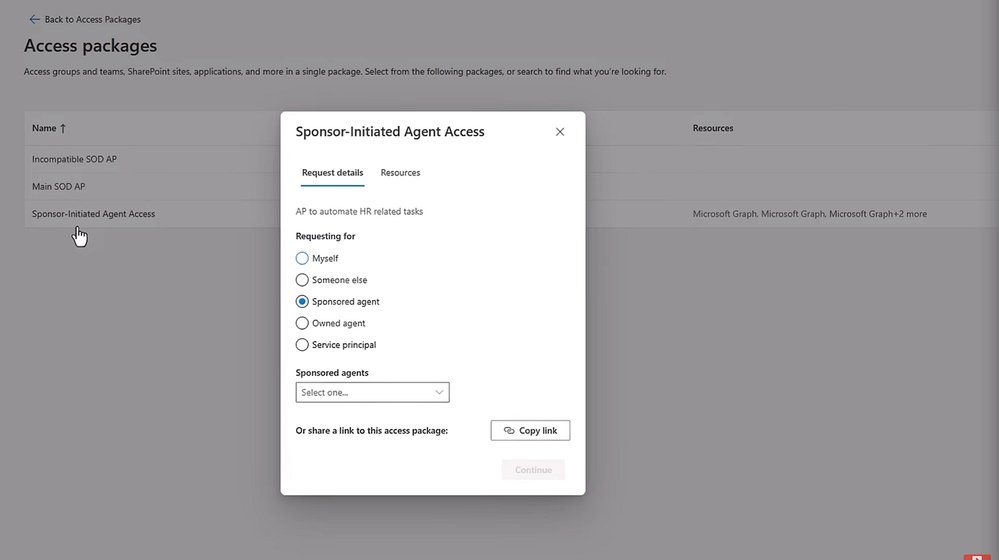
Entra Agent ID integrates with Microsoft Entra's entitlement management to control what agents can access. Using access packages, administrators can define specific resources and roles for different types of agents. For instance, an HR access package might include Microsoft Graph API roles needed for HR-related tasks.
Access requests follow a sponsor-initiated model where human sponsors must approve agent access requests with business justifications. This creates accountability and ensures agents only get the permissions they need for their specific tasks.
Conditional Access for Agents
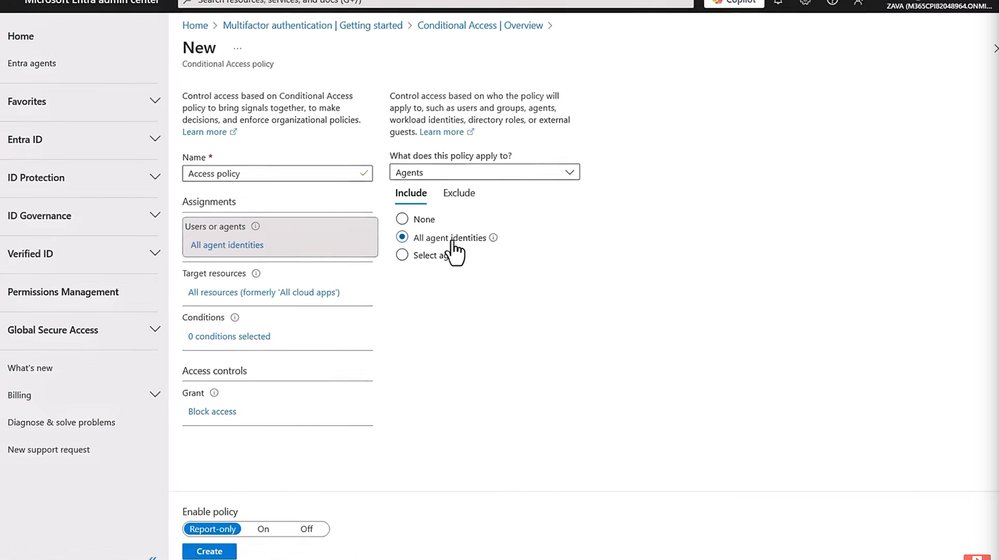
Real-time protection comes through agent-specific Conditional Access policies. Administrators can create policies that assess agent risk in real-time and automatically block access when suspicious behavior is detected.
For example, a policy might block all agents from accessing sensitive information by default, then create exceptions for approved HR agents. Another policy could monitor agent risk levels (high, medium, low) and block access when high-risk behavior is detected, protecting against compromised sponsor accounts that might give malicious instructions to agents.
Lifecycle Management and Ownership
Agents need sponsors just like human users need managers. When sponsors leave or change roles, agents can become "ownerless," creating security gaps. Entra Agent ID uses lifecycle workflows to automate notifications when agents lose their sponsors.
These workflows can trigger email notifications to managers, prompting them to identify new sponsors for affected agents. This ensures continuous accountability throughout the agent's lifecycle, from creation through eventual retirement.
The Microsoft Advantage
The power of Entra Agent ID lies in its integration with existing Microsoft Entra tools. Organizations don't need to learn new governance models or implement separate security frameworks. They can leverage the same tools they already use for managing human identities—Conditional Access, entitlement management, identity protection, and lifecycle workflows.
This unified approach means agents get the same level of security and governance as human users, but with controls specifically designed for autonomous entities. The system works across Microsoft's ecosystem, including the Agent 365 control plane, providing a consistent experience regardless of where agents are created or deployed.
Why This Matters
As AI agents become more prevalent in enterprise environments, treating them as unmanaged entities creates significant security risks. Agent sprawl, over-permissioned access, lack of accountability, and inability to detect risky behavior can all lead to data breaches or compliance violations.
Entra Agent ID addresses these challenges by bringing identity management principles to AI agents. It provides the visibility, control, and security organizations need to deploy agents confidently while maintaining governance standards.
For organizations already invested in Microsoft's identity and access management ecosystem, Entra Agent ID represents a natural evolution—extending familiar tools and processes to cover the new reality of autonomous AI agents in the enterprise.
The future of enterprise AI isn't just about deploying more agents; it's about managing them securely and responsibly. With Entra Agent ID, Microsoft is providing the foundation for that future, ensuring that as AI agents become more capable and autonomous, they remain under proper governance and control.
Learn more: aka.ms/EntraAgentID
Comments
Please log in or register to join the discussion