
Microsoft’s latest Entra ID updates address critical weaknesses in post-password deployments, including dormant legacy credentials and social engineering-prone recovery channels, as AI-driven phishing campaigns reach 54% click-through rates. The changes include general availability of synced passkeys for external users, self-service verified recovery with government ID checks, and tools to fully remove phishable authentication methods.
Microsoft Entra closes passkey security gaps with verified recovery, credential removal for enterprise identities

Microsoft’s latest updates to Entra ID and Entra External ID tackle a persistent problem in enterprise identity security: even as organizations adopt passkeys to stop phishing, attackers shift to exploiting weak fallback methods and recovery channels. The changes, announced in May 2026, build on the company’s existing passkey rollout to hundreds of millions of consumer and enterprise users, adding tools to eliminate phishable credentials entirely and replace helpdesk-based recovery with high-assurance self-service options.
What changed: Microsoft’s latest Entra identity updates
The updates follow data from the Microsoft Digital Defense Report showing AI-driven phishing campaigns now achieve 54% click-through rates, with attackers targeting recovery and lockout workflows rather than primary sign-in moments. Three core gaps drove the changes: persistent phishable sign-in methods, dormant legacy credentials left on accounts after passkey deployment, and weak recovery channels reliant on social engineering-vulnerable knowledge-based questions.
Expanded passkey availability and usability
Synced passkeys are now generally available for Microsoft Entra External ID customers, extending the passwordless sign-in experience to customer-facing applications with no custom integration required. This builds on existing support for workforce users, with synced passkeys now the default for hundreds of millions of Microsoft account users across all major operating systems, browsers, and device types.
Internal metrics show consumer users are 3 times more successful signing in with passkeys than legacy methods (95% vs 30% success rate), with sign-ins 14 times faster than password-plus-code MFA. These gains carry over to enterprise customers, as Microsoft’s consumer and enterprise identity platforms share a common foundation, meaning registration flows, error handling, and cross-device sync improvements reach Entra ID and Entra External ID customers automatically.
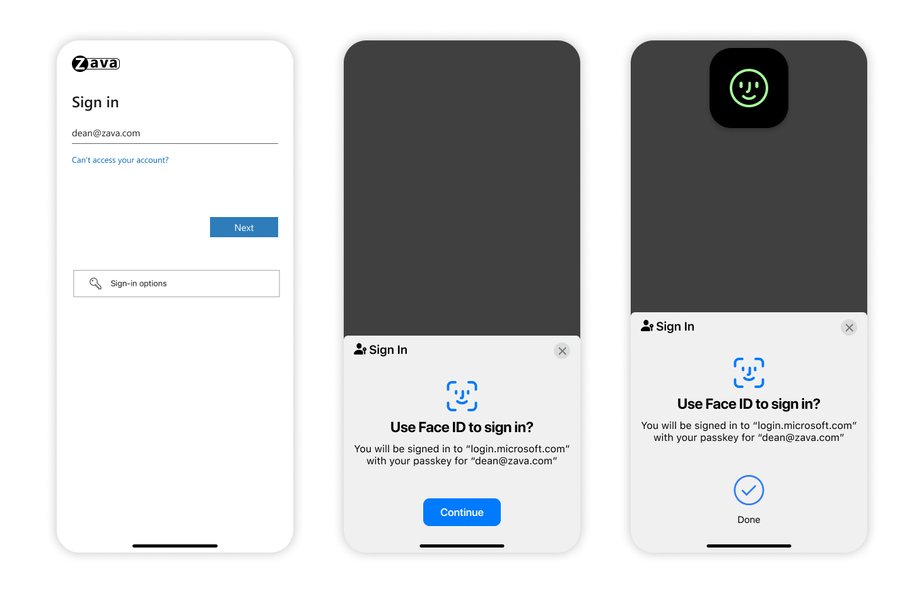
Synced passkeys sync across devices via iCloud Keychain, Google Password Manager, Microsoft Password Manager, or other platform credential managers, eliminating the need for app switching, SMS code copying, or push notification approvals. For unmanaged Windows devices, including those used by contractors, frontline workers, and BYOD users, Microsoft Entra passkeys on Windows are now generally available. This feature lets users create device-bound passkeys via Windows Hello (face, fingerprint, or PIN) on their own devices with no managed enrollment or hardware token deployment.
Granular passkey management and credential removal
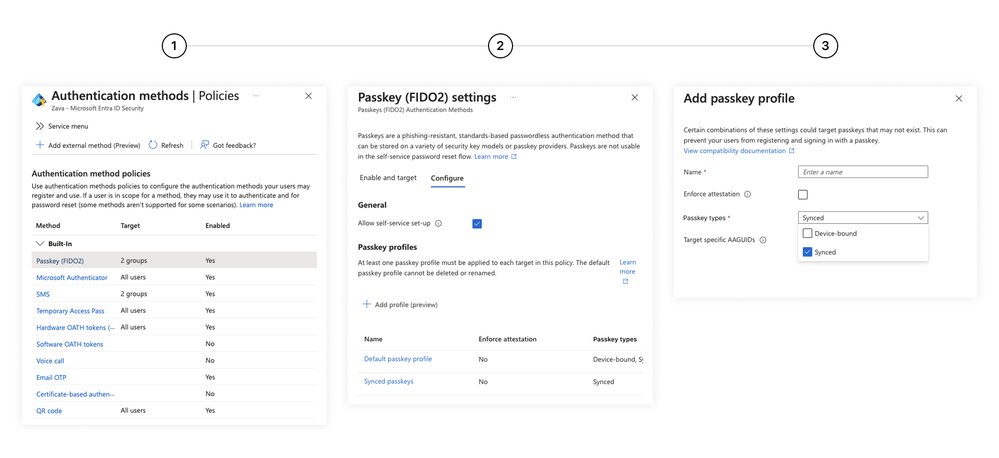
General availability of passkey profiles gives admins granular control over passkey deployment, with group-based policies for attestation requirements, passkey type, and specific provider selection. 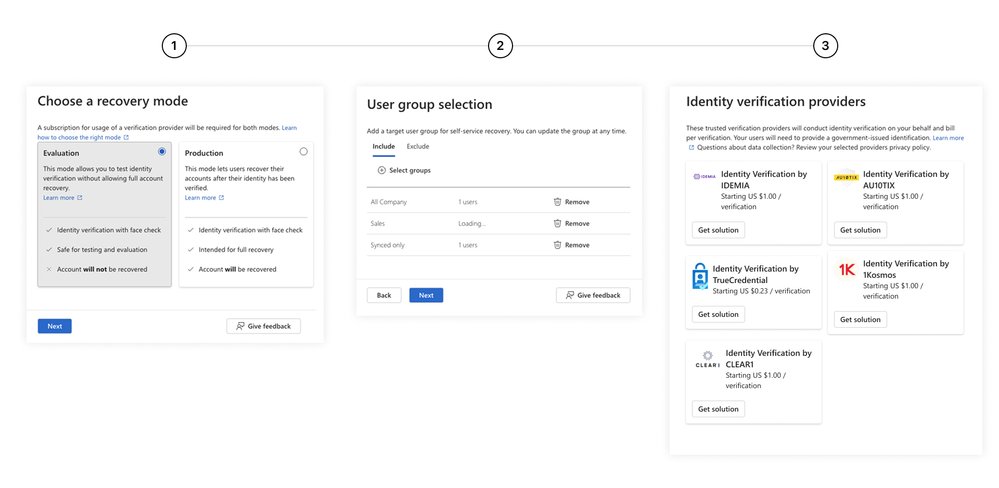 Admins can deploy synced passkeys for most users alongside device-bound passkeys, FIDO2 security keys, or Microsoft Authenticator passkeys for high-privilege roles or regulated industries, all within the same tenant.
A companion preview feature, passkey-preferred authentication, detects a user’s registered methods and prompts the strongest option first, defaulting to passkeys if they are registered.
Critically, admins can now remove all phishable credentials, including passwords, SMS codes, and push notifications, from user accounts entirely. Microsoft has already rolled out phishing-resistant authentication to 99.9% of its own users and devices, eliminating weaker methods from internal accounts. The company also announced the deprecation of security questions for password reset in Microsoft Entra ID starting March 2027, urging organizations still using knowledge-based recovery to migrate to high-assurance options.
Verified self-service account recovery
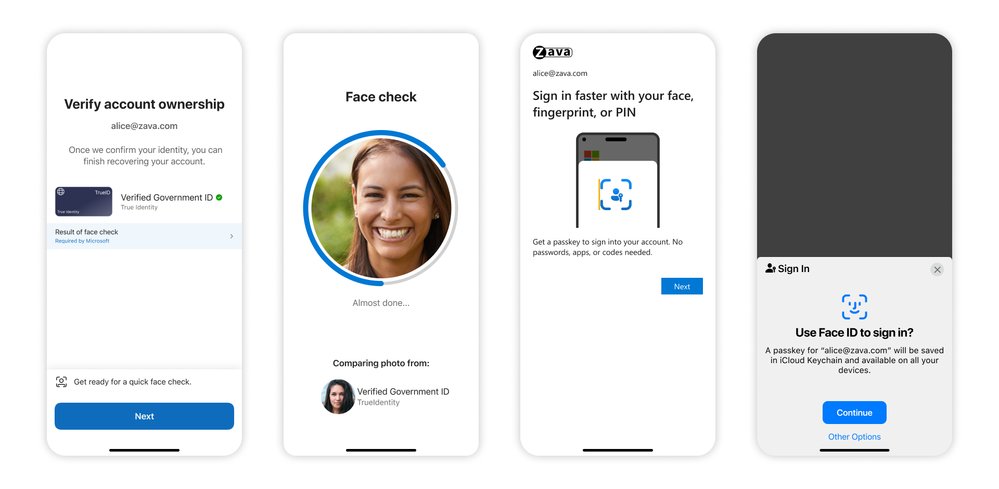
The general availability of Microsoft Entra ID account recovery replaces legacy helpdesk-based recovery workflows, which typically take 20 to 30 minutes per user and rely on social engineering-vulnerable knowledge-based questions. The new self-service flow lets users recover access in minutes by scanning a government-issued ID (driver’s license, passport, etc.), completing a live face check via Face Check in Microsoft Entra Verified ID (powered by Azure AI), and registering a new passkey immediately.
The flow matches verified attributes against the organization’s directory and HR system via custom authentication extensions, sharing only match results rather than sensitive identity data to preserve privacy. Recovery profiles let admins assign different identity verification (IDV) providers by region to meet local regulatory requirements, with coverage for 192+ countries via partners including Au10tix, IDEMIA, TrueCredential (LexisNexis), 1Kosmos, and CLEAR1, all available via the Microsoft Security Store with no custom business contracts or integrations.
The table below summarizes the before-and-after of the updates:
Licensing for the new capabilities is tiered: synced passkeys, Windows Entra passkeys, passkey profiles, and passkey-preferred authentication (preview) are included for all Entra ID customers. Account recovery requires a Microsoft Entra ID P1 license, while Face Check is available as an add-on per verification or as part of the Microsoft Entra Suite. Government ID verification is pay-per-verification via the Microsoft Security Store.
Provider comparison: How Microsoft’s approach stacks up against competitors
The identity and access management (IAM) market has largely standardized on FIDO2 passkeys as the primary phishing-resistant authentication method, but Microsoft’s latest updates differentiate its offering across three key areas: recovery workflows, cross-tenant credential management, and external user support.
Okta
Okta supports FIDO2 passkeys for both workforce and customer identity, with adaptive MFA policies that can prioritize passkeys over legacy methods. However, Okta’s self-service recovery options still rely primarily on email, SMS, or admin-approved temporary passwords, with no native integration for government ID and biometric verification at scale. Okta partners with third-party IDV providers, but customers must negotiate custom contracts and build bespoke integrations, unlike Microsoft’s pre-integrated Security Store options. Okta also lacks Microsoft’s granular passkey profiles for group-based attestation and provider selection, and its support for synced passkeys across consumer password managers is less mature for external customer-facing applications.
AWS IAM Identity Center
AWS IAM Identity Center supports FIDO2 security keys for workforce users, but synced passkeys tied to platform credential managers (iCloud Keychain, Google Password Manager) are not yet generally available for enterprise tenants. Recovery for AWS accounts is handled via email, phone, or AWS Support cases, with no self-service biometric verification option for workforce users. AWS’s passkey support is tightly coupled to its own ecosystem, with no native support for unmanaged Windows devices via a Windows Hello-like flow for BYOD users. Credential removal is possible via policy, but bulk removal of phishable methods across a tenant requires custom scripting, unlike Microsoft’s native admin controls.
Google Cloud Identity
Google Cloud Identity supports passkeys via Google Password Manager for Workspace users, with synced passkey support for consumer Google accounts extending to enterprise users. However, Google’s group-based passkey policies are less granular than Microsoft’s passkey profiles, with no support for per-group attestation requirements or provider selection. Recovery for Google Workspace accounts relies on admin resets, SMS codes, or backup codes, with no integrated government ID verification for self-service recovery. Google’s external identity support for customer-facing applications is less mature than Entra External ID, with no out-of-the-box passkey sign-in for customer apps.
Pricing for Microsoft’s updated capabilities is competitive: most base features are included in standard Entra ID licenses, with only recovery and Verified ID add-ons requiring additional cost. Okta’s equivalent advanced recovery features would require its highest-tier Workforce Identity Cloud license, while AWS and Google charge for additional MFA features via add-on SKUs.
Business impact and migration considerations
For enterprises, the updates close the entire credential lifecycle, addressing not just primary sign-in but also lockout and recovery workflows that have historically been the weakest link in identity security. This is particularly critical as organizations deploy autonomous AI agents that act on behalf of users: a compromised identity can let attackers trigger actions at machine speed, making gaps in recovery and fallback methods high-severity risks.
Key benefits
- Reduced helpdesk costs: Self-service recovery eliminates 20 to 30 minutes of per-user helpdesk time for lockouts, with Microsoft noting internal reductions in identity-related support tickets after rolling out phishing-resistant authentication to 99.9% of its users.
- Compliance alignment: The verified recovery flow meets NIST SP 800-63B high-assurance requirements for identity proofing, making it suitable for regulated industries including finance, healthcare, and government.
- Improved user experience: Synced passkeys eliminate app switching and code copying, with 95% sign-in success rates compared to 30% for legacy methods, reducing friction for workforce and customer users alike.
- AI readiness: Closing recovery and fallback gaps ensures that identities used to authorize AI agents and automated workflows are fully verified, reducing the risk of machine-speed attacks.
Early adopters including Ericsson have seen positive results from Microsoft’s passkey ecosystem. The telecommunications company deployed passkeys to managed devices via Windows Hello for Business and Microsoft Authenticator, with FIDO2 security keys for high-privilege roles, since 2020. Ericsson reports that the approach improves security while reducing user friction, a combination that is rare for identity updates.
Migration considerations
Organizations looking to adopt the new capabilities should follow a phased approach:
- Audit existing credentials: Identify all phishable methods (passwords, SMS, push notifications) attached to user accounts, even if they are not actively used.
- Pilot passkey profiles: Deploy synced passkeys to low-privilege user groups first, using passkey profiles to set attestation and provider requirements, before expanding to high-privilege roles.
- Test recovery workflows: Use Entra ID’s recovery simulation tools to test the verified self-service flow with selected IDV providers, ensuring regional compliance requirements are met.
- Communicate with users: Train users on passkey sign-in and self-service recovery flows, particularly for frontline and BYOD users who may be using legacy methods on unmanaged devices.
- Schedule legacy method removal: Set a timeline to remove phishable credentials after passkey adoption reaches critical mass, aligning with the March 2027 deprecation of security questions for password reset.
Enterprises with existing Entra ID deployments can start using synced passkeys and passkey profiles immediately at no additional cost. Organizations requiring verified recovery will need Entra ID P1 licenses, which most mid-to-large enterprises already hold as part of Microsoft 365 E3 or equivalent SKUs.
Conclusion
Passkeys are a critical step forward for phishing resistance, but they are not a complete solution if legacy fallbacks and weak recovery channels remain. Microsoft’s latest Entra updates address these gaps with a holistic approach to the credential lifecycle, combining expanded passkey availability, granular management tools, and high-assurance recovery. For enterprises evaluating IAM providers, the integration of cross-platform passkeys, self-service verified recovery, and native credential removal makes Entra ID a competitive option, particularly for organizations with mixed device fleets, external customer identities, or AI adoption plans.
Comments
Please log in or register to join the discussion