Microsoft Intune's new Admin Tasks feature consolidates critical IT operations into a single, prioritized queue, integrating Endpoint Privilege Management, Defender for Endpoint security tasks, Multi Admin Approval requests, and Device Offboarding Agent actions. This unified approach streamlines decision-making, enhances security oversight, and prepares organizations for AI-assisted workflows while maintaining administrator control.
Managing modern IT infrastructure requires IT administrators to make critical decisions across multiple platforms and security tools. Microsoft Intune has long served as a centralized endpoint management solution, but the growing complexity of IT operations demanded a more unified approach to high-impact tasks. With the general availability of Admin Tasks, Microsoft has created a single, prioritized queue that brings together essential decision points from across the Intune ecosystem.
The Evolution of IT Operations Management
IT administrators face an increasingly complex landscape where security threats, privilege management, and device lifecycle decisions must be made quickly and accurately. Traditional approaches scattered these critical decisions across multiple consoles and workflows, creating inefficiencies and potential security gaps. The introduction of Admin Tasks represents a fundamental shift in how organizations approach IT operations management.
The feature aggregates three core decision points that IT teams encounter daily: Endpoint Privilege Management elevation requests, Microsoft Defender for Endpoint security tasks, and Multi Admin Approval requests. This consolidation addresses a critical pain point in modern IT operations - the need to switch between multiple interfaces to complete related tasks.
Endpoint Privilege Management: Balancing Security and Productivity
One of the most significant challenges in enterprise environments is managing user privileges effectively. Endpoint Privilege Management (EPM) within Admin Tasks enables organizations to implement a principle of least privilege without hampering user productivity. Standard users can run approved applications with elevated privileges when necessary, but without granting permanent local admin rights.
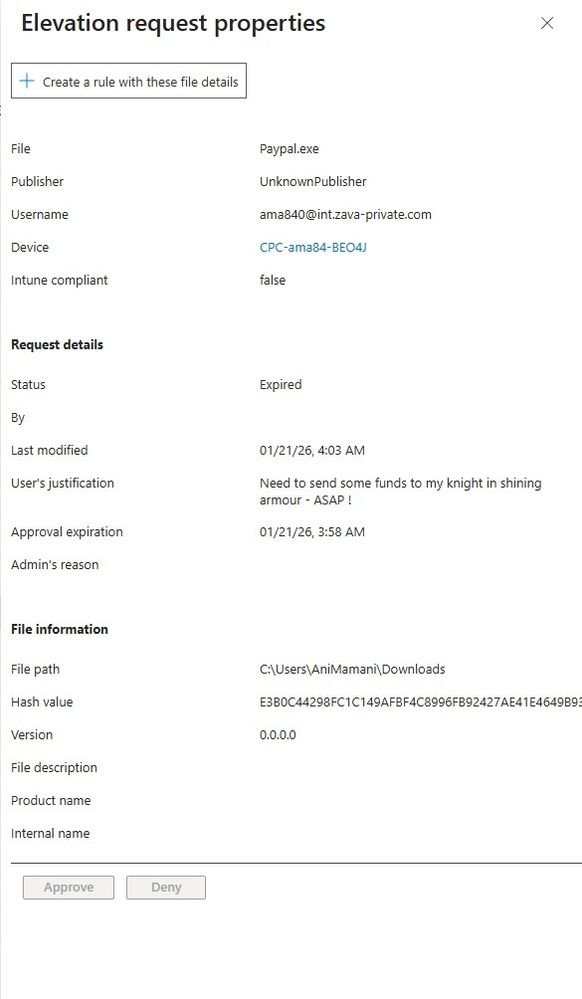
The EPM workflow within Admin Tasks provides administrators with granular control over elevation requests. When a user requests elevated privileges, the request appears in the same prioritized queue as other critical IT decisions. Administrators can approve or deny requests, create reusable rules based on file details, or add files to reusable settings.
This approach offers several key benefits:
- Flexible elevation models: Supports automatic, user-confirmed, and support-approved workflows
- Granular controls: Defines elevation rules based on publisher, file hash, or command-line arguments
- Audit and compliance: Logs elevation activity for visibility, reporting, and compliance requirements
- Improved user experience: Helps standard users stay productive while reducing help desk tickets and security exposure
Perhaps most importantly, when integrated with Microsoft Security Copilot, EPM can surface contextual risk signals to inform elevation approval decisions. This AI-assisted capability helps administrators make more informed decisions while maintaining human oversight.
Security Task Management: Unified Threat Response
Microsoft Defender for Endpoint generates security tasks when threats or configuration issues are detected on devices. Traditionally, these tasks required administrators to navigate separate consoles and workflows. Admin Tasks brings these security remediation actions into the same queue used for other critical IT decisions.
This unified approach to security task management offers several advantages:
- Unified task management: View and act on security tasks from Defender in a single queue
- Recommended endpoint security profiles: Supports new configurations for Endpoint Detection and Response (EDR) and Antivirus exclusions on Linux devices
- Audit and compliance: Logs all task activities for visibility, reporting, and compliance
- Integrated security settings management: Manage antivirus and EDR settings directly through Defender for Endpoint security settings management in Intune
By consolidating security tasks with other IT operations, organizations can respond more quickly to threats while maintaining comprehensive oversight of all critical actions.
Multi Admin Approval: Enhanced Security Governance
Multi Admin Approval (MAA) addresses one of the most critical security concerns in enterprise environments: ensuring that high-impact actions receive appropriate oversight. MAA requires a second administrator to approve sensitive operations such as scripts, remote actions, role changes, and device wipes before execution.
Within Admin Tasks, MAA requests benefit from the same prioritized queue approach, ensuring that critical security governance decisions receive appropriate attention. The feature provides:
- Alignment with access policies: Applies to protected configurations that require approvals
- Audit and compliance: Logs all approval, rejection, and completion activities
- Protection against compromised accounts: Ensures sensitive changes cannot be performed by a single administrator
- Contextual risk analysis: The Change Review Agent (part of Microsoft Security Copilot) analyzes MAA script requests in context, providing detailed insights on potential impact and clear recommendations
This approach to security governance ensures that organizations can maintain strict control over sensitive operations while streamlining the approval process.
Device Offboarding: Lifecycle Management at Scale
The Device Offboarding Agent represents a significant advancement in device lifecycle management. As organizations scale their device fleets, managing the offboarding of stale or unused devices becomes increasingly complex. The Device Offboarding Agent automates much of this process while maintaining administrator oversight.
Key capabilities include:
- Routine reviews: Pre-packaged tasks reduce manual investigation and make cleanup repeatable
- Automated identification: Detects unused or outdated devices using automated signals across Intune and Microsoft Entra
- Offboarding insights: Provides actionable recommendations and details requiring approval before offboarding
- Cross-platform support: Supports Intune managed devices running Windows, iOS/iPadOS, macOS, Android, and Linux
By incorporating device offboarding into the Admin Tasks queue, organizations can ensure that device lifecycle management receives the same level of attention as security and privilege management decisions.
Preparing for AI-Assisted Operations
The introduction of Admin Tasks represents more than just a consolidation of existing workflows - it's a strategic foundation for the future of AI-assisted IT operations. As organizations adopt Zero Trust principles and prepare for agentic automation, the need for centralized oversight becomes even more critical.
Microsoft's approach with Admin Tasks ensures that as Intune expands its automated and AI-assisted capabilities, there remains an oversight layer that keeps AI-driven recommendations under administrator control. This balance between automation and human oversight is crucial for maintaining security and compliance in modern IT environments.
Implementation and Access
Admin Tasks is available in the Intune admin center under Tenant administration. The feature is designed to be intuitive for administrators while providing the depth of control required for enterprise environments. Organizations can begin leveraging the unified task management approach immediately, with additional task types planned for future integration.
For organizations with Microsoft 365 E5 subscriptions, the integration with Microsoft Security Copilot provides additional AI-assisted capabilities at no additional cost. This integration represents significant value, as it brings advanced threat analysis and contextual risk assessment into the standard IT operations workflow.
The Strategic Impact
The consolidation of IT operations through Admin Tasks addresses several strategic challenges facing modern organizations:
- Improved response times: By centralizing high-impact decisions, administrators can respond more quickly to critical issues
- Reduced risk: Unified oversight helps prevent security gaps that can occur when decisions are scattered across multiple consoles
- Enhanced audit readiness: Centralized logging and tracking simplify compliance reporting and audit preparation
- Scalability: As organizations grow, the unified approach scales more effectively than managing multiple separate workflows
- AI readiness: The centralized model provides the foundation needed for effective AI-assisted operations while maintaining human oversight
Looking Forward
As Microsoft continues to expand Intune's capabilities, the Admin Tasks framework provides a flexible foundation for incorporating new task types and workflows. This extensibility ensures that the solution can evolve alongside changing IT requirements and emerging security challenges.
The integration of AI-assisted capabilities through Microsoft Security Copilot represents just the beginning of what's possible with this unified approach to IT operations management. As agentic automation becomes more prevalent, the ability to maintain centralized oversight while leveraging automation will become increasingly critical.
Organizations that adopt Admin Tasks today are not just solving current operational challenges - they're positioning themselves for the future of IT operations management. By establishing a unified, prioritized approach to high-impact decisions, they're creating the foundation needed to effectively leverage AI and automation while maintaining the security and compliance standards that modern enterprises require.
The evolution of IT operations management continues, and Microsoft Intune's Admin Tasks represents a significant step forward in creating more efficient, secure, and scalable IT operations. As organizations navigate the complexities of modern IT environments, solutions that provide both consolidation and control will become increasingly essential.
Comments
Please log in or register to join the discussion