Microsoft is shifting user account name management from Control Panel to the Settings app in Windows 11 Dev builds, continuing its years-long consolidation of system controls.
Microsoft has resumed its gradual migration of legacy Control Panel functions to the modern Settings application, with user account name management becoming the latest feature to transition. This change, currently visible in Windows 11 Dev Channel builds (build 26080+), represents another strategic step in Microsoft's long-term plan to retire the decades-old Control Panel interface.
The Control Panel Sunset Strategy
For over five years, Microsoft has systematically relocated settings from the classic Control Panel to the unified Settings app. This transition addresses fundamental architectural limitations of the Control Panel, which comprises over 50 separate .cpl files and applets dating back to Windows 95. The modern Settings application offers:
- Unified search across all system configurations
- Responsive design adaptable to different screen sizes
- Consistent theming with Fluent Design principles
- Deeper integration with cloud accounts and Microsoft 365
- Modern accessibility features
Despite these advantages, the migration has proceeded cautiously due to enterprise dependency on legacy interfaces and technical complexities in porting certain applets.
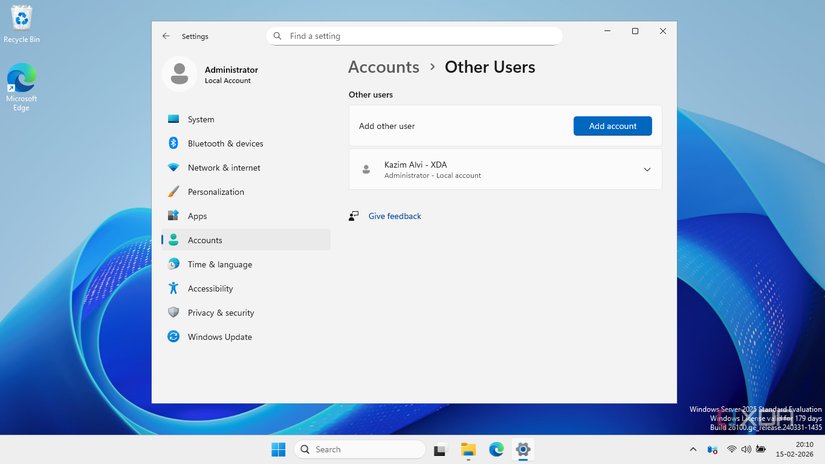 User account settings appearing in Windows 11 Settings app (Dev Channel)
Technical Implementation Details
The user account name change functionality now appears under Settings > Accounts > Your Info in recent Dev builds. Behind the scenes, Microsoft has replaced the legacy netplwiz.exe and control userpasswords2 pathways with modern Windows Runtime APIs. This shift has several technical implications:
Automation Changes: Scripts using Control Panel interfaces (VBScript, AutoHotkey) will break when Control Panel is eventually removed. PowerShell alternatives using
Set-LocalUserandRename-LocalUsernow represent the future-proof solution.Deployment Impacts: Enterprise provisioning packages and MDM policies must reference new setting paths. The Windows Configuration Designer documentation will require updates once this change reaches stable builds.
UWP Compatibility: Applications modifying user accounts via the Windows.System.UserProfile namespace remain compatible, demonstrating Microsoft's API consistency across migration phases.
Migration Timeline and Developer Guidance
Current implementation in the Dev Channel suggests a staged rollout:
| Channel | Expected Availability | Notes |
|---|---|---|
| Dev Channel | Available now | Build 26080+ |
| Beta Channel | Late Q1 2026 | Feature validation |
| Release Preview | Q2 2026 | Enterprise testing |
| Stable | Windows 11 24H2 | Fall 2026 |
Developers should:
- Audit applications for Control Panel dependencies
- Replace
control.exeinvocations with PowerShell equivalents - Test against Windows Insider builds
- Monitor Windows SDK updates for new account management APIs
 PowerShell remains the preferred automation method during transition
The Endgame for Control Panel
With user account management joining network properties, sound settings, and privacy controls in Settings, fewer than 15 major Control Panel applets remain unported. The most complex holdouts include:
- Advanced system properties (performance settings)
- Device Manager
- Administrative Tools
- Font management
Microsoft's deliberate pace reflects technical challenges in replicating these functions without breaking enterprise management tools. The company maintains a public tracker showing migration status.
As this transition continues, users should expect periodic interface changes with minimal announcement. Following Windows Insider blogs and monitoring Windows SDK release notes provides the most reliable advance notice of feature migrations.
While no official decommission date exists for Control Panel, its gradual deprecation follows Microsoft's established pattern with legacy components like Internet Explorer and the Windows Subsystem for Linux v1. Developers building Windows applications should prioritize Settings-compatible implementations to ensure long-term compatibility.
Comments
Please log in or register to join the discussion