Microsoft is rolling out a new feature in Windows 11 that prompts users to run memory diagnostics after a blue screen of death (BSOD), aiming to detect and resolve hardware issues proactively. Currently in testing, this innovation could significantly reduce system crashes by targeting memory corruption linked to kernel errors. The move highlights Microsoft's push toward self-healing systems, offering developers and IT teams a tool to enhance reliability without manual intervention.
The dreaded blue screen of death (BSOD) has haunted Windows users for decades, signaling catastrophic system failures that often require tedious troubleshooting. Now, Microsoft is taking a proactive step to tackle one of its root causes: faulty memory. In a new feature rolling out to Windows Insiders, Windows 11 will prompt users to run an automatic memory scan after a BSOD crash, transforming post-failure recovery into a diagnostic opportunity.
How the Memory Diagnostics Feature Works
When a bugcheck occurs—a critical kernel or driver error that forces a BSOD—Windows will now display a notification upon the next login suggesting a memory scan. If accepted, the system schedules a Windows Memory Diagnostic tool to run during the next reboot, completing in under five minutes on average. As Windows Insider Program lead Amanda Langowski explained:
"We're introducing a new feature that helps improve system reliability. If your PC experiences a bugcheck (unexpected restart), you may see a notification when signing in suggesting a quick memory scan. If you choose to run it, the system will schedule a Windows Memory Diagnostic scan... and if a memory issue is found and mitigated, you will see a notification post-reboot."
This scan targets memory corruption, a common culprit behind system instability that often goes undetected until it triggers repeated crashes. For now, the prompt appears after any bugcheck as Microsoft refines its targeting, but future updates will focus on specific error codes.
Limitations and Current Rollout
The feature is exclusive to x64 systems in the Windows Insider Dev and Beta channels, specifically builds 26220.6982 and 26120.6982. It won't function on ARM64 devices or systems with Administrator Protection or BitLocker without Secure Boot, limiting its initial reach but ensuring security isn't compromised.
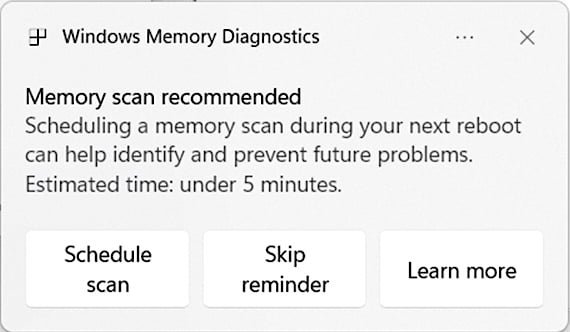
Memory scan prompt in Windows 11 (Microsoft)
Broader Implications for Developers and Enterprises
This isn't just a user convenience—it's a shift toward autonomous system health management. For developers, reducing BSODs means fewer support tickets and more stable environments for testing applications. Enterprises benefit from minimized downtime, as memory issues can be caught early before they escalate. The feature dovetails with Microsoft's recent AI-driven Copilot enhancements, like connectivity to third-party services and Copilot Actions, painting a picture of Windows evolving into a self-diagnosing, proactive platform.
Yet, challenges remain. Memory corruption can stem from drivers, kernel bugs, or hardware flaws, so while scans may mitigate symptoms, they won't replace deeper fixes. As Windows matures, expect such diagnostics to become smarter, potentially integrating with AI for predictive maintenance. For now, this update underscores a simple truth: in the battle against crashes, prevention starts the moment the screen turns blue.
Source: BleepingComputer
Comments
Please log in or register to join the discussion