Microsoft Viva Insights introduces new Agent Dashboard for tracking Copilot Studio agent adoption, benchmarking features for comparing Copilot usage across organizations, and expanded reporting capabilities including Copilot metrics export and customizable Power BI templates.
Microsoft Viva Insights is expanding its capabilities with several new features designed to help organizations better understand and optimize their use of Microsoft 365 Copilot and Copilot Studio agents. The updates, rolling out throughout early 2026, provide deeper insights into adoption patterns, comparative benchmarks, and enhanced reporting flexibility.
Agent Dashboard: Tracking Copilot Studio Agent Adoption
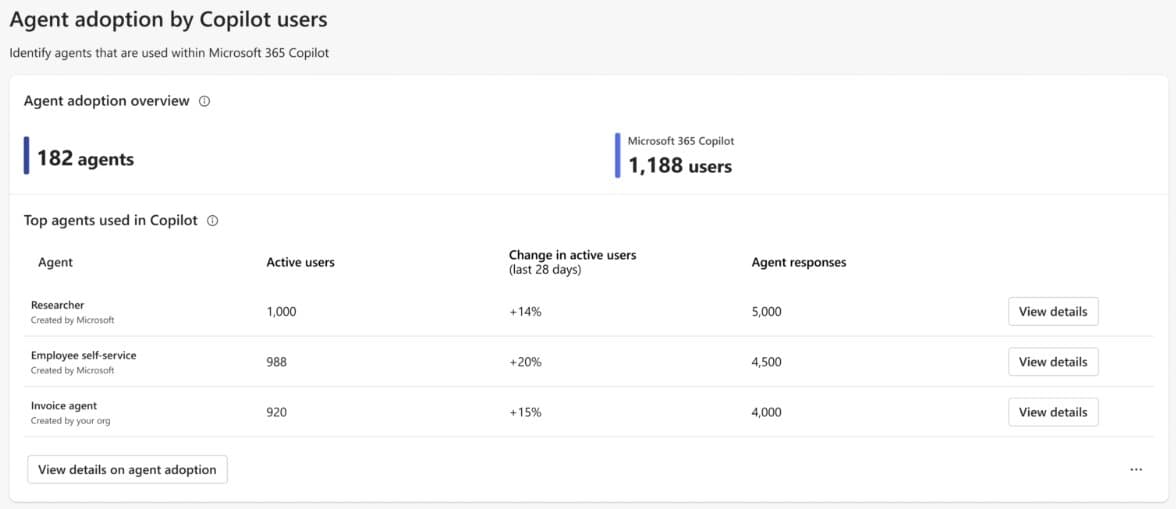
One of the most significant additions is the new Agent Dashboard, now in public preview for the Viva Insights web app. This dashboard gives leaders and analysts actionable insights into how agents built in Microsoft Copilot Studio are being adopted across their organization.
The dashboard focuses on Copilot Credit usage metrics, allowing users to track how agents are being utilized and identify optimization opportunities. Initially, it covers adoption metrics aggregated at the user level for agents used within Microsoft 365 Copilot. This granular view helps organizations understand which agents are gaining traction and where additional training or promotion might be needed.
For organizations looking to implement the Agent Dashboard, Microsoft provides detailed guidance through their MS Learn platform. The dashboard is currently available only to public preview customers, with broader rollout expected in the coming months.
Benchmarking Capabilities in Copilot Dashboard
A major enhancement to the existing Copilot Dashboard is the addition of benchmarking features. Previously focused on providing insights into Copilot readiness, adoption, and impact trends for specific organizational groups, the dashboard now allows users to compare their adoption metrics against others.
These benchmarks serve two primary purposes: comparing usage across internal cohorts within the organization, and seeing how adoption compares to similar organizations externally. This contextual information helps leaders understand whether their Copilot adoption is on track relative to industry peers or internal benchmarks.
The benchmarking feature addresses a common challenge organizations face when implementing new technologies - understanding what "good" adoption looks like. By providing these comparative metrics, Microsoft enables more informed decision-making about Copilot deployment strategies and resource allocation.
Enhanced Data Export Capabilities
Recognizing that organizations often need to perform custom analysis beyond what's available in the dashboard, Microsoft is introducing Copilot metrics export functionality. This public preview feature allows organizations to download usage data for both Microsoft 365 Copilot and Copilot Chat for the past six months at the de-identified user level.
The export tool provides leaders and analysts with access to raw data that can be combined with other organizational data sources for custom analysis and reporting. This flexibility is particularly valuable for organizations with sophisticated analytics requirements or those looking to integrate Copilot adoption metrics into broader business intelligence initiatives.
Data export is available to users with access to the global scope dashboard, ensuring that only authorized personnel can access this detailed usage information. The de-identified nature of the data also addresses privacy concerns while still providing meaningful insights for analysis.
Copilot Studio Agents Report
In an expansion of reporting tools for Microsoft 365 Copilot, the Copilot Studio agents report is now broadly available as a Power BI template. This powerful new tool allows organizations to gain deeper insights into the impact of agents built in Microsoft Copilot Studio across various deployment channels.
The report helps answer critical questions about agent performance, including:
- Which agents are being used most frequently
- High-level KPIs such as sessions, satisfaction scores, and success rates
- Impact analysis of individual agents, including conversational and autonomous agents
- Distribution of engaged sessions, topics, actions, and triggers
- Maker-led inputs and customizations
Importantly, the report covers agents deployed across multiple channels including Microsoft Teams, Microsoft 365 Copilot, Facebook, mobile apps, and custom or demo websites. This cross-channel visibility provides a comprehensive view of agent adoption and impact across the entire organization.
Microsoft provides detailed guidance on running the report through their MS Learn platform, making it accessible to organizations with varying levels of Power BI expertise.
Customizable Power BI Reports
Building on existing customization capabilities for Power BI template reports in the Viva Insights web app, Microsoft has expanded the toolkit for Viva Insights analysts. The new customization features allow for even greater tailoring of out-of-the-box reports to meet specific organizational needs.
Analysts can now:
- Add new visualizations, text boxes, and graphics
- Modify report filters
- Add, rename, and rearrange report pages
- Save and delete customized reports
These enhancements apply to pre-built Power BI reports such as the Copilot Studio agents report and Copilot for Sales adoption reports. However, custom queries such as Person queries or Meeting queries cannot be customized through this interface. Additionally, any queries previously run by analysts within the organization can be customized, providing flexibility for iterative report development.
The expanded customization capabilities address a common pain point for organizations implementing analytics solutions - the need to adapt standard reports to reflect unique business contexts, terminology, and metrics that matter most to specific stakeholders.
Strategic Implications for Organizations
These updates to Viva Insights represent Microsoft's continued investment in helping organizations maximize their return on investment in Copilot technologies. By providing deeper insights into adoption patterns, comparative benchmarks, and flexible reporting options, Microsoft is addressing key challenges organizations face when implementing AI-powered productivity tools.
The Agent Dashboard and Copilot Studio agents report are particularly significant as they provide visibility into the emerging ecosystem of custom agents that organizations are building. As more companies move beyond basic Copilot usage to develop specialized agents for specific business processes, these tools will become increasingly valuable for measuring and optimizing that investment.
The benchmarking capabilities also reflect a broader trend in enterprise software toward comparative analytics. Organizations no longer need to guess whether their adoption rates are "good" - they can see how they stack up against similar companies and internal benchmarks.
For IT leaders and analysts, these updates provide the tools needed to move from basic usage tracking to sophisticated analysis of Copilot's business impact. The combination of granular usage data, comparative benchmarks, and customizable reporting creates a comprehensive framework for understanding and optimizing Copilot investments.
As these features continue to roll out throughout 2026, organizations should begin planning how to leverage them effectively. This includes ensuring appropriate access permissions are in place, training analysts on the new capabilities, and developing internal processes for regularly reviewing and acting on the insights these tools provide.
The evolution of Viva Insights reflects the maturing of the Copilot ecosystem and Microsoft's commitment to helping customers realize value from their AI investments. Organizations that effectively leverage these new capabilities will be better positioned to optimize their Copilot deployment and demonstrate clear business impact from their AI initiatives.
Comments
Please log in or register to join the discussion