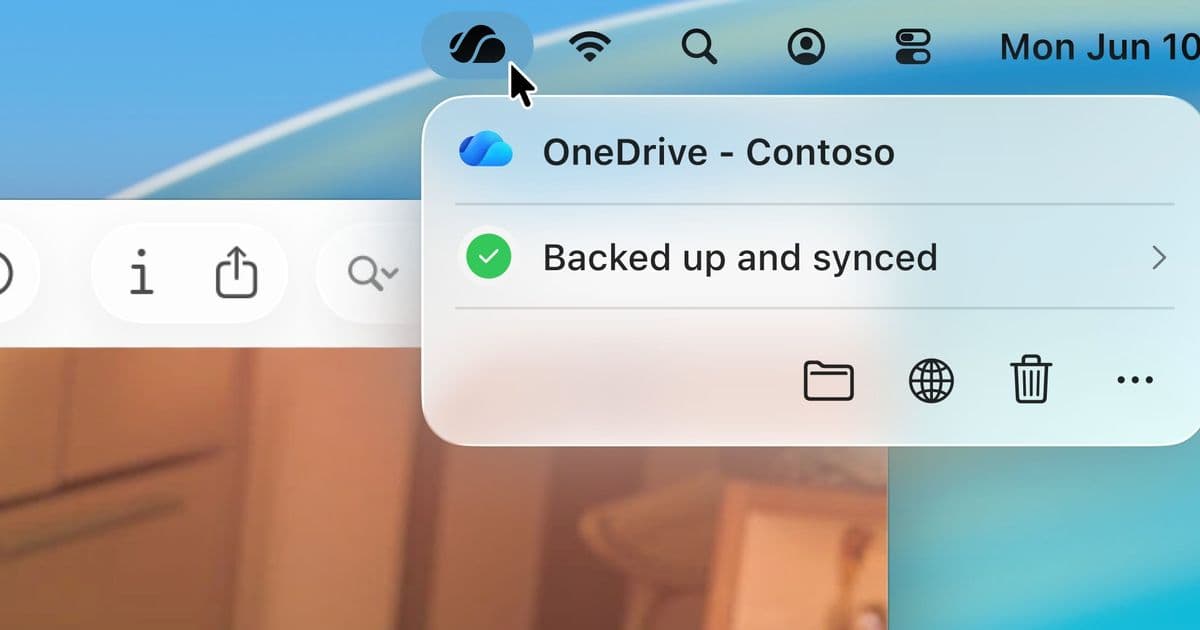
Microsoft's OneDrive for Mac is receiving a major visual and functional upgrade with Liquid Glass design support and native SwiftUI components, bringing the cloud storage experience in line with macOS 26's aesthetic.
Microsoft is rolling out a significant update to OneDrive for Mac that brings the cloud storage experience in line with Apple's latest design language. The update introduces an all-new Activity Center built with SwiftUI and native Mac dialogs, creating a more cohesive experience for macOS users.
Liquid Glass Design Integration
The standout feature of this update is support for Liquid Glass, Apple's new translucent design system introduced in macOS 26. When users click the OneDrive icon in the menu bar, they'll see a refreshed Activity Center that embraces Swift UI design language with the characteristic frosted glass effect. This creates a more integrated feel with the operating system while maintaining OneDrive's functionality.
Enhanced Activity Center Experience
The redesigned Activity Center offers several improvements:
- Streamlined Interface: The new design shows only essential information initially, allowing users to explore additional details as needed
- Visual Thumbnails: Files that have changed now display helpful thumbnails, making it easier to identify content at a glance
- Compact Information Display: Sync status and file change information is presented in a more digestible format
- Improved Accessibility: Enhanced support for VoiceOver and Full Keyboard Access ensures the experience works well for all users
Native Mac Dialogs
Beyond the Activity Center, Microsoft has rebuilt the informational and action dialogs within OneDrive using native Mac controls. This means when users encounter prompts—such as learning about file deletion behavior for the first time—the dialogs will match macOS 26's visual language and interaction patterns.
Technical Foundation
The entire new Activity Center is built with SwiftUI, Apple's modern UI framework. This architectural choice ensures the interface looks and works consistently across all supported macOS versions where OneDrive runs, not just the latest release.
Rollout Strategy
Microsoft is taking a measured approach to deployment:
- Initial release to Windows Insiders with build 26.017
- Automatic background upgrade once available
- Gradual rollout to ensure stability
The company is actively seeking user feedback through the "Send Feedback" option within the new Activity Center, demonstrating their commitment to refining the experience based on real-world usage.
Context and Significance
This update represents Microsoft's continued investment in making OneDrive feel truly native on macOS, addressing long-standing user feedback about the application's integration with Apple's ecosystem. By adopting SwiftUI and Liquid Glass, Microsoft is aligning OneDrive with modern macOS design principles while maintaining the reliability and functionality users expect from their cloud storage solution.
For Mac users who rely on OneDrive for file synchronization, this update delivers both aesthetic improvements and practical enhancements that make monitoring and managing file changes more intuitive. The focus on accessibility and native controls suggests Microsoft is prioritizing a seamless experience that respects platform conventions while delivering cross-platform functionality.
The timing of this release, coinciding with macOS 26's launch, positions OneDrive as a contemporary Mac application rather than a ported experience, potentially strengthening its appeal to Apple's user base.
Comments
Please log in or register to join the discussion