
OpenAI's experimental Atlas browser for ChatGPT is testing a new 'Actions' feature while adding video comprehension abilities, allowing AI-assisted browsing with contextual understanding and workflow automation.

OpenAI is advancing its experimental ChatGPT Atlas browser with two significant capabilities currently in testing: an "Actions" feature for task automation and new video comprehension tools. This evolution transforms ChatGPT from a conversational partner into an active browsing assistant that understands page context and now even video content.
The Atlas browser fundamentally reimagines web interaction by embedding ChatGPT directly into the browsing experience. Unlike traditional browsers where you manually share content with AI tools, Atlas enables real-time assistance within your current webpage. "This represents a shift from reactive to proactive browsing assistance," explains Dr. Elena Rodriguez, Human-AI Interaction researcher at Stanford. "Having an AI that comprehends both page structure and video content creates opportunities for entirely new productivity paradigms."
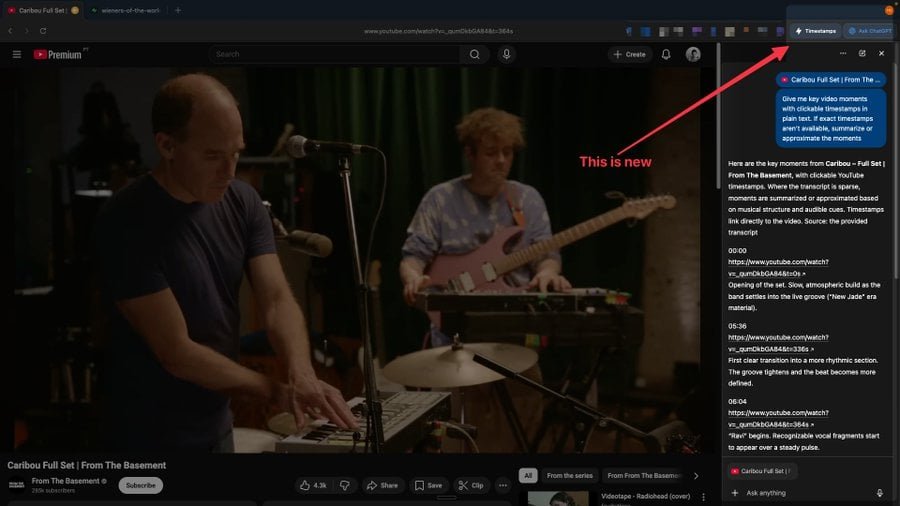 Caption: ChatGPT Atlas browser interface showing video analysis capabilities
Key developments in testing include:
Video Comprehension: Atlas can now analyze video content, with early implementations showing YouTube timestamp extraction. When watching videos, users see a "Timestamps" button that generates chapter markers in the sidebar - useful for quickly navigating tutorials, lectures, or lengthy presentations.
Actions Feature: Though details remain limited, early indications suggest "Actions" will enable multi-step task automation within the browser. This appears related to the existing "Agent Mode" which can open tabs and interact with page elements under strict safety constraints.
Contextual Memory: When users enable "browser memories," Atlas retains contextual information from previously visited sites. This allows comparative analysis across sessions - such as recalling product specs from different retailers or tracking price changes over time.
Recent updates also addressed stability issues and improved daily usability:
- Fixed a memory overuse bug
- Enhanced "what to ask next" suggestions when sidebar is closed
- Tab search now displays recent tabs when empty
- Added Cmd/K shortcut for tab search
Practical Considerations for Early Testers
While Atlas remains invite-only, testers should note:
- Privacy Settings: Browser memories store browsing context - review retention settings in preferences
- Agent Mode Limitations: Automation avoids sensitive sites (banking, healthcare) and requires confirmation for critical actions
- Video Analysis: Currently optimized for YouTube; performance varies with other platforms
- Resource Usage: Early versions showed memory strain; recent updates aim to optimize this
OpenAI has confirmed plans for a Windows 11 release later this year. As Atlas evolves, it signals a broader industry trend toward integrated browsing assistants. "We're moving toward browsers that don't just display content but actively help users accomplish goals," notes Martin Ford, AI researcher and author of Rule of the Robots. "The challenge remains balancing automation with user control."
For developers interested in the underlying architecture, OpenAI maintains technical documentation on their API platform, though Atlas-specific implementations remain proprietary.
Comments
Please log in or register to join the discussion