
Pixelmator Pro arrives on iPad exclusively through Apple Creator Studio, bringing professional-grade photo editing, design tools, and AI-powered features to Apple's tablet platform for the first time.
Pixelmator Pro has finally arrived on iPad, marking a significant milestone for mobile photo editing enthusiasts and creative professionals alike. The powerful image editing application, which has long been a favorite among Mac users, is now available exclusively through Apple Creator Studio, bringing its comprehensive suite of design, photography, and illustration tools to Apple's tablet platform for the first time.
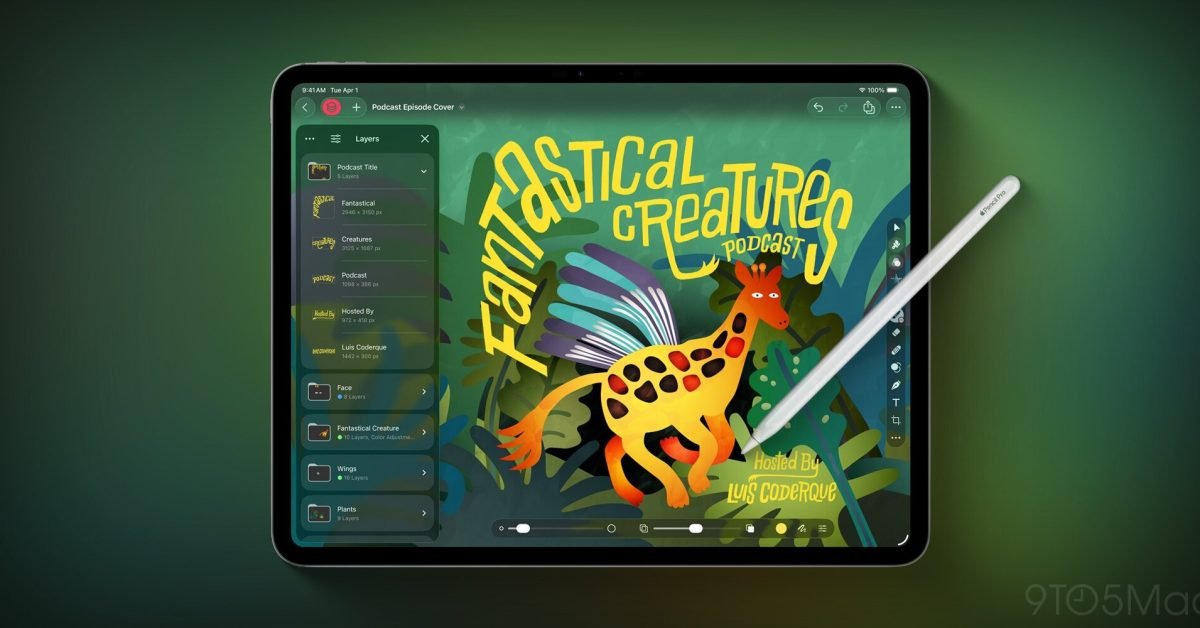
First Impressions: A Polished iPad Experience
As a longtime Pixelmator user, I've been fortunate to test the new iPad version during Apple Creator Studio's surprise 3-month free trial period. The initial experience is overwhelmingly positive, with Pixelmator Pro appearing to be thoughtfully adapted for iPadOS 26's latest features. The app embraces Apple's Liquid Glass design language, creating a modern and cohesive look that feels right at home on the latest iPadOS. The user interface demonstrates impressive flexibility, resizing smoothly to accommodate various window setups whether you're using your iPad in split-screen mode or full-screen. For users who rely heavily on keyboard shortcuts, Pixelmator Pro doesn't disappoint - the wealth of available shortcuts makes the transition from Mac to iPad feel natural and efficient.
What's particularly encouraging is the attention to detail in the adaptation process. It's clear that Apple's teams worked closely with Pixelmator's developers to ensure the app takes full advantage of iPad-specific capabilities while maintaining the powerful feature set that made the Mac version so popular.
The Creator Studio Subscription Model
However, there's a significant caveat to this launch: Pixelmator Pro on iPad is exclusively available through Apple Creator Studio subscriptions. This represents a departure from the traditional standalone purchase model that many Pixelmator users are accustomed to. While the Mac app remains available as a standalone purchase, iPad users must subscribe to Creator Studio to access Pixelmator Pro.
This subscription-only approach may be disappointing for users who prefer owning their software outright or who only need occasional access to advanced editing features. The decision likely reflects Apple's strategy to bundle multiple creative tools under the Creator Studio umbrella, but it does create a barrier for casual users or those on a tight budget.
Powerful Features at Your Fingertips
Despite the subscription model concerns, the feature set of Pixelmator Pro for iPad is genuinely impressive. The app brings virtually all of the Mac version's capabilities to Apple's tablet, optimized for touch interaction and Apple Pencil support.
Design and Painting Excellence
The app offers pixel-perfect precision when using Apple Pencil, with full support for hover, squeeze, double-tap, and palm rejection features. This level of Apple Pencil integration ensures that artists and designers can work naturally and intuitively. The ability to insert photos directly from your iPad camera as new layers streamlines the creative process, making it easy to incorporate fresh content into your projects.
One of the standout features is the seamless round-tripping capability between iPad and Mac versions. Projects sync through iCloud, allowing users to start work on one device and continue on another without missing a beat. This cross-device functionality is particularly valuable for professionals who work across multiple Apple devices throughout their day.
Revolutionary Warp Tool
Perhaps the most exciting addition is the all-new Warp tool, which allows users to twist and bend images, shapes, text, and even video layers by manipulating individual points on a warp grid. This tool opens up creative possibilities that were previously difficult or impossible to achieve on a mobile device. The Warp tool includes 12 smart warp presets for common transformations like cylinder, arc, and flag effects, plus the ability to split layers into customizable grid sizes (3×3, 4×4, or 5×5). Additionally, two new collections of premium product and apparel mockups take full advantage of this warp functionality, making it simple to showcase designs on t-shirts, mugs, and other products.
Comprehensive Editing Capabilities
Pixelmator Pro for iPad delivers a robust set of editing tools that rival desktop applications:
- Color Adjustments: A powerful collection of pro-grade color adjustments for photos and videos
- AI-Powered Tools: Machine learning features for automatic background removal, color enhancement, and resolution increase
- Presets and Effects: Over 40 color adjustment presets and 70+ versatile effects for creative looks
- RAW Support: Full compatibility with RAW photos from over 750 popular digital cameras
- Layer-Based Editing: Complete support for vector shapes, typography, and video layers
- Templates and Mockups: Beautiful templates and customizable mockups for quick design starts
Drawing and Illustration Tools
For illustrators and digital artists, the app provides:
- Full set of vector tools including Pen and Freeform Pen tools
- Extensive shape libraries covering categories like arches, plants, and organic shapes
- Customizable Smart Shapes for quick custom shape creation
- Handcrafted dual-texture brushes for natural painting experiences
- Full Apple Pencil support with pressure and tilt sensitivity
- Metal-powered painting engine for fast, responsive performance
File Compatibility and Sharing
Pixelmator Pro for iPad supports an extensive range of file formats, ensuring compatibility with various workflows:
- Image formats: JPEG, TIFF, PNG, PSD, HEIF, SVG, AI, Illustrator EPS, PDF, GIF, BMP, TGA, WebP, JPEG-2000, AVIF
- Video formats: MP4, MOV
- Additional support: HDR images and videos
Sharing options are equally comprehensive, with direct integration to Photos, Mail, AirDrop, and other locations, making it easy to distribute your finished work.
The Future of Mobile Photo Editing
The arrival of Pixelmator Pro on iPad represents a significant evolution in mobile photo editing capabilities. For years, iPad users have had to choose between simplified mobile apps or complex desktop software that didn't translate well to touch interfaces. Pixelmator Pro bridges this gap, offering professional-grade tools in a touch-optimized package.
However, the subscription-only model raises questions about accessibility and long-term value. While the comprehensive feature set justifies a premium price point for professionals, casual users might find the Creator Studio requirement prohibitive. It will be interesting to see how this pricing strategy affects adoption and whether Apple might consider alternative options in the future.
Community Response and Next Steps
Early adopters are already sharing their experiences, with many praising the app's performance and feature completeness. The integration with iPadOS 26's latest features suggests that Pixelmator Pro will continue to evolve alongside Apple's tablet platform.
For those interested in trying Pixelmator Pro, the app is available exclusively through Apple Creator Studio. Users can take advantage of the current free trial period to evaluate whether the subscription model provides sufficient value for their needs.
As mobile devices continue to close the gap with desktop computers in terms of creative capabilities, Pixelmator Pro's iPad debut represents another step toward true mobile productivity. Whether you're a professional designer, a serious photographer, or an enthusiastic hobbyist, this app brings desktop-level editing power to your iPad in a way that feels natural and intuitive.
Have you tried Pixelmator Pro on iPad? The creative community is eager to hear about your experiences and how this powerful tool fits into your mobile workflow.
Comments
Please log in or register to join the discussion