Ubiquiti's UniFi Network 10.2 introduces a Time Machine feature for switches, a digital twin for network visualization, and a subtle jab at Sonos in its announcement video.
Ubiquiti Networks has officially announced UniFi Network version 10.2, bringing several significant updates to its network management platform. The most notable addition is a feature called "Time Machine for Switches," which visually tracks network changes on a timeline, making it easier to monitor port status changes and troubleshoot configuration issues.
The new Time Machine feature works similarly to Apple's Time Machine backup system, allowing network administrators to see what happened on their switches over the past 24 hours. This visual timeline can be particularly useful when diagnosing problems caused by recent configuration changes or port modifications. Instead of manually checking logs or trying to remember what changed, administrators can now see a chronological view of network events.
Another major addition in UniFi Network 10.2 is the "digital twin" feature. This creates a virtual representation of the physical network configuration within the UniFi interface. For larger installations with multiple switches and devices, this digital twin provides a clear overview of the entire network topology. During large-scale outages or complex troubleshooting scenarios, having this visual representation can significantly reduce the time needed to identify and resolve issues.
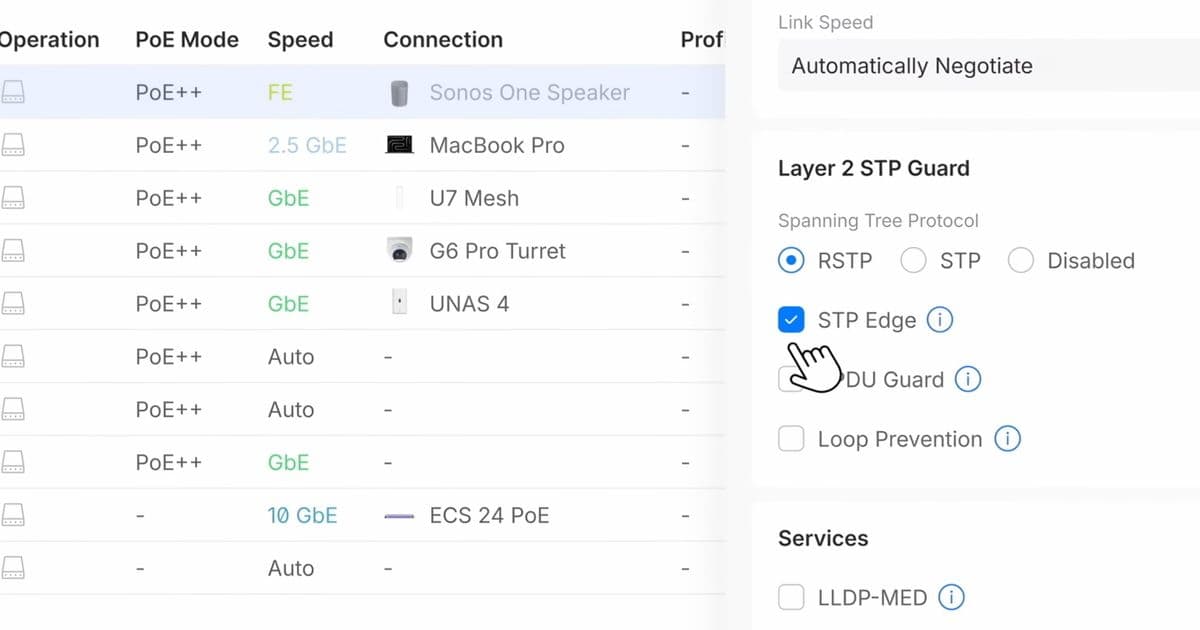
The announcement video for UniFi Network 10.2 contains an interesting detail that has caught the attention of the Ubiquiti community. The video shows a Sonos device being used to illustrate a network problem, which many viewers interpreted as a subtle jab at the popular audio company. This isn't entirely surprising given the known compatibility issues between Ubiquiti and Sonos products. The two ecosystems have had a somewhat rocky relationship, with users frequently reporting problems when trying to use both systems together.
These compatibility issues have been significant enough that they reportedly influenced hardware decisions at Ubiquiti several years ago. According to industry rumors, Ubiquiti launched the Poweramp device as an alternative to certain Sonos products. The Poweramp was designed to provide similar functionality to Sonos speakers but within the Ubiquiti ecosystem, potentially avoiding the integration headaches that users experienced when mixing the two brands.
The Poweramp made an appearance at MWC 2026 in Barcelona, where it was displayed alongside other new products like network racks and the U7 Mesh. While the Poweramp seems somewhat out of place in the current product lineup, its prominent display suggests that Ubiquiti still sees value in the device and potentially in competing with Sonos in the audio market.
For network administrators and IT professionals using UniFi products, version 10.2 represents a meaningful upgrade in terms of troubleshooting capabilities. The Time Machine feature addresses a common pain point in network management: understanding what changed and when. Being able to visually track the past 24 hours of network activity can dramatically reduce the time spent on root cause analysis.
The digital twin feature complements this by providing better visibility into complex network architectures. As networks grow larger and more sophisticated, having a clear visual representation becomes increasingly important. This is especially true in enterprise environments where multiple administrators might be working on the same infrastructure.
While the Sonos reference in the announcement video might seem like a minor detail, it reflects the broader ecosystem dynamics in the smart home and networking space. Companies are increasingly building walled gardens where their products work best with other devices from the same manufacturer. This strategy can create better user experiences within the ecosystem but can also lead to frustration when trying to mix and match products from different vendors.
For existing UniFi users, the upgrade to version 10.2 should be relatively straightforward. The new features integrate into the existing interface without requiring major changes to current workflows. However, administrators should still test the upgrade in a non-production environment first, as with any major software update.
The timing of this release is interesting given the current state of the networking market. With more people working from home and relying on home networks for both personal and professional use, tools that make network management easier are increasingly valuable. Features like Time Machine for Switches could appeal to both professional IT administrators and advanced home users who want better visibility into their network performance.
Overall, UniFi Network 10.2 represents a solid update that addresses real-world network management challenges. The combination of improved troubleshooting tools and the subtle competitive positioning against Sonos shows that Ubiquiti is continuing to evolve its platform while maintaining its distinctive approach to network management.
Comments
Please log in or register to join the discussion