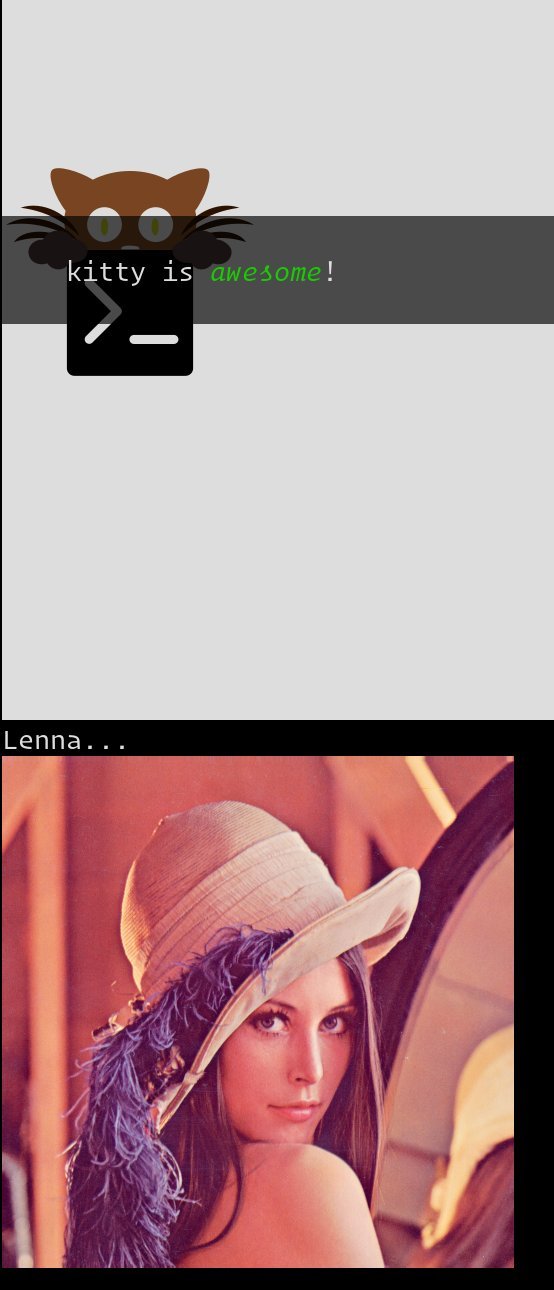
The Kitty graphics protocol turns the terminal from a plain text sandbox into a canvas capable of rendering arbitrary pixel art, animations, and even full‑screen images. By offloading image decoding to the client and using lightweight escape sequences, developers can embed high‑fidelity graphics in any TUI tool, from file explorers to video players, without sacrificing performance or portability.
Reimagining the Terminal with Kitty’s Graphics Protocol
The terminal has long been the backbone of developer workflows, but its visual capabilities have traditionally been limited to ANSI colors and block characters. The Kitty graphics protocol, documented at https://sw.kovidgoyal.net/kitty/graphics-protocol/, flips that narrative on its head by allowing any raster image—PNG, JPEG, SVG, even animated frames—to be rendered directly in the terminal emulator.
Why a New Protocol?
Kitty’s designers set out with four core goals:
- No image‑format support required in the emulator – the client supplies raw pixel data or a PNG, keeping the terminal lightweight.
- Fine‑grained placement – images can be positioned at individual pixel coordinates, overlaid on text, and scrolled with it.
- Performance – when client and emulator share the same machine, the protocol can use shared memory or file descriptors to avoid expensive base64 encoding.
- Extensibility – the escape‑code syntax is deliberately minimal, making it easy to add new features like animation or Unicode placeholders.
These design choices mean that a terminal can now serve as a true canvas, while still being a text interface.
How the Protocol Works
At its heart the protocol uses Application Programming Commands (APC):
<ESC>_G<control data>;<payload><ESC>\
<ESC>is the escape character (0x1B).<control data>is a comma‑separated list of key=value pairs.<payload>is the image data, base64‑encoded.
Example: Sending a PNG
#!/bin/bash
transmit_png() {
    data=$(base64 "$1")
    data="${data//[[:space:]]}"
    pos=0
    chunk_size=4096
    while [ $pos -lt ${#data} ]; do
        printf "\e_G"
        [ $pos = "0" ] && printf "a=T,f=100,"  # transmit+display, PNG format
        chunk="${data:$pos:$chunk_size}"
        pos=$((pos+chunk_size))
        [ $pos -lt ${#data} ] && printf "m=1"
        [ ${#chunk} -gt 0 ] && printf ";%s" "$chunk"
        printf "\e\\"
    done
}
transmit_png "$1"
Python offers a similar helper:
from base64 import standard_b64encode
import sys

def serialize_gr_command(**cmd):
    payload = cmd.pop('payload', None)
    cmd_str = ','.join(f'{k}={v}' for k, v in cmd.items())
    result = [b'\033_G', cmd_str.encode('ascii')]
    if payload:
        result.extend([b';', payload])
    result.append(b'\033\\')
    return b''.join(result)

# ... (rest of script omitted for brevity)
Both examples illustrate the core idea: the client does the heavy lifting (reading the file, base64‑encoding, chunking) while the emulator merely renders.
Querying Capabilities
A terminal can be asked whether it supports the protocol by sending a query (a=q) and waiting for an immediate reply. If the emulator responds before processing other input, it guarantees protocol support.
Advanced Features
Animation
Kitty can store multiple frames per image. Frames are transmitted with a=f and can be composed from previous frames using c or r. The terminal can then drive the animation, looping or pausing as requested.
Unicode Placeholders
A private‑use Unicode character (U+10EEEE) can act as a placeholder for an image. The placeholder’s foreground color encodes the image ID, and the terminal automatically moves the image as the placeholder moves. This technique lets any Unicode‑aware application (e.g., Vim, tmux) embed images without knowing about the protocol.
Relative Placements
Images can be positioned relative to other images or placeholders, enabling complex UI layouts that move cohesively when the parent shifts.
Ecosystem: Apps, Libraries, and Terminals
Kitty’s protocol is already in use by a growing list of tools:
- Browsers & file explorers –
awrit,broot,ranger,Yazi. - Utilities –
fzf,neofetch,mpv. - Image viewers –
chafa,pixcat,viu. - Libraries –
ctx.graphics,notcurses,rasterm,image.nvim.
Other terminals that support the protocol include Ghostty, Konsole, st (patched), Warp, wayst, and WezTerm.
Security and Quotas
To mitigate denial‑of‑service attacks, emulators impose a storage quota (e.g., 320 MB in Kitty). When the quota is exceeded, older images are purged. The protocol also validates file paths, refusing device or socket files and rejecting symlink loops.
Performance Considerations
On a local machine, the protocol can use shared memory (t=s) or direct file references (t=f) to avoid base64 overhead. Over SSH, the client must chunk data into 4 KB segments, but compression (o=z) can reduce bandwidth.
The Future of Rich Terminals
Kitty’s graphics protocol demonstrates that the terminal can evolve beyond simple text. As more libraries adopt the protocol, we’ll see TUI applications that blend crisp images, animations, and interactive controls—blurring the line between console and GUI. The protocol’s extensible design also invites future enhancements: 3D rendering, GPU‑accelerated shaders, or even real‑time video streams.
Source
The information in this article is based on the official Kitty graphics protocol specification: https://sw.kovidgoyal.net/kitty/graphics-protocol/.
Comments
Please log in or register to join the discussion