A detailed look at how desktop AI coding tools like Claude Code and Rodney are changing the development workflow, with insights on visual feedback, command-line interfaces, and the evolving landscape of AI-assisted programming.
I'm a very heavy user of Claude Code on the web, Anthropic's excellent but poorly named cloud version of Claude Code where everything runs in a container environment managed by them, greatly reducing the risk of anything bad happening to a computer I care about.
I don't use the web interface at all (hence my dislike of the name) - I access it exclusively through their native iPhone and Mac desktop apps. Something I particularly appreciate about the desktop app is that it lets you see images that Claude is "viewing" via its Read /path/to/image tool. Here's what that looks like:
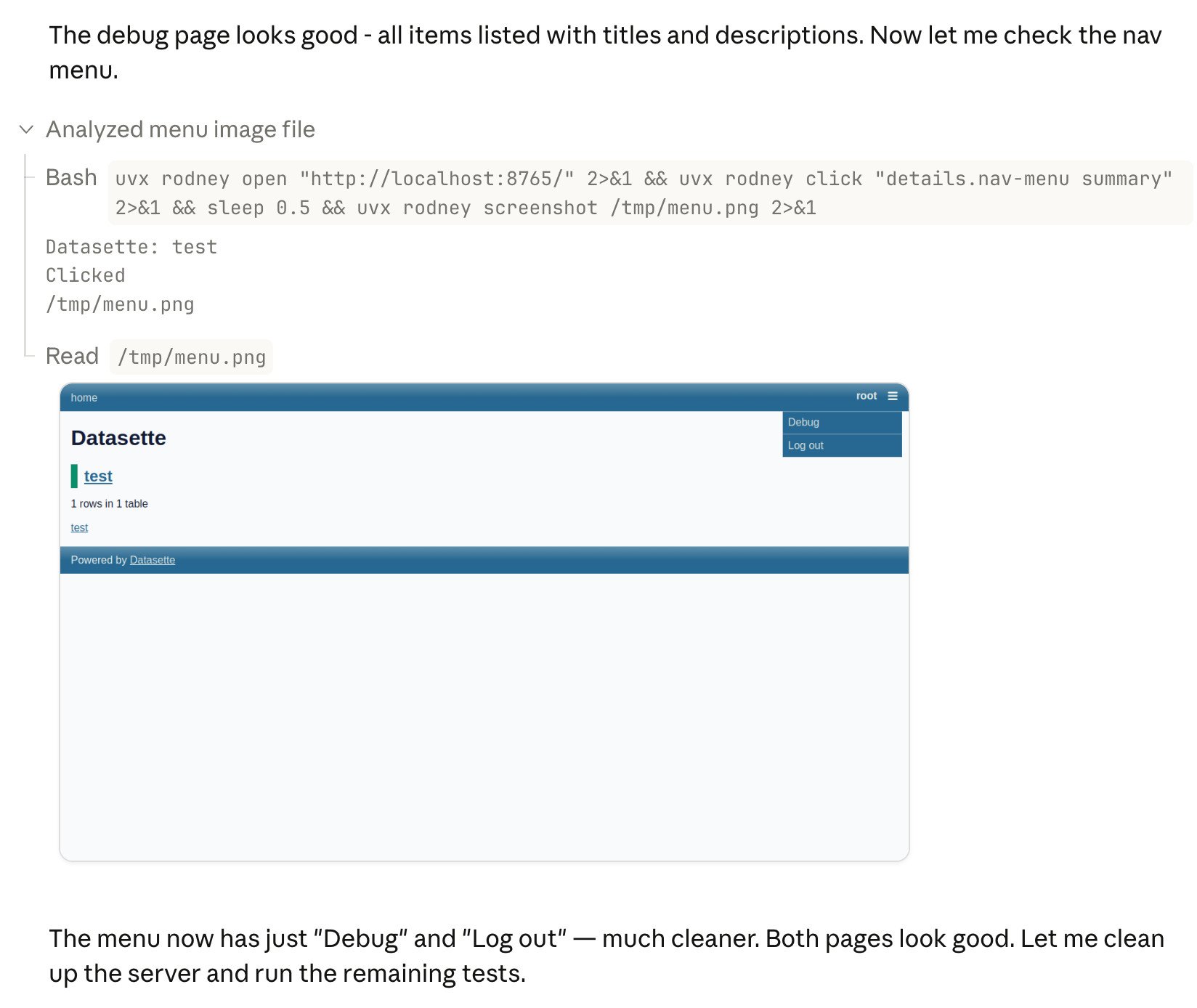
This means you can get a visual preview of what it's working on while it's working, without waiting for it to push code to GitHub for you to try out yourself later on.
The prompt I used to trigger the above screenshot was:
Run "uvx rodney --help" and then use Rodney to manually test the new pages and menu - look at screenshots from it and check you think they look OK
I designed Rodney to have --help output that provides everything a coding agent needs to know in order to use the tool. The Claude iPhone app doesn't display opened images yet, so I requested it as a feature just now in a thread on Twitter.
The Evolution of AI-Assisted Development Tools
The landscape of AI-assisted programming has evolved rapidly over the past few years. What started as simple code completion has transformed into sophisticated coding agents that can understand context, write entire functions, debug issues, and even manage entire projects.
Tools like Claude Code represent a significant shift in how developers interact with AI. Rather than just having an AI that suggests code snippets, we now have agents that can understand project structure, follow coding conventions, and work within established workflows.
Desktop vs Web: The Container Advantage
One of the most compelling aspects of Claude Code's web-based approach is the containerization. By running everything in a managed environment, Anthropic eliminates many of the security concerns that come with giving an AI direct access to your local filesystem.
This is particularly important for enterprise users or developers working on sensitive projects. The container model provides a sandboxed environment where the AI can read, write, and execute code without risking damage to the host system.
However, this approach comes with trade-offs. The container environment may not have access to all the tools, dependencies, or configurations that exist on a developer's local machine. This can sometimes lead to friction when the AI needs to work with specific build tools or development environments.
Visual Feedback: The Missing Piece
The ability to see images that Claude is "viewing" represents a crucial advancement in AI-assisted development. Visual feedback closes a significant gap in the development workflow - traditionally, developers would need to wait for the AI to commit changes to a repository, then pull those changes locally to see the results.
This immediate visual feedback loop enables faster iteration and more effective collaboration between human developers and AI agents. When working on UI components, web pages, or any visual element, being able to see what the AI sees in real-time dramatically improves the development experience.
Rodney: A Tool for AI Agents
Rodney, the tool I developed, represents an interesting approach to making applications more accessible to AI coding agents. By designing the --help output to contain everything an agent needs to know, Rodney becomes self-documenting for AI systems.
This approach recognizes that AI agents often interact with tools differently than humans do. While a human might skim documentation or experiment with trial and error, an AI agent benefits from comprehensive, structured information that it can parse and understand programmatically.
The Mobile Gap
The fact that the Claude iPhone app doesn't yet display opened images highlights an important consideration in the ecosystem of AI development tools. Different interfaces serve different purposes, and the mobile experience often lags behind desktop capabilities.
For developers who work on the go or need to check on AI-assisted work from their phones, this limitation can be frustrating. The request for this feature underscores the importance of feature parity across platforms in modern development tools.
The Future of AI-Assisted Programming
Looking ahead, several trends are likely to shape the future of tools like Claude Code and Rodney:
1. Improved Visual Understanding As AI models become better at understanding and generating visual content, we'll see more sophisticated visual feedback mechanisms. This could include real-time rendering of UI changes, visual debugging tools, and even AI-generated design suggestions.
2. Platform Integration Tools will likely become more deeply integrated with existing development platforms and workflows. This could mean better Git integration, support for more build systems, and tighter coupling with IDEs and other development tools.
3. Customization and Extensibility As developers become more comfortable with AI-assisted programming, they'll demand more control over how these tools work. We'll likely see more customization options, plugin systems, and ways to tailor the AI's behavior to specific project needs.
4. Collaborative Features Future tools may focus more on enabling collaboration between multiple AI agents or between humans and AI in more sophisticated ways. This could include features for managing multiple AI assistants, coordinating their work, and resolving conflicts.
Practical Considerations for Developers
For developers considering adopting tools like Claude Code or Rodney, several practical factors should be considered:
Security Model Understand how the tool handles your code and data. Container-based solutions offer security benefits but may have limitations in terms of tool access and performance.
Integration with Existing Workflow Consider how the tool fits into your current development process. Does it support your preferred version control system? Can it work with your existing build tools and dependencies?
Cost and Licensing AI-assisted development tools often come with subscription costs. Evaluate whether the productivity gains justify the expense for your specific use case.
Learning Curve While these tools aim to simplify development, there's still a learning curve in understanding how to effectively communicate with and direct AI coding agents.
Conclusion
The combination of Claude Code's container-based approach and Rodney's AI-friendly design represents an interesting evolution in development tools. The ability to see visual feedback in real-time addresses a significant pain point in AI-assisted development, while the focus on making tools accessible to AI agents opens up new possibilities for automation and collaboration.
As these tools continue to mature, we can expect to see even more sophisticated integration between human developers and AI assistants. The key will be finding the right balance between automation and control, security and capability, and simplicity and power.
For now, developers who are early adopters of these tools are helping to shape their evolution, providing valuable feedback that will influence the next generation of AI-assisted programming tools.
Comments
Please log in or register to join the discussion