
Microsoft's Azure Storage Mover, integrated with Azure Arc's multicloud connectors, provides a managed pathway for migrating high-volume data from Amazon S3 to Azure Blob Storage, a critical step for modernizing SAP environments like RISE and HANA deployments.
For enterprises running SAP workloads on AWS, the journey to Azure often begins with a fundamental data gravity problem: moving petabytes of structured and unstructured data from Amazon S3 to Azure Blob Storage. This is not merely a storage migration; it's the foundational step for modernizing SAP RISE deployments, migrating SAP HANA databases, or integrating SAP S/4HANA with Azure's native analytics stack. The challenge lies in executing this transfer at scale without incurring prohibitive downtime, data integrity risks, or operational overhead.
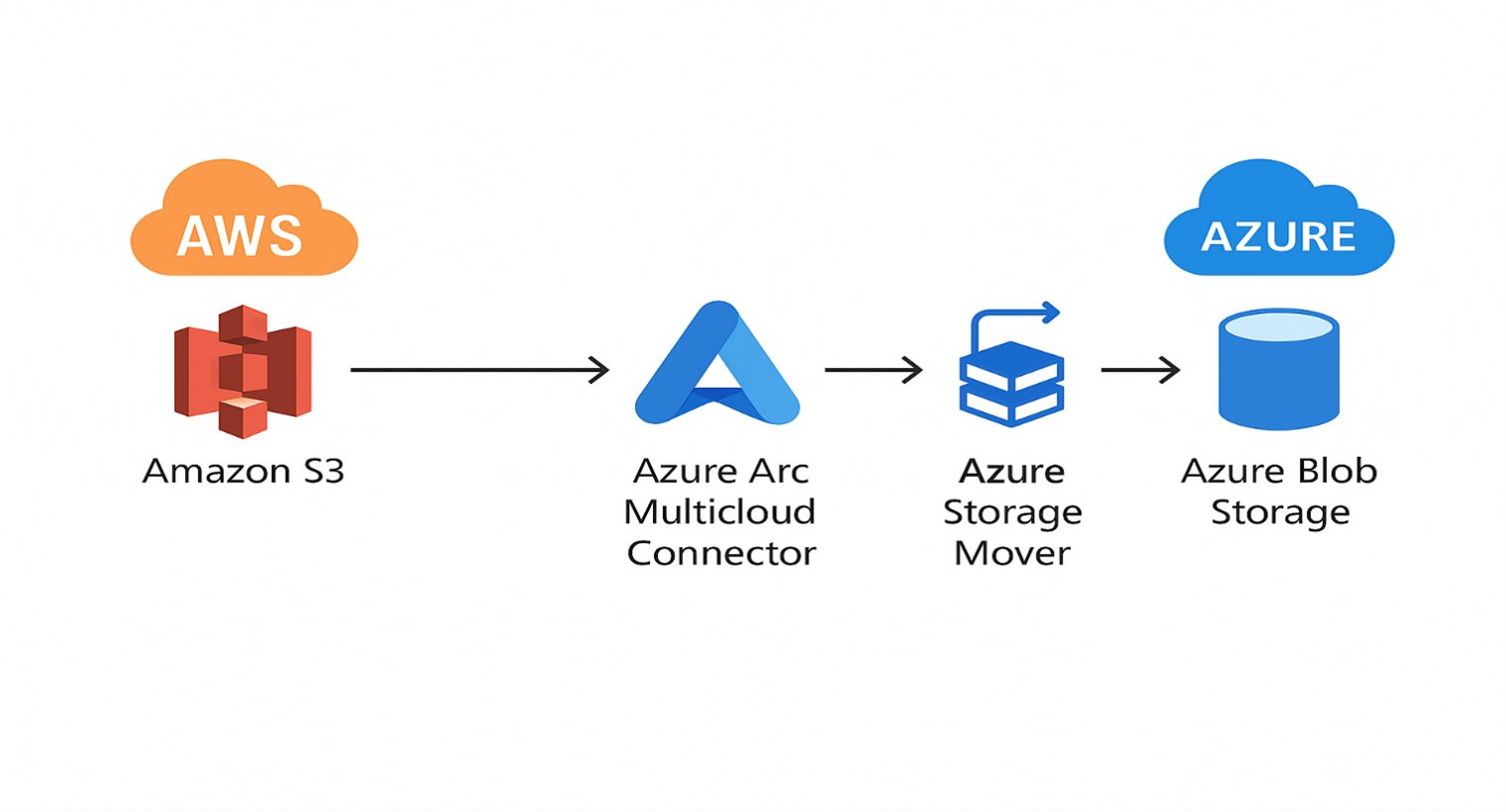
Microsoft's answer is a two-part architecture: Azure Arc Multicloud Connector for secure discovery and control-plane integration, and Azure Storage Mover for orchestrated, high-throughput data movement. Together, they form a managed service pipeline designed specifically for large-scale, cross-cloud data transfers, addressing the unique requirements of SAP-centric modernization projects.
The Architecture: From S3 to SAP-Consumable Azure Storage
The migration flow is a controlled, observable process. It begins with your data residing in Amazon S3 buckets. Azure Arc's Multicloud Connector acts as the secure bridge, authenticating to your AWS account, discovering S3 buckets, and exposing them as managed external resources within the Azure control plane. This is not a simple API call; it establishes a governance layer, allowing Azure to understand the source inventory without requiring you to open inbound network paths from AWS to Azure.
Once the source is discovered, Azure Storage Mover takes over. This fully managed service orchestrates the end-to-end data movement. It uses the S3 source endpoint and an Azure Blob Storage target endpoint you define, supporting migrations of up to 500 million objects per job. The service handles the heavy lifting: parallel transfers, integrity validation, and providing detailed telemetry. It supports three primary migration modes:
- Full Copy: A one-time bulk transfer of all objects.
- Mirror: A continuous sync where the target Blob Storage container mirrors the source S3 bucket, including deletions.
- Incremental: A one-time copy followed by periodic syncs of only new or modified objects, ideal for phased cutovers.
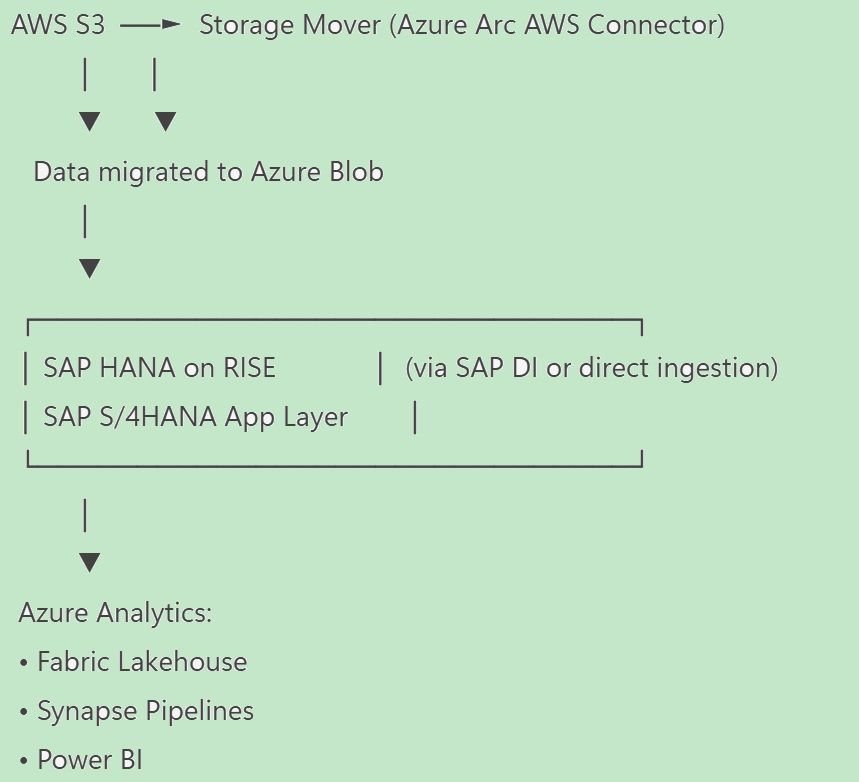
The destination, Azure Blob Storage, is not just a landing zone. For SAP workloads, it becomes the cloud-native storage layer for SAP HANA data volumes, SAP Data Intelligence pipelines, SAP S/4HANA, and BW/4HANA backups. It integrates directly with Azure Synapse for analytics, Azure Data Factory for ETL, and Azure AI services, creating a unified data platform post-migration.
Prerequisites and Critical Service Limits
Before initiating a migration, several prerequisites must be met to avoid configuration dead-ends:
- Azure Subscription & Permissions: You need an active subscription with permissions to deploy Azure Storage Mover and Azure Arc resources. Role-Based Access Control (RBAC) is critical; the Azure Storage Mover service requires specific roles to manage data movement.
- AWS Account Access: You must have IAM permissions on the AWS side to list S3 buckets and read objects. The multicloud connector will need an AWS account ID and appropriate credentials.
- Azure Storage Account: A destination storage account and blob container must be provisioned. The service account running the migration will need the Storage Blob Data Contributor role on this target.
- Azure Storage Mover Deployment: The service itself must be deployed in your Azure environment before creating projects and jobs.
Equally important are the service limits, which dictate the scope and feasibility of your migration:
- Object Scale: A single migration job can handle up to 500 million objects. For larger datasets, jobs must be partitioned logically (e.g., by project, department, or data type).
- Concurrency: The default limit is 10 concurrent migration jobs per subscription. This can be increased via a support request, but planning for sequential or staggered jobs is often necessary.
- Archived Data: Objects in S3 Glacier or Deep Archive tiers are not automatically rehydrated. They must be restored to a standard storage class before Azure Storage Mover can access and transfer them. This adds a time and cost consideration for cold data.
- Network Security: Private networking (VNet integration) is not supported for the S3 source endpoint. Data transfer occurs over the public internet using trusted Azure IP ranges. For highly sensitive data, this may require a review of security policies or the use of a VPN gateway in a hybrid setup.
Step-by-Step Implementation Guide
1. Establish the Multicloud Connector
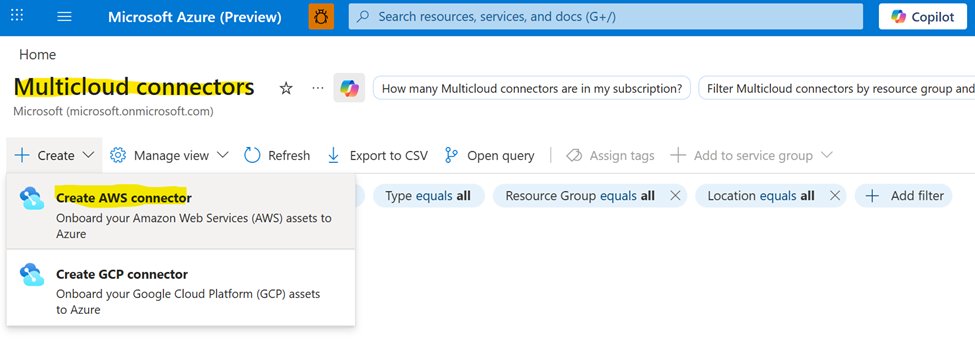
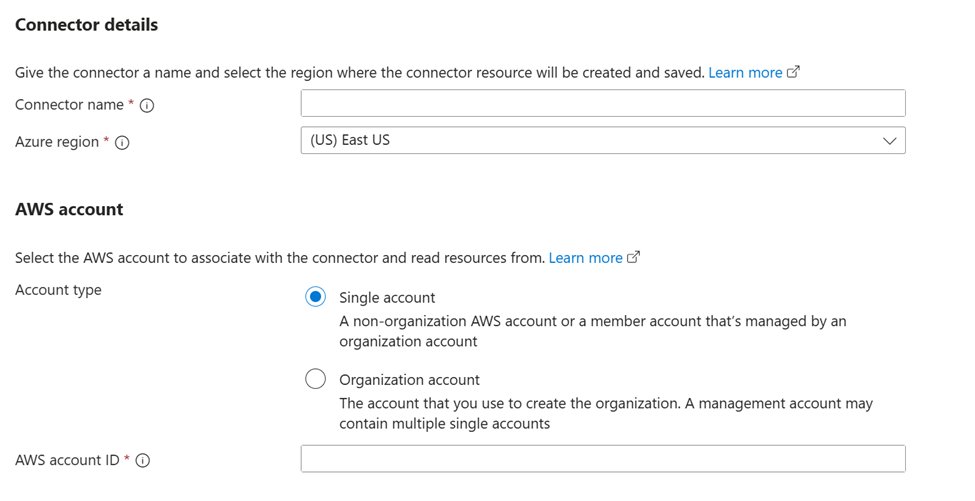
The first technical step is creating the bridge to AWS. Using the Azure Arc portal, you configure a multicloud connector for AWS. This involves:
- Selecting your Azure subscription and region.
- Providing your AWS Account ID.
- Adding the necessary solutions: Inventory (for discovery) and Storage Data Management (for migration operations).
This connector authenticates with AWS using IAM roles and policies you configure on the AWS side, ensuring a secure, least-privilege connection.
2. Configure Source and Target Endpoints
Within the Azure Storage Mover service:
- Source Endpoint (AWS S3): Navigate to
Storage Endpoints->Source endpoints->Add endpoint. Select the AWS S3 bucket discovered via the multicloud connector. You can filter by bucket name or prefix to scope the migration. - Target Endpoint (Azure Blob): Create a target endpoint pointing to your Azure Storage Account and specific blob container. Ensure the service principal or managed identity used by Storage Mover has the Storage Blob Data Contributor role on the target container.
3. Create the Migration Project and Job
Organize your migration into projects and jobs. A project can represent a logical unit (e.g., "SAP HANA Data Volumes Q4 2025").
- In the Project Explorer, create a new migration project.
- Within the project, define a Job Definition. Here, you select the pre-configured S3 source endpoint and Blob target endpoint.
- Choose the migration mode: Mirror for ongoing sync, Incremental for phased cutovers, or Full copy for a one-time bulk transfer.
4. Execute and Monitor the Migration
Start the job from the Job Properties pane. Azure Storage Mover provides a dashboard with real-time metrics:
- Throughput: Data transfer speed (MB/s).
- Progress: Percentage complete and estimated time to completion.
- Object Count: Objects processed vs. total.
The service generates detailed logs for any transfer errors or warnings. Operational visibility is a key advantage, allowing teams to monitor progress without manual scripting or third-party tools.
5. Post-Migration Validation and Cutover
Once the job completes, validation is mandatory:
- Data Integrity: Compare object counts, sizes, and checksums (if available) between source and target. Azure Storage Mover logs can assist in identifying discrepancies.
- User Acceptance Testing (UAT): For SAP workloads, this involves pointing a test SAP HANA instance or application to the Azure Blob Storage endpoint and verifying functionality.
- Incremental Sync: If using Mirror or Incremental mode, configure the sync schedule to keep the target updated until the final cutover.
- Source Cleanup: Only after successful validation and UAT should the source S3 bucket be decommissioned. Consider a phased deletion or archival process.
Business Impact and Strategic Considerations
This migration architecture directly supports the SAP RISE model, where the application layer (SAP S/4HANA) is managed by SAP, but the infrastructure and data layer are controlled by the customer in their cloud of choice. Moving data to Azure Blob Storage aligns with a cloud-native strategy, enabling:
- Cost Optimization: Azure Blob Storage offers tiered pricing (Hot, Cool, Archive) similar to AWS S3, allowing for cost-effective storage of historical SAP data.
- Analytics Integration: Post-migration, data in Blob Storage can be directly queried by Azure Synapse Analytics or used as a source for Azure Data Factory pipelines, breaking down silos between SAP operational data and enterprise analytics.
- Disaster Recovery: Azure Blob Storage can serve as a secondary copy for SAP HANA backups, leveraging Azure's geo-redundancy for enhanced business continuity.
The use of a managed service like Azure Storage Mover reduces the operational burden on IT teams. Instead of managing complex scripts, custom ETL jobs, or third-party tools, organizations can rely on a platform-native solution with built-in monitoring, error handling, and scalability.
Conclusion
Migrating SAP data from AWS S3 to Azure Blob Storage is a complex but essential undertaking for enterprises pursuing a multi-cloud or Azure-centric SAP strategy. The combination of Azure Arc's multicloud connector and Azure Storage Mover provides a robust, secure, and scalable framework for this data movement. It abstracts much of the complexity, offering a managed path for transferring hundreds of millions of objects while maintaining operational visibility and data integrity.
For SAP RISE and HANA modernization, this establishes Azure Blob Storage as the cloud-native data foundation. It enables seamless integration with Azure's broader analytics, AI, and application services, transforming a storage migration into a strategic enabler for digital transformation. The process is not just about moving data; it's about positioning SAP workloads for the next generation of cloud-native innovation.
Reference Links
- Migrate data from Amazon S3 to Azure Storage - Azure Data Factory | Microsoft Learn
- 3476767 - How-To: Connect S/4HANA on premise with Azure Blob | SAP Knowledge Base Article
- Azure Storage Mover Documentation
- Azure Arc Multicloud Connectors
Comments
Please log in or register to join the discussion