
As websites increasingly support both light and dark modes, developers face the challenge of making images visually appealing in both contexts. This article explores a clever shortcode solution for Hugo that dynamically serves appropriate images based on the user's theme preference.

As modern web applications evolve to support both light and dark modes, developers encounter a persistent challenge: how to ensure images and diagrams remain visually appealing and readable across both contexts. A common issue emerges where images that look perfect in light mode become surrounded by jarring white boxes or lose all contrast in dark mode—and vice versa.
This problem isn't merely aesthetic; it impacts user experience and can make technical content difficult to comprehend. David Isaksson, a developer facing this exact issue on his Hugo-powered website, recently devised an elegant solution that deserves attention from the developer community.
The Challenge of Theme-Agnostic Images
"An issue is that images and diagrams are perfectly visible in light mode, but when flipping over to dark mode they either are surrounded by a big white box or lost all contrast if the background is transparent, or vice versa," Isaksson explained in a recent post detailing his solution.
This challenge becomes particularly acute for technical blogs and documentation sites where diagrams, screenshots, and illustrations are essential for conveying complex information. When these visual elements fail to adapt to the user's preferred theme, the content's effectiveness diminishes significantly.
The Dynamic-Image Shortcode Solution
Hugo, the static site generator powering Isaksson's website, offers extensibility through shortcodes—templates that can be invoked within markdown content to generate complex HTML structures. Isaksson leveraged this feature to create a dynamic-image shortcode that intelligently serves different image versions based on the current theme.
The implementation consists of two parts: the shortcode template itself and accompanying CSS rules:
The Shortcode Template
{{ $lightSrc := .Get "light"}}
{{ $darkSrc := .Get "dark"}}
{{ $alt := .Get "alt" }}
{{ $class := .Get "class" }}
{{ $style := .Get "style" }}

<div class="dynamic-image {{ $class }}" style="{{ $style }}">
  <center>
    <img src="{{ $lightSrc }}" alt="{{ $alt }}" class="light-mode-img">
    <img src="{{ $darkSrc }}" alt="{{ $alt }}" class="dark-mode-img">
  </center>
</div>
This template accepts five parameters:
light: Path to the light mode variantdark: Path to the dark mode variantalt: Alternative text for accessibilityclass: CSS classes for stylingstyle: Inline CSS styles
The CSS Implementation
.dynamic-image img {
  display: none;
}
body:not(.dark) .dynamic-image .light-mode-img {
  display: block;
}
body.dark .dynamic-image .dark-mode-img {
  display: block;
}
This CSS approach ensures that only the appropriate image variant is displayed based on the presence or absence of the .dark class on the body element. When the user toggles between light and dark mode, the corresponding image becomes visible while the other remains hidden.
Usage Example
Implementing the shortcode is straightforward:
{{<
    dynamic-image
    light="/img/reverse-proxy-without-light.svg"
    dark="/img/reverse-proxy-without-dark.svg"
    alt="Without a reverse proxy"
>}}


This approach allows developers to create theme-aware images without resorting to JavaScript-based solutions, maintaining the static nature of Hugo sites while enhancing user experience.
Implications for Static Site Development
This solution represents a significant advancement for static site development, particularly for technical documentation and blogs. By addressing a common pain point in theme implementation, it enables creators to focus on content rather than wrestling with visual inconsistencies.
The approach also highlights the power of Hugo's shortcode system, demonstrating how developers can extend the platform's capabilities to solve specific challenges. As static site generators continue to gain popularity for their performance benefits, such community-driven solutions become increasingly valuable.
Limitations and Considerations
Isaksson acknowledges a significant limitation of this approach: "different 'web readers' strip CSS making the images disappear or sometimes even show both variants." This presents a challenge for accessibility-focused readers that rely on simplified rendering.
"Maybe there is some way to detect in the shortcode..?" Isaksson speculates, suggesting potential for further development. Indeed, a JavaScript-based solution that could detect the reader's capabilities and adapt accordingly might provide a more robust approach.
Diagram Generation Workflow
The solution also touches on Isaksson's diagram creation process, which utilizes Excalidraw—a web application that stores all data locally and excels at creating quick diagrams and illustrations.
"The trick here is to export the same image twice, once in dark mode and once in light mode," Isaksson explains. "During export, make sure Background is unchecked, and then export the image as SVG. Export the image once again but now toggle the Dark mode option."
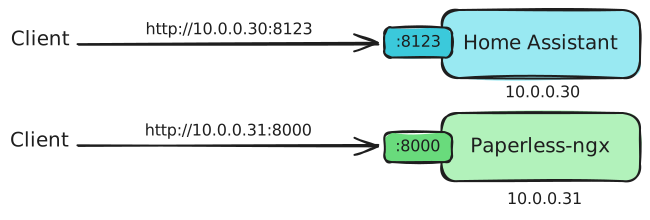

This workflow enables the creation of theme-aware diagrams without requiring specialized design skills, making it accessible to developers who need to create visual content but lack graphic design expertise.
Broader Context and Alternatives
Isaksson's solution joins other approaches to this common problem. He references a similar blog post by Sten Brinke that implements theme-aware images in a different way for Hugo's figure shortcode.
This variety of solutions underscores the importance of community knowledge sharing in addressing development challenges. As web technologies continue to evolve, particularly around accessibility and user preference customization, such contributions become increasingly valuable.
The dynamic-image shortcode represents a practical, elegant solution to a persistent problem in modern web development. By leveraging Hugo's extensibility and focusing on CSS-based implementation, Isaksson has created a tool that enhances the user experience while maintaining the performance benefits of static site generation.
As developers continue to prioritize both aesthetics and functionality in their web projects, solutions like this will play a crucial role in bridging the gap between design intent and user experience across diverse contexts.
Comments
Please log in or register to join the discussion