Discover how SQL Server 2025's revolutionary sp_invoke_external_rest_endpoint enables direct Kubernetes cluster interactions from within T-SQL. We explore a groundbreaking workaround using custom certificates and reverse proxies to bypass security hurdles, demonstrating live pod management and deployment from the database engine.
The release of SQL Server 2025 introduced a game-changing capability: the sp_invoke_external_rest_endpoint stored procedure. This feature allows SQL Server to communicate directly with external REST APIs, unlocking unprecedented integration possibilities. When Kubernetes' REST API entered the conversation, an intriguing question emerged: Could SQL Server directly orchestrate containers? The answer—after navigating significant security complexities—is a resounding yes.
The Certificate Conundrum
Initial attempts to connect SQL Server to Kubernetes' API server hit immediate roadblocks. Despite efforts to use Kubernetes' native certificates, SQL Server consistently threw cryptic errors:
Msg 31608, Level 16, State 24...
An error occurred, failed to communicate with the external rest endpoint. HRESULT: 0x80072ee7.
The breakthrough came through a custom certificate authority workflow:
# Generate CA and signed certificate
openssl genrsa -out CA.key 2048
openssl req -x509 -new -nodes -key CA.key -sha256 -days 3650 -out CA.pem
openssl genrsa -out api.dbafromthecold.local.key 2048
openssl req -new -key api.dbafromthecold.local.key -out api.dbafromthecold.local.csr
openssl x509 -req -in api.dbafromthecold.local.csr -CA CA.pem -CAkey CA.key -out api.dbafromthecold.local.crt
Kubernetes Reverse Proxy Setup
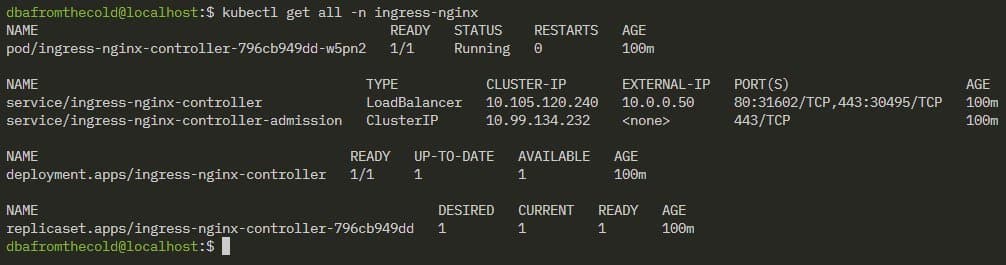
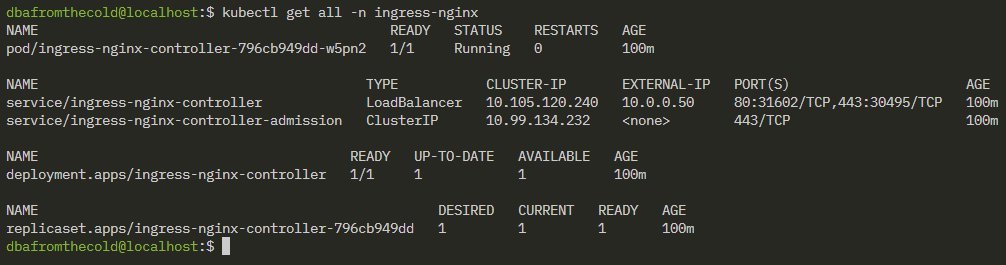
The solution required a TLS-terminating reverse proxy to handle encryption handshakes incompatible with SQL Server's requirements. An Nginx proxy deployed in Kubernetes became the critical bridge:
- Certificate Secret: Store the custom cert in Kubernetes
- Ingress Controller: Deploy Nginx ingress
- Proxy Configuration: Route traffic to the kube-apiserver
# Nginx ConfigMap
kubectl create configmap k8s-api-nginx-conf --from-literal=nginx.conf='
events {}
http {
  server {
    listen 443 ssl;
    ssl_certificate /etc/nginx/certs/tls.crt;
    ssl_certificate_key /etc/nginx/certs/tls.key;
    location / {
      proxy_pass https://10.0.0.41:6443;
      proxy_ssl_verify off;
    }
  }
}'
SQL Server Trust Configuration
For secure communication, SQL Server needed to trust the custom CA:
mkdir /var/opt/mssql/security/ca-certificates
cp CA.pem /var/opt/mssql/security/ca-certificates/
chown mssql:mssql /var/opt/mssql/security/ca-certificates/CA.pem
systemctl restart mssql-server
Kubernetes Orchestration from T-SQL
With authentication and routing resolved, Kubernetes management became possible directly from SQL queries. First, enable REST endpoints:
EXECUTE sp_configure 'external rest endpoint enabled', 1;
RECONFIGURE WITH OVERRIDE;
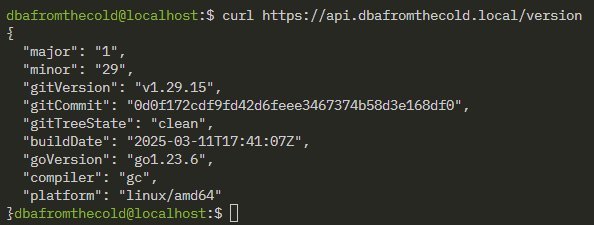
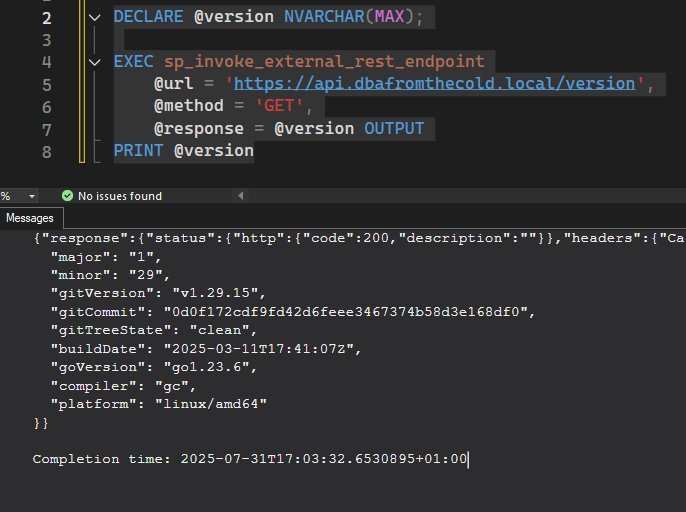
Then, retrieve Kubernetes version information:
DECLARE @version NVARCHAR(MAX);
EXEC sp_invoke_external_rest_endpoint
  @url = 'https://api.dbafromthecold.local/version',
  @method = 'GET',
  @response = @version OUTPUT;
PRINT @version;
Service Accounts and RBAC Magic
Listing pods required creating a dedicated service account with appropriate permissions:
kubectl create serviceaccount api-reader
kubectl create role pod-reader --verb=get,list,watch,create --resource=pods
kubectl create rolebinding pod-reader-binding --role=pod-reader --serviceaccount=default:api-reader
The service account token then enabled pod management from SQL:
DECLARE @pods NVARCHAR(MAX);
EXEC sp_invoke_external_rest_endpoint
  @url = 'https://api.dbafromthecold.local/api/v1/namespaces/default/pods',
  @headers = '{"Authorization":"Bearer eyXXXXX....XXXX"}',
  @method = 'GET',
  @response = @pods OUTPUT;

SELECT
  pod_name = JSON_VALUE(value, '$.metadata.name'),
  status = JSON_VALUE(value, '$.status.phase')
FROM OPENJSON(@pods, '$.result.items');
The Ultimate Test: Deploying Pods from SQL
The most dramatic demonstration involved creating Kubernetes resources directly from T-SQL:
DECLARE @deploy NVARCHAR(MAX);
EXEC sp_invoke_external_rest_endpoint
  @url = 'https://api.dbafromthecold.local/api/v1/namespaces/default/pods',
  @headers = '{"Authorization":"Bearer eyXXXXX....XXXX"}',
  @method = 'POST',
  @payload = '{"apiVersion":"v1","kind":"Pod","metadata":{"name":"nginx"},"spec":{"containers":[{"name":"nginx","image":"nginx:latest"}]}}',
  @response = @deploy OUTPUT;
The New Frontier of Database-Driven Orchestration
This integration fundamentally rethinks infrastructure management paradigms. Database events can now trigger container deployments, SQL agent jobs can scale Kubernetes workloads based on query patterns, and operational databases gain unprecedented awareness of their hosting environment. While security considerations remain paramount—especially around certificate management and RBAC—the fusion of SQL Server's transactional intelligence with Kubernetes' orchestration power creates thrilling possibilities for cloud-native architectures.
Source: dbafromthecold.com
Comments
Please log in or register to join the discussion