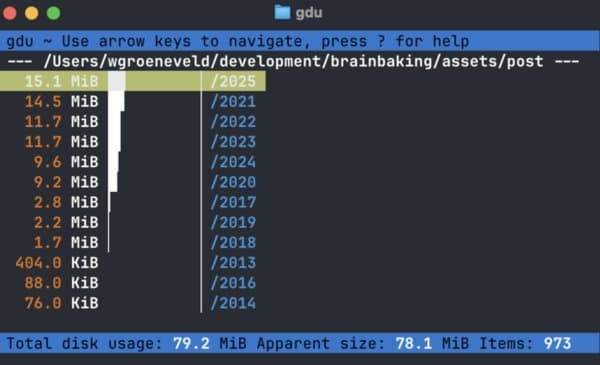
As websites grow more complex, developers face a perennial question: how much should we optimize images? A deep dive into the practical impact of image optimization reveals surprising insights about storage, bandwidth, and the diminishing returns of compression.
The Byte-Sized Dilemma: Is Image Optimization Still Worth the Effort?
In the ever-evolving landscape of web development, image optimization remains a constant concern. Developers and site owners grapple with the eternal question: how much should we compress our images, and is the effort truly justified? A recent analysis of personal blog assets reveals surprising insights that challenge conventional optimization wisdom.
The Numbers Game: Asset Usage Over Time
When we think about image optimization, our minds often jump to massive bandwidth savings and storage efficiencies. But what do the actual numbers show? One developer analyzed their blog's asset directory using the gdu disk analyzer, revealing a fascinating trend:
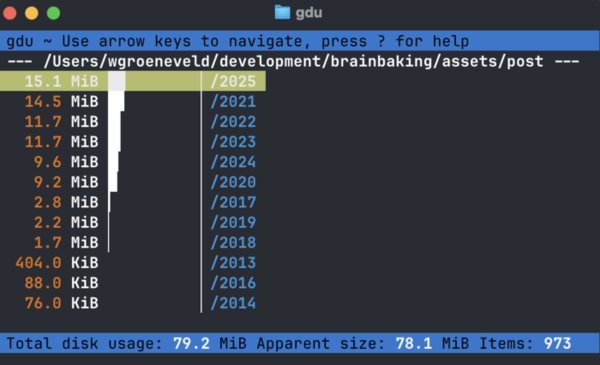
The data shows that, on average, only 12.5 MiB of new assets are added to the blog each year. Extrapolating this over twenty years results in just 260 MiB of accumulated assets—less than half the capacity of a classic CD-ROM.
This revelation prompts a critical question: if the total storage impact is minimal, should developers still obsess over every kilobyte?
"The problem with questions is that they lead to other questions," the author muses. "How much assets is this blog actually generating each year? Is my image optimization technique sustainable enough or will I end up with terabytes full of nonsense in ten or twenty years?"
The analysis reveals that each post contains an average of 1.038 assets, totaling approximately 147.24 KiB per post. These numbers suggest that for many sites, the cumulative impact of images may be smaller than developers fear.
The Technical Deep Dive: Understanding ImageMagick Parameters
For developers handling image conversion, ImageMagick remains a trusted tool. But are we using it correctly? Let's examine a typical optimization command:
mogrify -sampling-factor 4:2:0 +profile '!icc,*' -quality 80 -interlace JPEG -format jpg -colorspace sRGB screenshot.png
Breaking down each parameter:
-sampling-factor 4:2:0: This sets the chroma subsampling ratio. As Colin Bendell's research indicates, this can reduce image size by approximately 17% by downsampling color information while preserving luminance detail.+profile '!icc,*': This crucial parameter removes all profiles except the ICC color profile. Unlike the-stripcommand, which completely removes all profiles including ICC, this preserves color consistency across different devices and browsers.-quality 80: Sets the JPEG compression quality. Research shows that at quality 80, file sizes are about 23x the original, while at quality 100, they balloon to 50x the original size.-interlace JPEG: Creates progressive JPEGs, allowing browsers to display a lower-resolution version while the full image loads, improving perceived performance.-format jpg: Despite the rise of WebP, the author sticks with JPEG for compatibility reasons, prioritizing websites that last over cutting-edge formats.-colorspace sRGB: Ensures proper color space conversion for web display, as most images don't contain additional color space information.
The ICC Profile Discovery: Why -strip Might Be Stripping Too Much
A significant finding emerged when comparing images processed with -strip versus +profile '!icc,*':

The difference is subtle but noticeable—images processed with -strip appear washed out, lacking the color saturation of their counterparts. This occurs because -strip removes the ICC color profile entirely, leaving browsers to interpret colors without guidance.
"Inspecting the images using ImageMagick's identify reveals that the ICC profile is removed in the process," the author explains. "The embedded ICC profile is there to make sure the image looks the same on any computer and any piece of software; without it browsers can render it like they want."
This discovery highlights a common optimization pitfall: in the pursuit of smaller files, we may inadvertently compromise visual quality and consistency.
The Quality vs. Size Trade-off: Finding the Right Balance
The research from Colin Bendell provides valuable insights into optimization priorities:
Resizing images matters most. It multiplies the size a little more than the square root of the total pixels. More pixels, many more bytes. Compression matters somewhat. For quality=80 the bytes are x23; for quality=100 bytes multiply x50. Subsampling of 4:2:0 could further reduce the bytes by 17%.
This hierarchy suggests that developers should focus first on appropriate image dimensions, then compression quality, and finally chroma subsampling.
The author also considers responsive image approaches—providing different resolutions for different devices—but ultimately rejects the complexity:
"For me, that's a hassle I don't want to bother with at all. It requires saving the assets in their original format and providing a couple of alternatives, greatly increasing the total size of the source repository, the total size of the deployable folder, and the total bandwidth for my humble server."
The Future-Proofing Question: Should We Optimize for the Long Term?
With twenty years of accumulation resulting in less than half a CD-ROM's worth of data, the author questions whether the relentless pursuit of optimization is still warranted:
"Maybe I should be less worried about the file size and more about the content."
This perspective challenges the conventional wisdom that every byte must be squeezed out of images. For many sites, especially those with modest traffic or limited content growth, the cumulative impact of images may be minimal compared to other performance considerations.
However, for high-traffic sites or those with extensive media libraries, optimization remains crucial. The key is finding the right balance—one that considers both current performance needs and future growth projections.
The Path Forward: Balanced Optimization
The analysis suggests a middle ground: optimize intelligently without obsessing over microscopic gains. Focus on:
- Appropriate image dimensions based on display requirements
- Quality settings around 80 for JPEGs
- Preserving ICC color profiles for consistent rendering
- Progressive JPEGs for better perceived performance
- Regular assessment of actual asset accumulation rather than theoretical savings
As web development continues to evolve, so too must our approach to optimization. The goal isn't necessarily to eliminate every byte, but to make informed decisions that balance performance, quality, and maintainability.
In the end, perhaps the most important optimization isn't technical at all—it's optimizing our focus toward what truly matters: creating valuable, engaging content for our audiences.
Comments
Please log in or register to join the discussion