
iPadOS 26.4 introduces a smart new popup that alerts users when apps have hidden windows, making it easier to manage the newfound windowing freedom in iPadOS 26.
iPadOS 26.4 is bringing a thoughtful new feature to iPad power users who have embraced the platform's expanded windowing capabilities. The update introduces a subtle but useful popup that appears when you launch an app with multiple windows open, some of which may be hidden from view.
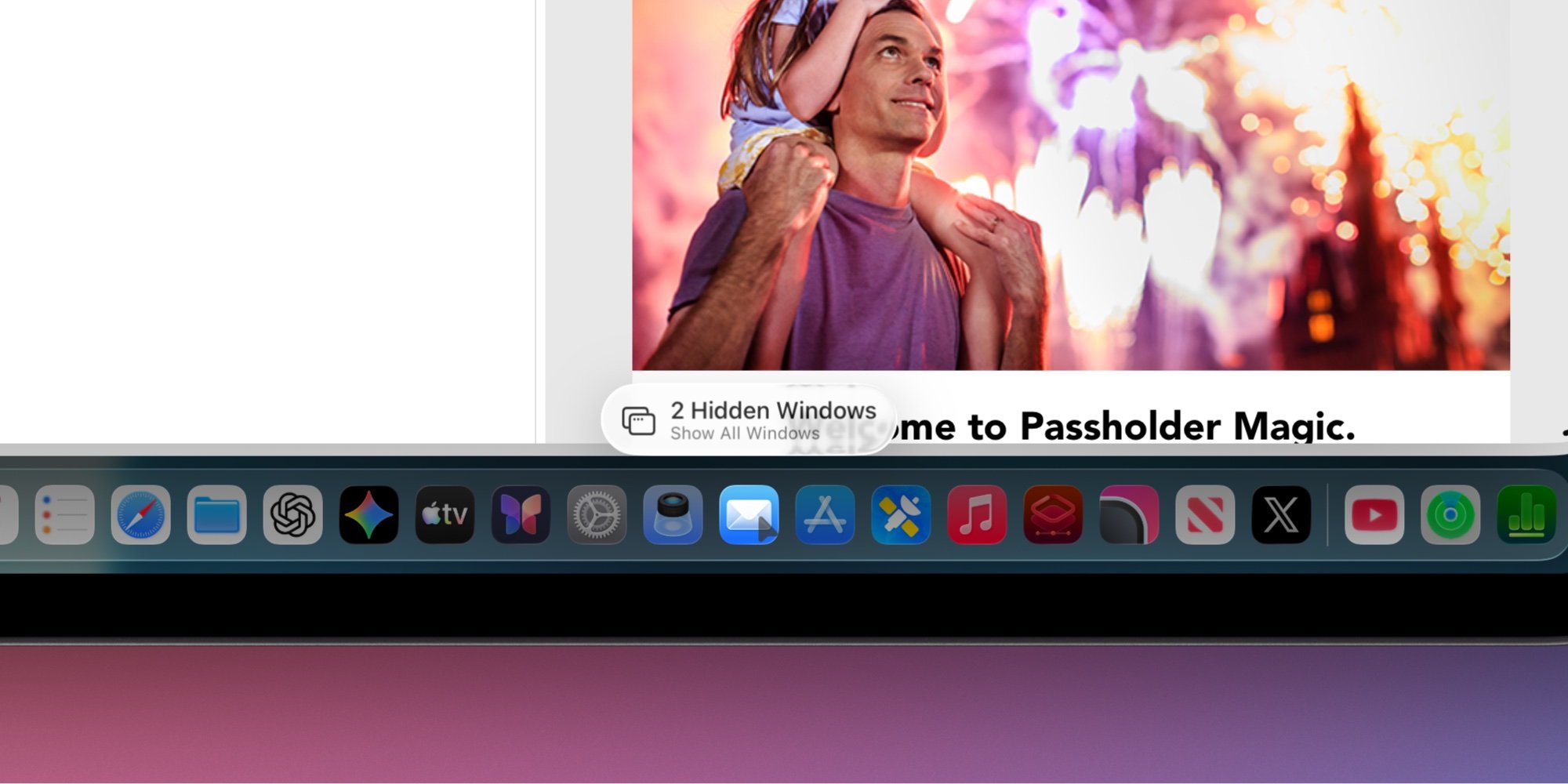
The feature addresses a common pain point that emerged with iPadOS 26's dramatic overhaul of multitasking. After years of iPad users requesting a less restrictive windowing system, Apple finally delivered with iPadOS 26, allowing users to open as many app windows as they want and freely resize them. While this newfound freedom is welcome, it also created a new challenge: keeping track of multiple open windows across different apps.
Now, when you launch an app that has hidden windows, iPadOS 26.4 displays a popup that says "X Hidden Windows" with an option to show all open windows. The popup appears to flow out from the app icon you launched, meaning its position varies depending on where the app is located on your home screen or dock.
This functionality serves a similar purpose to the old "Shelf" feature that debuted in iPadOS 15, but with a more contextual approach. Rather than being a persistent interface element, the popup appears only when relevant—though users in the beta have noticed it doesn't show up every single time an app is launched. According to reports, it typically appears only after some time has passed since the app was last used, suggesting Apple may be intentionally limiting its frequency to avoid becoming annoying during rapid app switching.
For the average iPad user who rarely opens multiple windows for the same app, this feature might go largely unnoticed. However, for power users who take advantage of iPadOS 26's expanded capabilities—whether for productivity workflows, research, or creative tasks—the popup provides a convenient way to quickly see and access all open windows without having to manually search for them.
The introduction of this feature highlights Apple's ongoing refinement of the iPad's multitasking experience. While iPadOS 26 represented a major leap forward in windowing capabilities, iPadOS 26.4 shows that Apple is still fine-tuning the user experience to address edge cases and power user needs. It's a small but meaningful addition that makes the expanded windowing system more practical for daily use.
As iPadOS 26.4 continues through its beta testing phase, it will be interesting to see if Apple makes any adjustments to the popup's behavior based on user feedback. The current implementation strikes a balance between being helpful and staying out of the way, but there's always room for optimization in how such contextual features are triggered.
For iPad users who have been waiting for a more desktop-like multitasking experience, iPadOS 26.4's hidden windows popup is another step toward making the iPad a more capable multitasking device without sacrificing the simplicity that makes it appealing to a broader audience.
Comments
Please log in or register to join the discussion