The structure of macOS applications has undergone a fascinating evolution from the resource forks of classic Mac OS to the sophisticated, self-contained bundles of today. This architectural shift has not only simplified application distribution and management but has also significantly enhanced security and stability for both developers and users.
The Evolving Architecture of macOS Applications: From Resource Forks to Modern Bundles
The way macOS applications are structured has evolved significantly over the decades, reflecting broader changes in computing paradigms, security requirements, and user expectations. What began as a clever solution to managing application resources in the classic Mac OS era has transformed into the sophisticated, self-contained bundles that define modern macOS applications. This evolution tells a story of adaptation, security enhancement, and the pursuit of a better user experience.
The Classic Mac OS Era: Resource Forks
In the early days of computing, programs running in windowing environments had more complex requirements than simple command-line tools. Rather than embedding all necessary resources—windows, menus, icons, and other assets—into a single executable file, Mac OS pioneered an innovative approach by storing these elements in separate "resources" within the application's resource fork.
"This separation of code and resources allowed for more flexible application design and easier localization, as graphical elements could be modified without touching the executable code."
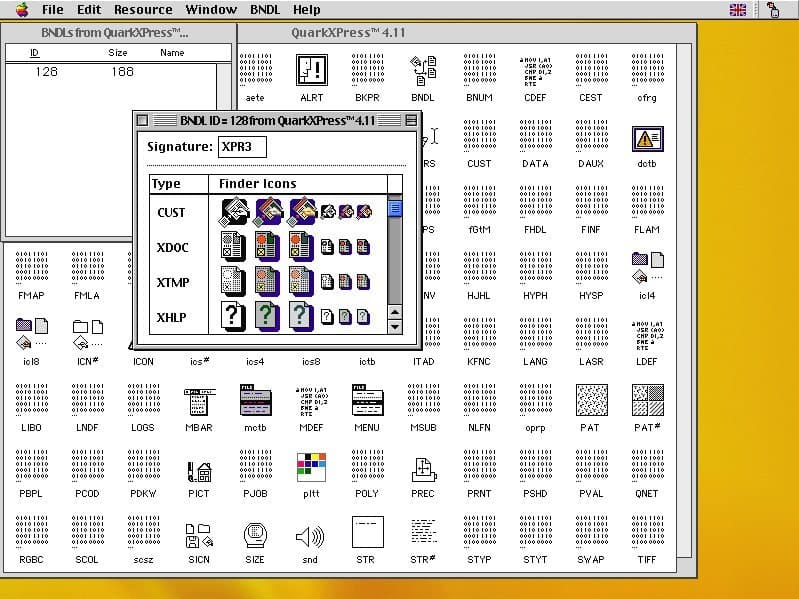
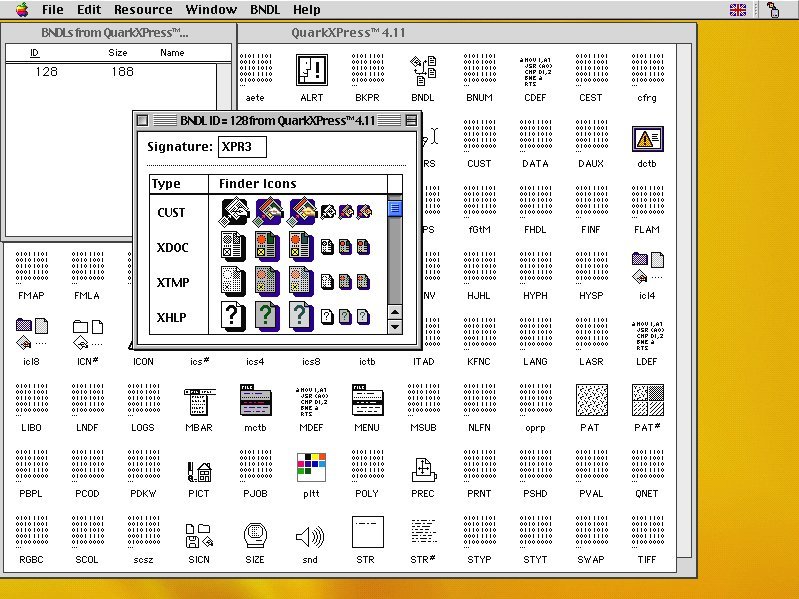
As shown in the image above from the ResEdit resource editor, applications like QuarkXPress version 4.11 stored executable code in CODE resources while maintaining type and creator information to support the Finder's functionality. This architecture, while revolutionary for its time, presented challenges for cross-platform compatibility and security.
The NeXTSTEP Inheritance: The Birth of App Bundles
The introduction of Mac OS X marked a significant architectural shift. Drawing from the NeXTSTEP operating system, Apple transitioned from resource forks to a directory-based structure known as the "app bundle." This new approach organized application components into a hierarchical directory structure, making applications more transparent and easier to manage.
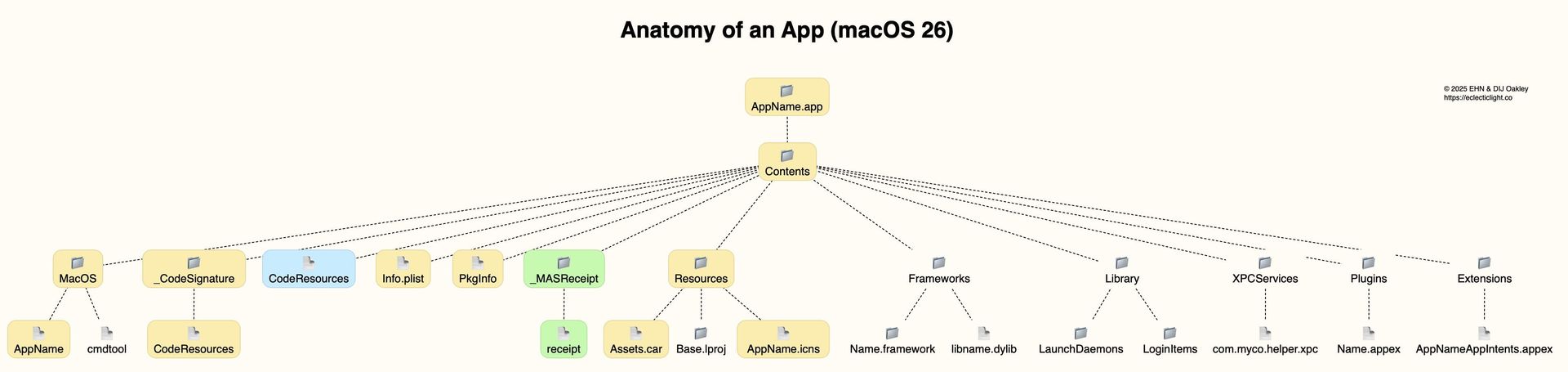
A modern macOS app bundle, identified by the .app extension, contains a Contents directory with several key components:
- MacOS: Contains the executable code for the application
- Resources: Houses the application's GUI components, icons, and other supporting files
- Frameworks: May contain dynamic libraries (dylibs) used by the application
- Info.plist: An essential property list file that specifies executable name, icon file, minimum macOS version, document types, and version information
- PkgInfo: Contains type and creator information inherited from Classic Mac OS
{{IMAGE:4}}
This diagram illustrates the standard structure of a macOS app bundle, showing how various components are organized within the Contents directory.
The Launch Process: More Than Just Executing Code
While command-line tools in macOS are launched directly by launchd, the process for launching a full GUI application is more complex. Although the application's executable is ultimately launched by launchd, the process begins with LaunchServices and RunningBoard, which parse information from the app bundle's Info.plist and other components to prepare the application environment.
This multi-stage launch process ensures that the application has all necessary resources loaded and that security checks are performed before the user interface appears.
Security Enhancements: Code Signatures and Notarization
The introduction of code signatures in Mac OS X 10.5 Leopard (2007) represented another significant evolution in app architecture. This added a _CodeSignature directory containing a CodeResources file with code directory hashes (CDHashes) to verify the integrity of the app bundle's contents.
{{IMAGE:5}}
Apps distributed through the App Store include a store receipt in a _MASReceipt directory. Since 2018, Apple's notarization process has introduced an additional layer of security, with the "ticket" issued by Apple being "stapled" into the app bundle as the CodeResources file. This notarization ticket serves as a form of attestation that the app has been reviewed by Apple's security systems.
Modern App Bundles: Centralization and Self-Containment
Over time, macOS app bundles have become increasingly centralized, incorporating components that were previously installed in system-wide locations. This self-containment approach offers several advantages:
- Simplified Installation and Updates: Apps can be installed, updated, or removed as single units
- Reduced Component Fragmentation: Supporting files are less likely to go missing or become outdated
- Enhanced Security: All components are protected by the app's code signature and notarization
Modern app bundles may include additional directories such as:
- Library: Contains LaunchDaemons and LoginItems previously installed in system locations
- XPCServices: Houses executable code for services provided by the app
- Plugins: Contains certain types of app extensions (Appex)
- Extensions: Houses other app extension types, including app intents
Universal Binaries: Architecture Transparency
Notably, there is no structural difference between apps built for Intel and Apple Silicon architectures. This is because binaries in the MacOS directory (and executable code in other directories) contain platform-specific code within a single Mach-O executable. A Universal application running natively on both architectures includes code for both processor types in its "fat" code file, with separate signatures stored within common files.
The Future of macOS App Architecture
As macOS continues to evolve, we can expect the app bundle architecture to adapt to new requirements while maintaining its core principles of self-containment, security, and user convenience. The increasing importance of sandboxing, privacy protections, and performance optimization will likely shape the next generation of macOS app structures.
The journey from resource forks to modern app bundles demonstrates how operating system architecture evolves to meet new challenges while preserving the essential functionality that users and developers depend on.
Conclusion
The anatomy of a macOS app bundle reflects the operating system's history and priorities—from the innovative resource management of classic Mac OS to the security-focused, self-contained applications of today. This architecture has enabled a more secure, stable, and user-friendly computing experience while providing developers with a clear framework for organizing their code and resources.
As Apple continues to innovate with new security features and performance optimizations, the macOS app bundle will undoubtedly continue to evolve, but its core principle of providing a comprehensive, self-contained application package will remain central to the macOS ecosystem.
Comments
Please log in or register to join the discussion