As web applications grow increasingly complex, the size of their Document Object Model (DOM) has emerged as a critical performance bottleneck. This deep dive examines how excessive DOM nodes impact rendering speed, interactivity, and user experience, along with actionable strategies to optimize your page's structure for better performance.
Every web developer knows that their pages need a Document Object Model (DOM) – the browser's representation of the HTML structure that enables JavaScript and CSS to interact with the page. But what many developers overlook is how the size of this structure directly impacts performance and user experience.
In the era of complex single-page applications and dynamic content loading, large DOMs have become a silent performance killer. When a page's DOM grows beyond optimal size, it triggers expensive rendering operations that can make even simple interactions feel sluggish. This isn't just about initial page load times; it's about how quickly your page responds to user interactions, a metric now formally measured by Interaction to Next Paint (INP).
When Does a DOM Become Problematic?
According to Google's Lighthouse performance auditing tool, a DOM is considered excessive when it exceeds 1,400 nodes. Warnings begin appearing around the 800-node mark, signaling that your page's structure might be impacting performance.
Consider this simple HTML structure:
<ul>
  <li>List item one.</li>
  <li>List item two.</li>
  <li>List item three.</li>
</ul>
This contains just four DOM elements – the unordered list and its three list items. Most modern web pages contain hundreds or even thousands of nodes, and each one contributes to rendering complexity.

The Performance Implications of Large DOMs
A bloated DOM affects performance in several critical ways:
Initial Render Performance
When a browser loads a page, it must parse both the HTML and CSS. CSS selectors traverse the DOM tree to determine styling, and as the DOM grows and selectors become more complex, this process becomes increasingly expensive. The resulting layout, styling, compositing, and paint work directly impacts how quickly users can begin interacting with your page.
Interaction-Induced Rendering
This is where large DOMs become particularly problematic. When a user interaction modifies the DOM – whether through insertion, deletion, or content updates – the browser must recalculate styles and potentially perform layout operations across potentially thousands of elements.
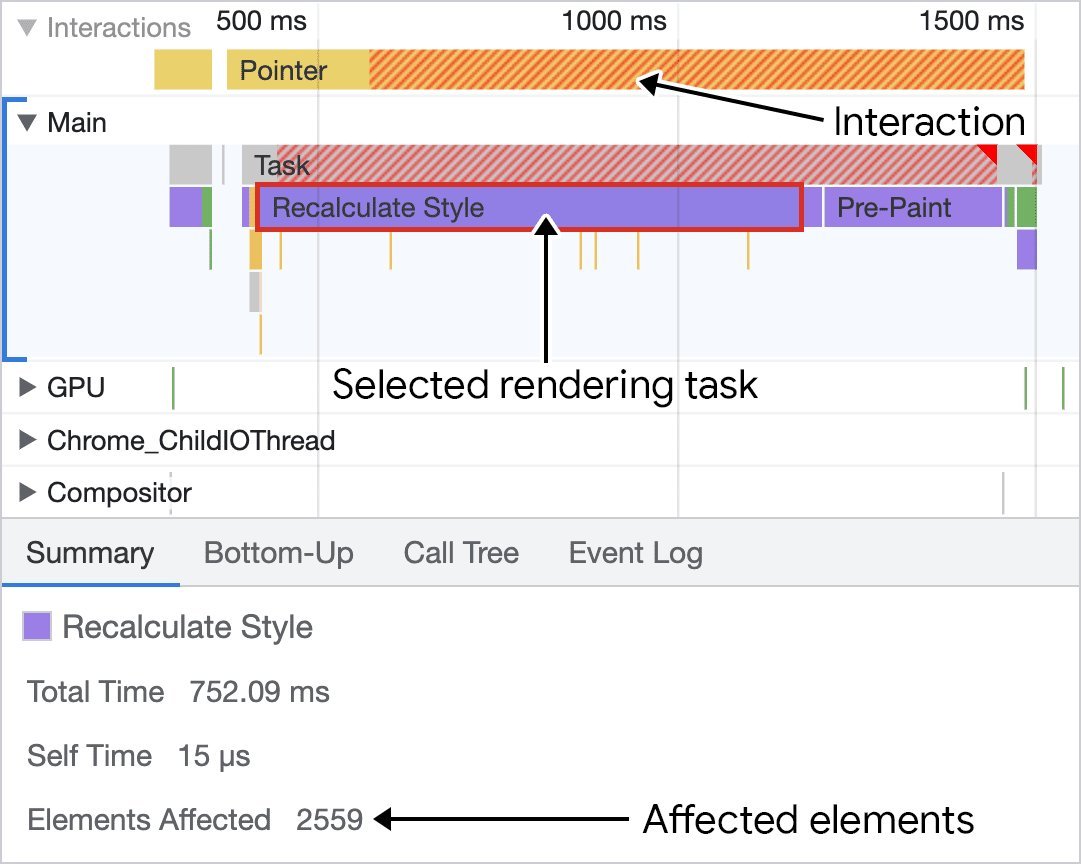
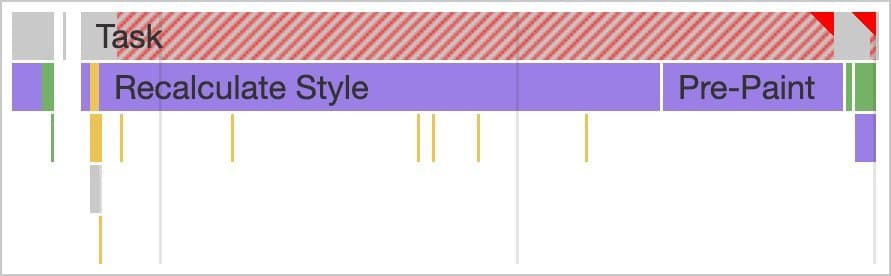
As shown in the performance profiler above, inserting DOM elements into a large structure can trigger significant rendering work. In this extreme case, over 2,500 DOM elements were affected by a single style recalculation, resulting in a long task that degraded the user experience.
Memory Consumption
Every DOM element consumes memory. When JavaScript queries the DOM – for example, using document.querySelectorAll('.some-class') – references to matching elements are stored in memory. On pages with thousands of elements, these memory costs can become substantial, potentially leading to increased garbage collection pressure and decreased overall application performance.
Measuring Your DOM's Footprint
Before you can optimize, you need to measure. Fortunately, developers have several tools at their disposal:
Lighthouse Audits
Google's Lighthouse provides a dedicated "Avoid an excessive DOM size" audit within its Diagnostics section. This report shows the total number of DOM elements, identifies the element with the most children, and reveals the deepest nested element in your DOM tree.
Console Commands
For a quick assessment, open your browser's developer tools and run this command in the console:
document.querySelectorAll('*').length;
This returns the total count of HTML elements in the current DOM.
Performance Monitor

Chrome's Performance Monitor tool offers real-time visualization of DOM size alongside other performance metrics like layout operations and style recalculations. This view allows you to correlate DOM growth with rendering performance and identify potential bottlenecks.
Reducing DOM Size: Practical Strategies
Once you've identified that your DOM is too large, the next step is optimization. Here are proven strategies:
Flatten Your DOM Structure
One of the most effective ways to reduce DOM size is to decrease its depth. If your markup contains unnecessary nested elements like this:
<div>
  <div>
    <div>
      <div>
        <!-- Contents -->
      </div>
    </div>
  </div>
</div>
You can likely simplify it by flattening the structure. This not only reduces the number of DOM elements but often simplifies your CSS as well.
Use Framework Fragments
Many component-based frameworks encourage nesting components, which can lead to deeply structured DOMs. Fortunately, most modern frameworks offer a solution: fragments.
React, Preact, Vue, and Svelte all support fragments, which allow you to group multiple elements without adding an extra node to the DOM. In React, for example:
// Instead of:
return (
  <div>
    <Header />
    <MainContent />
    <Footer />
  </div>
);

// Use fragments:
return (
  <>
    <Header />
    <MainContent />
    <Footer />
  </>
);
Consider an Additive Approach
For pages with large amounts of initially hidden content, consider lazy loading. Rather than including all HTML in the initial DOM, omit non-critical elements and add them dynamically when needed.
This approach reduces initial rendering workload and creates a lighter initial payload. However, be mindful of the tradeoffs: network requests to fetch additional content can introduce perceived latency. Always provide loading indicators to manage user expectations.
Limit CSS Selector Complexity
Complex CSS selectors force the browser to traverse more of the DOM tree to determine element matching. Prefer simple, direct selectors over complex ones when possible. For example:
/* Less efficient */
div.container > ul.navigation > li.active > a

/* More efficient */
.nav-link--active
Leverage the content-visibility Property
This powerful CSS property effectively implements lazy rendering for off-screen elements. By setting content-visibility: auto; on elements that aren't immediately visible, you instruct the browser to skip rendering them until they approach the viewport.
article {
  content-visibility: auto;
  contain-intrinsic-size: 1000px; /* Provides a hint for layout */
}
This approach not only improves initial page load but also reduces rendering work when the DOM changes due to user interactions.
The Bottom Line
In the pursuit of web performance, DOM optimization is often overlooked despite its significant impact. By keeping your DOM as small as necessary and implementing strategies to limit rendering work, you can dramatically improve your page's INP metric and create a more responsive user experience.
The relationship between DOM size and interactivity isn't just theoretical – it's a measurable factor that directly affects how users perceive your application's speed and responsiveness. As web applications continue to grow in complexity, managing DOM size will remain a critical skill for developers committed to delivering fast, fluid experiences.
Comments
Please log in or register to join the discussion