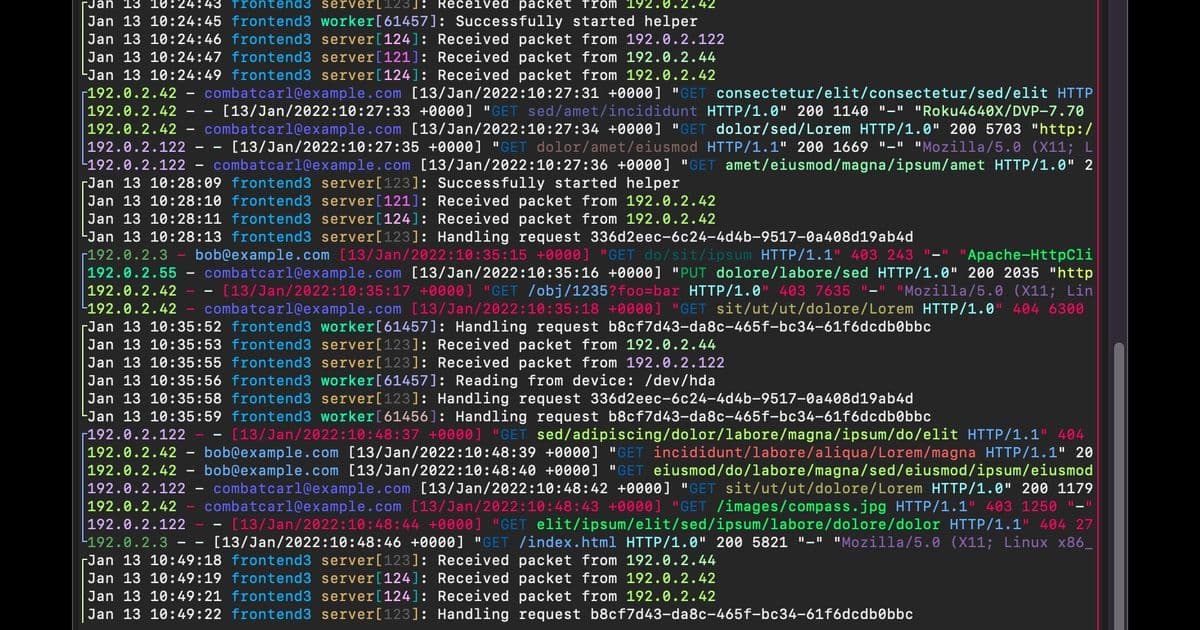
lnav offers a streamlined, high-performance solution for log file analysis that combines ease of use with advanced features, eliminating the need for complex server setups while providing powerful tools for developers and system administrators.
In the world of software development and system administration, log files serve as the digital breadcrumbs that help diagnose issues, track user behavior, and understand system performance. Yet, effectively analyzing these files often requires complex tools or significant setup time. Enter lnav, The Logfile Navigator, a terminal-based solution that brings powerful log analysis capabilities directly to your command line with minimal friction.
lnav stands out in the log analysis space by offering a comprehensive set of features without requiring server installation or complex configuration. The tool automatically detects file formats, handles compressed files on the fly, and provides intuitive ways to merge, tail, search, filter, and query log files. This approach makes sophisticated log analysis accessible to everyone from developers to DevOps engineers.
The tool's design philosophy centers on simplicity without sacrificing functionality. As the creators state, "Just point lnav at a directory and it will take care of the rest." This hands-off approach contrasts with many traditional log analysis tools that require extensive configuration, database setup, or server infrastructure. For teams working in resource-constrained environments or those who prefer lightweight tools, lnav offers an attractive alternative.
Performance is another key differentiator. When processing large log files—common in production environments—lnav demonstrates significant advantages over standard terminal tools. 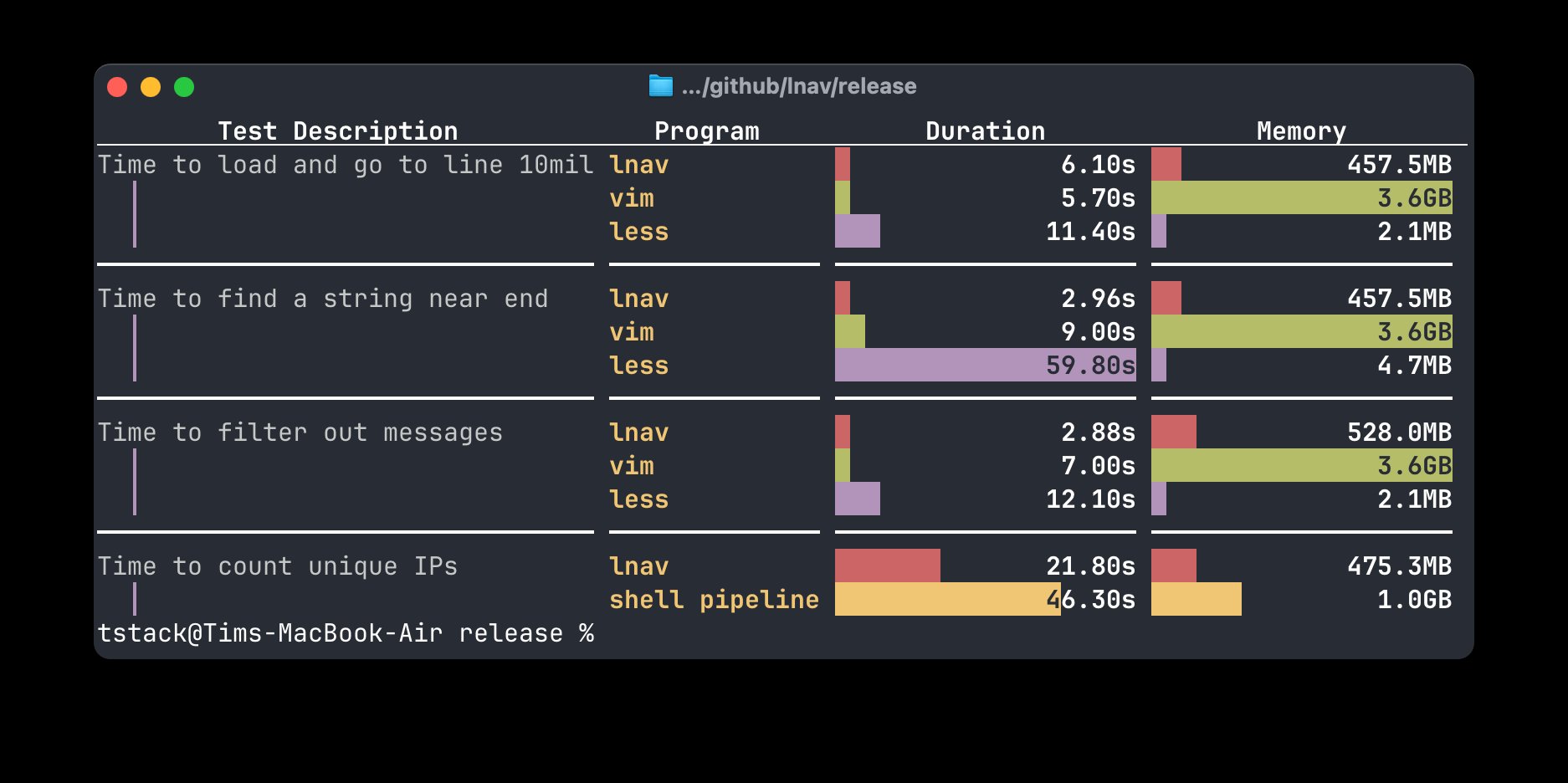 The chart comparing lnav's CPU and memory usage against traditional tools when processing a 3.3GB access log reveals substantial efficiency gains. This performance advantage becomes critical when working with production systems where resources are valuable and time-sensitive troubleshooting is essential.
What sets lnav apart technically is its integration with SQLite, allowing users to leverage SQL queries for complex log analysis. This feature bridges the gap between simple log viewing and advanced data analysis, enabling users to extract meaningful insights from log data without switching tools. The same SQLite interface was used to generate the performance comparison chart, demonstrating the tool's self-documenting capabilities.
For those new to log analysis or lnav specifically, the tool includes built-in help and preview features that facilitate learning. This thoughtful design lowers the barrier to entry while still providing depth for experienced users. The availability of a demo server (accessible via ssh [email protected]) allows potential users to test the tool without any local installation, further reducing friction.
lnav's target audience spans several roles: developers debugging applications, system administrators monitoring server health, security professionals analyzing access logs, and data scientists extracting behavioral patterns from system logs. Its terminal interface makes it particularly valuable for users who spend significant time in the command line or work in remote environments where graphical tools might be impractical.
The log analysis space has evolved considerably over the years, with solutions ranging from simple command-line tools like grep and tail to complex enterprise platforms with machine learning capabilities. lnav occupies a unique middle ground—offering more power than basic tools while remaining far simpler and more lightweight than full-featured commercial solutions.
For organizations adopting DevOps practices, lnav's ability to work locally without server setup aligns well with the infrastructure-as-code and immutable infrastructure principles. Developers can include lnav in their toolkits without worrying about additional infrastructure dependencies, making it suitable for everything from local development environments to cloud-based CI/CD pipelines.
The documentation and introductory video resources provide comprehensive learning materials for those looking to maximize lnav's capabilities. These resources cover everything from basic navigation to advanced querying techniques, ensuring users can leverage the tool to its full potential regardless of their expertise level.
As log volumes continue to grow with increasingly complex distributed systems, tools like lnav that balance performance, functionality, and accessibility will become increasingly valuable. By eliminating unnecessary complexity while providing powerful analysis capabilities, lnav represents a practical approach to one of the most common yet challenging tasks in software and systems management.
Comments
Please log in or register to join the discussion