
Discover how tailoring a Logitech MX Master 3S mouse for multi-device switching and Zoom shortcuts can slash context-switching and boost efficiency in hybrid work environments. This deep dive reveals the technical setup and broader implications for developers seeking seamless workflows.

In the era of remote and hybrid work, tech professionals face a constant battle against inefficiency—juggling multiple devices, toggling apps, and managing virtual meetings. One developer's quest for a frictionless setup led to a revelation: a custom-configured mouse isn't just a peripheral; it's a productivity engine. By leveraging the Logitech MX Master 3S and its software, users can transform mundane tasks into one-click operations, saving precious cognitive load for high-value work.
The Blueprint for a Remote-Ready Mouse
At the heart of this optimization are four non-negotiable features:
- Multi-device switching: A dedicated button to cycle between work laptops, personal machines, and secondary devices like a Mac mini.
- Browser navigation: Instant access to 'Back' actions in Chrome for swift research.
- Zoom agility: Background-agnostic buttons to raise/lower hands and mute/unmute mics, ensuring seamless participation in meetings without tab-switching.
This trifecta targets the pain points of modern workflows, where developers lose hours to context shifts. As one user put it: "Even if Zoom is in the background, I need to raise my hand instantly to contribute."
Engineering the Setup: Logitech Options and Zoom Synergy
The Logitech MX Master 3S shines here, with its programmable buttons and Logitech Options software enabling granular control. Key steps include:
- Mapping buttons to Zoom's global shortcuts:
Option + Afor mute/unmute andOption + Zfor hand-raising. - Enabling global shortcuts in Zoom's settings, allowing triggers regardless of active windows.
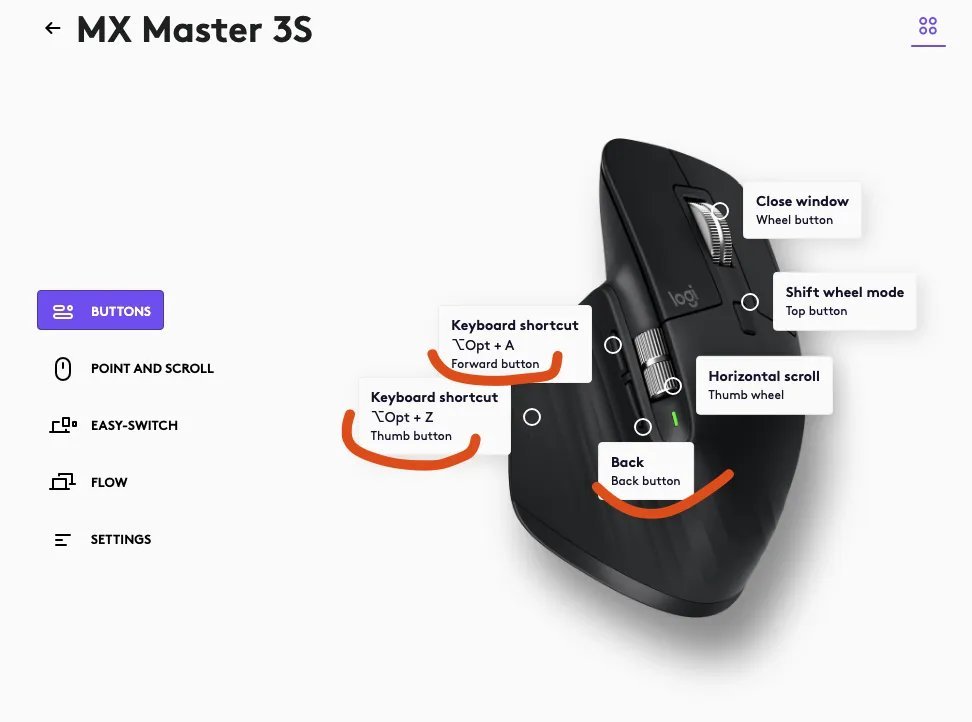 Logitech Options interface for button customization.
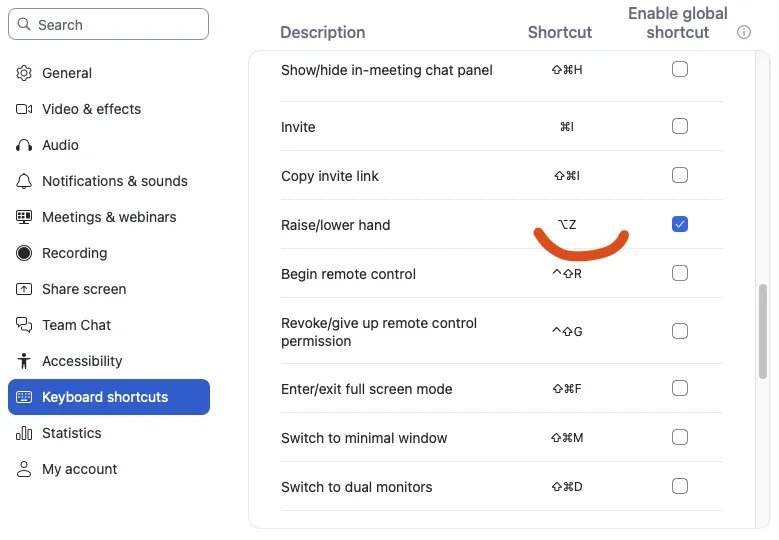 Zoom's global shortcut configuration—critical for background control.
This synergy turns the mouse into a command center. For instance, muting during a meeting while coding becomes instantaneous, eliminating disruptive app-switching. The setup underscores a broader trend: hardware is evolving into a customizable interface for software ecosystems, much like APIs extend functionality in development.
Why This Matters for Tech Professionals
For developers and engineers, such optimizations aren't mere conveniences—they're force multipliers. Reducing friction in tasks like device-switching or meeting interactions can reclaim 10-15% of daily focus, as cognitive studies suggest. Moreover, it highlights how off-the-shelf tools, when configured thoughtfully, rival bespoke solutions. As remote work matures, expect demand to surge for peripherals that support multi-OS environments and integrate deeply with SaaS tools like Zoom.
In the end, this isn't just about a mouse; it's about reclaiming agency in a fragmented digital workspace. The real win? When technology fades into the background, letting brilliance take the foreground.
Source: Based on user experiences from JobSort.
Comments
Please log in or register to join the discussion