
Windows 11's SCOOBE feature is more than just an annoyance—it's raising significant privacy and compliance issues for organizations and individual users alike.
Microsoft's Windows 11 includes a feature called SCOOBE (Second Chance Out of Box Experience) that presents users with a deceptive 'You're almost done setting up your PC' message months or even years after initial setup. While Microsoft frames this as an opportunity to help users get the most out of their devices, privacy advocates and IT professionals are raising serious concerns about its deceptive nature, potential privacy violations, and compliance implications under regulations like GDPR and CCPA.
What is SCOOBE?
SCOOBE appears as a series of screens that present themselves as completing the Windows setup process, but are actually designed to upsell Microsoft services. The experience typically begins with a confusing message claiming the PC setup was never completed, followed by prompts to:
- Use "recommended browser settings"
- Link a phone with the PC
- Confirm Office installation
- Purchase Xbox Game Pass subscription
- View Windows tips

You're almost done setting up your PC screen
This experience can trigger multiple times throughout a device's lifecycle, often after Windows updates, catching users off guard when they're trying to work or be productive.
Privacy and Regulatory Concerns
From a privacy perspective, SCOOBE raises several red flags. The feature collects user interaction data without clear disclosure, potentially violating data protection regulations. Under GDPR, such practices could be considered processing personal data without a proper legal basis, as the "consent" obtained through deceptive UI patterns may not meet the requirement for freely given, specific, informed, and unambiguous consent.
"SCOOBE represents a concerning trend of 'dark patterns' in software design," said digital rights advocate Sarah Johnson. "These manipulative interfaces exploit user psychology to achieve business goals, often at the expense of user autonomy and privacy. Under GDPR, such practices may not constitute valid consent for data processing."
The CCPA in California similarly requires transparency in data collection practices, and SCOOBE's opaque nature could violate these requirements. If the feature tracks which options users select or decline, this data collection needs proper disclosure and an opt-out mechanism, which currently doesn't appear to be adequately provided.
Impact on Organizations
For businesses, SCOOBE presents significant operational challenges. The deceptive nature of the feature leads to increased support calls from employees who believe something is wrong with their systems.
"SCOOBE first appeared on our devices months after their configuration," said Hanna Parkhots, data collection project manager at Unidata. "The appearance timing was especially inconvenient since they appeared on our contributors' screens who were working actively on data collection and thought that there might be a technical issue with their machines. It led to numerous support ticket increases."
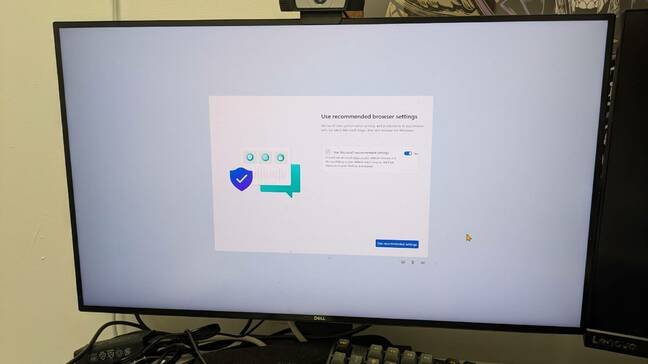
Screen asks you to use recommended browser settings
Worse, employees may be tricked into purchasing or installing software that violates organizational policies. A user might inadvertently install Xbox Game Pass on a work device, or accept "recommended browser settings" that override IT-mandated configurations.
"The most frustrating instance was on our front-desk PC mid-consultation with a wedding client," said Tatiana Egorova, a florist with Flowers N Baskets. "The screen hijacked itself, pushing Office subscriptions while we were trying to pull up venue photos. Not a great look."
Compliance Implications
Organizations face several compliance risks due to SCOOBE:
Software Asset Management: Unauthorized installations could violate licensing agreements and complicate software asset management.
Data Protection: If SCOOBE collects user interaction data, organizations must ensure this processing complies with GDPR, CCPA, and other relevant regulations.
Consumer Protection: The deceptive nature of the interface may violate consumer protection laws in various jurisdictions.
Contractual Obligations: Enterprise licensing agreements often specify how Microsoft can interact with licensed systems, which SCOOBE may violate.
"Microsoft is putting a boost in its subscription profits for services such as Office 365 and Xbox Game Pass over its obligation to help businesses that have already paid for Windows licenses," noted IT security consultant Michael Chen. "This creates a compliance minefield for organizations that must balance user experience with regulatory requirements."

Screen asks you to set up phone connection to your PC
User Trust and Ethical Concerns
Beyond legal compliance, SCOOBE erodes user trust in the operating system itself. The feature blurs the line between system functionality and advertising, creating a frustrating experience for users.
"What makes SCOOBE especially frustrating to me is that it breaks trust in the device itself," said Athena Kavis, a web designer. "It feels less like setup and more like an ad layer, and for small teams that already juggle enough, even one extra interruption can derail a task like fulfilling orders, updating branding assets, or responding to leads."
This manipulation of user interfaces raises ethical questions about software design. When a company controls the platform and the applications running on it, the temptation to prioritize revenue over user experience becomes significant.
Mitigation Strategies
For individual users, SCOOBE can be disabled by navigating to Settings → System → Notifications → Additional settings and unchecking "Suggest ways to get the most out of Windows and finish setting up this device."

This screen would try to sell you Office 365 if you didn't already have it installed
For IT departments, several strategies can prevent SCOOBE from appearing:
Group Policy Configuration: In Group Policy Editor, navigate to Computer Configuration → Administrative Templates → Windows Components → Cloud Content and enable "Turn off Microsoft consumer experiences."
Task Scheduler Management: Check the Windows Task Scheduler for "UserNotPresentOrFirstLogon" and disable it if present.
Registry Tweaks: Advanced users can modify the registry to prevent SCOOBE triggers.
"Enterprises tolerate SCOOBE because switching operating systems is expensive and inconvenient, but smaller organizations are affected more severely since each minute counts," said Sheraz Ali, founder of HARO Links Builder. "Imagine if Apple did something similar and forced users to subscribe to iCloud and App Store via a macOS update? They'd probably face a congressional hearing about it."
Regulatory Response
Privacy regulators have not yet specifically addressed SCOOBE, but the broader trend of deceptive UI patterns has drawn attention. The European Data Protection Board has previously expressed concerns about dark patterns in digital services, which could provide a basis for future enforcement actions against features like SCOOBE.
As organizations become increasingly aware of these issues, we may see more companies taking legal action against Microsoft or seeking regulatory intervention. The tension between Microsoft's business interests and user privacy rights appears to be reaching a critical point.
In the meantime, IT departments must remain vigilant, implementing technical controls to protect their environments from the unwanted intrusions of SCOOBE while monitoring for any changes in how Microsoft implements these features in future updates.
Comments
Please log in or register to join the discussion