Microsoft introduces significant improvements to Windows Update, giving users more control over update timing and reducing disruptive forced restarts while maintaining security.
Microsoft is rolling out substantial improvements to Windows Update that directly address long-standing user complaints about disruptive update schedules and lack of control. These changes represent a notable shift in how the company approaches update management, balancing security requirements with user experience.
The improvements come after Microsoft analyzed extensive user feedback. "We are continually reading the feedback submitted about the Windows update experience. Personally, I've had the opportunity to read over 7,621 direct verbatims over the last months," explains Microsoft's Aria Hanson. "Across this feedback there are two key themes that persistently pop out: disruption caused by untimely updates and not enough control over when updates happen."
Enhanced Update Control Features
Microsoft has implemented several key improvements that give users unprecedented control over their update experience:
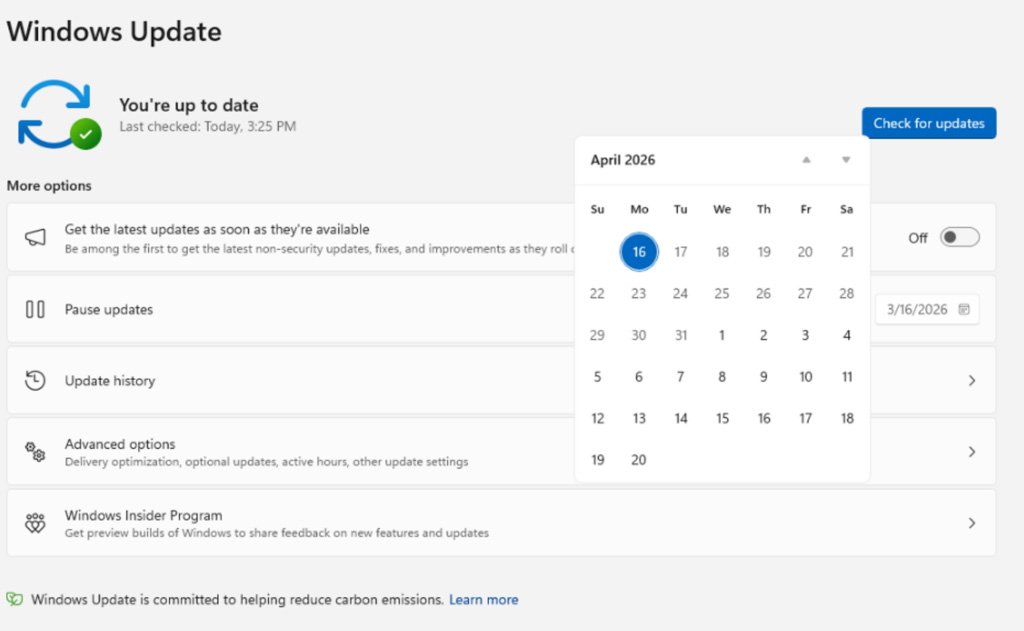
1. Improved Update Pausing with Calendar Interface
The most significant change is the new calendar-based pause functionality. Users can now select a specific date to pause updates for up to 35 days using a flyout calendar interface. Unlike previous limitations, this pause can be extended repeatedly without a fixed limit, providing flexibility for users managing critical projects or important work periods.
2. Separated Power Menu Options
A common frustration has been unexpected updates during shutdown or restart. Microsoft has addressed this by separating standard power options from update-related actions. The Power menu now offers distinct "Restart" and "Shut down" options that won't trigger updates, while "Update and restart" and "Update and shut down" are used only when updates are ready to be installed.

3. Enhanced Driver Update Visibility
Driver updates have frequently been confusing, often listed under a manufacturer name without clear indication of which device they're for. Windows Update will now display the device type directly in the update title (such as display, audio, or battery), helping users make informed decisions about which updates to install.
4. Consolidated Update Installation
To minimize restart disruptions, Microsoft is consolidating different update types into a single monthly restart. Driver, .NET, and firmware updates will now install alongside monthly cumulative updates, reducing the number of required reboots. "Updates will download in the background, then will wait for a coordinated installation and restart. This installation and restart will align with the next Windows quality update or other update that you manually approve," explains Hanson.
Out-of-Box Experience Improvements
Microsoft has already introduced a feature allowing users to skip updates during the out-of-box experience (OOBE), enabling faster access to the desktop. This option is particularly valuable for users setting up new systems who want to customize their environment before installing updates.
"These changes represent a significant evolution in our approach to Windows updates," notes Hanson. "We're balancing our commitment to security with the need for user control and predictability."
Practical Implications for Users
For everyday Windows users, these changes translate to:
- Greater predictability in update scheduling
- Ability to plan around critical work periods
- Reduced disruption from unexpected restarts
- More informed decisions about driver updates
- Fewer total restarts due to consolidated updates
The features are currently rolling out to Windows Insiders in the Dev and Experimental channels, with a broader release expected in coming months. Users interested in accessing these features early can join the Windows Insider program.
Security Considerations
While these changes provide more user control, Microsoft emphasizes that security remains paramount. The consolidated update approach actually improves security by ensuring all critical updates are installed in a timely manner, rather than allowing users to indefinitely postpone important security patches.
For organizations managing enterprise deployments, these changes offer improved predictability for IT departments while maintaining security requirements. The separation of standard power options from update actions helps prevent accidental installations during critical operations.
As Windows continues to evolve, these improvements signal a more user-centric approach to update management that respects both security needs and user experience.
Comments
Please log in or register to join the discussion