A new Rust-based CLI tool, agent-desktop, provides AI agents with structured access to desktop applications through OS accessibility trees, eliminating the need for screenshot-based automation while maintaining deterministic element references.
The developer community has seen a surge in tools designed to bridge AI capabilities with desktop environments, but a new Rust-based CLI called agent-desktop takes a fundamentally different approach. Rather than relying on visual recognition or pixel matching, this tool taps directly into operating system accessibility trees to provide AI agents with deterministic control over any application.
Beyond Screenshot-Based Automation
Most desktop automation solutions for AI agents have traditionally relied on visual recognition—analyzing screenshots to identify UI elements and simulate mouse movements. This approach has inherent limitations: it breaks with UI theme changes, fails with high-DPI displays, and struggles with complex applications. agent-desktop sidesteps these issues by leveraging the accessibility APIs built into modern operating systems.
"The traditional approach of screenshot-based automation creates a fragile foundation for AI agents," observes Alex Chen, a developer tools researcher. "Accessibility APIs provide a semantic understanding of applications that persists across visual changes, which is exactly what AI systems need for reliable automation."
Technical Architecture and Design Philosophy
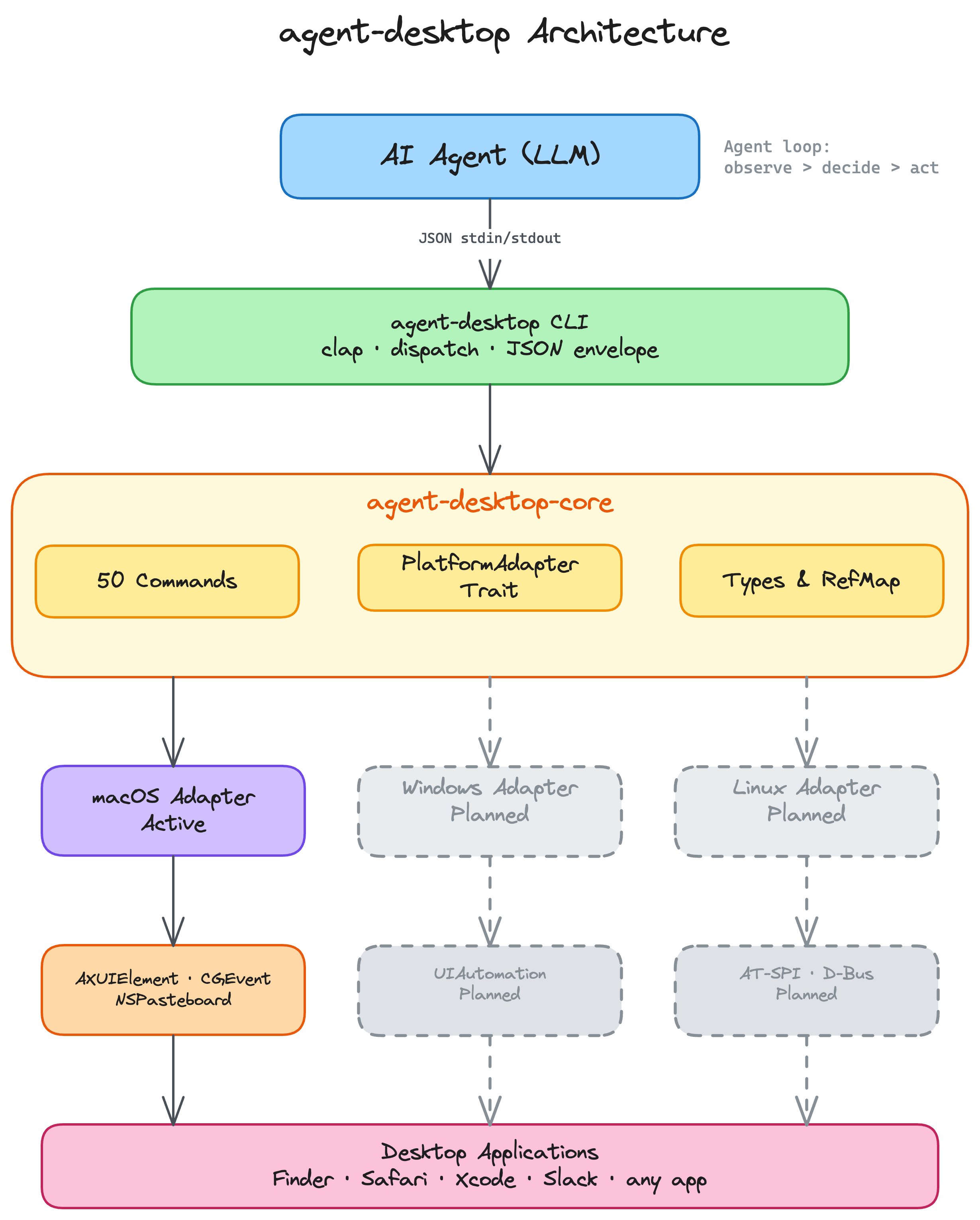
Built entirely in Rust, agent-desktop delivers a native CLI with no runtime dependencies, addressing performance concerns that have plagued some JavaScript-based automation tools. The architecture centers around several key innovations:
Accessibility-First Interaction Model
The tool follows an AX-first interaction strategy, exhausting pure accessibility API approaches before falling back to mouse events. This creates more reliable interactions that work regardless of visual styling or resolution.
"The accessibility-first approach is particularly smart for AI applications," explains Sarah Johnson, an accessibility engineer. "Instead of teaching AI systems to recognize pixels, we're giving them semantic understanding of applications. This aligns with how assistive technologies have worked for years, but optimized for machine consumption."
Progressive Skeleton Traversal
For complex applications like Slack or VS Code, the tool implements progressive skeleton traversal, which reduces token usage by 78-96% through a shallow overview approach combined with targeted drill-down. This optimization addresses a critical challenge in AI agent development: managing context windows while maintaining sufficient understanding of application state.
"The token reduction isn't just about efficiency—it's about making AI agents practical for real-world applications," notes Marcus Rodriguez, an AI systems architect. "Being able to efficiently explore complex UIs without overwhelming context windows could significantly improve the viability of desktop AI agents."
Deterministic Element References
The snapshot system assigns deterministic element references (@e1, @e2, etc.) that persist until the next snapshot, creating a stable interaction model for AI agents. This contrasts with XPath or CSS selectors that frequently break in dynamic applications.
Language Integration and Ecosystem Support
A standout feature is the C-ABI cdylib that allows the tool to be loaded once and called from various programming languages without forking the CLI per call. This approach reduces overhead and improves performance for applications that need frequent automation calls.
"The FFI approach is a pragmatic solution to the classic problem of automation tools being either too slow or too complex to integrate," comments Wei Zhang, a developer tools specialist. "By providing a single binary that can be embedded in various environments, they've lowered the barrier to adoption while maintaining performance."
Current Capabilities and Limitations
The tool currently offers 53 commands covering observation, interaction, keyboard, mouse, notifications, clipboard, and window management. It works with any application that exposes an accessibility tree, including system apps like Finder and third-party applications like Slack and Xcode.
However, the project currently only supports macOS, with Windows and Linux support planned but not yet implemented. This limitation has sparked debate in the developer community about the practicality of adopting a tool with such restricted platform support.
"For a tool targeting AI agents, the macOS-only limitation is significant," points out Lisa Park, a cross-platform developer. "Most AI development happens on Linux, and many target applications run on Windows. Unless they can deliver on their cross-platform roadmap quickly, this tool might face adoption challenges despite its technical merits."
Potential Applications and Industry Impact
The potential applications for agent-desktop span several domains:
- AI Desktop Assistants: Building assistants that can genuinely interact with desktop applications rather than just providing information
- Automated Testing: Creating more reliable test automation that doesn't break with UI changes
- Accessibility Research: Providing new tools for understanding how applications are structured for assistive technologies
- Workflow Automation: Enabling complex multi-application workflows that adapt to changing UI states
"What's interesting is how this tool could democratize desktop automation for AI development," suggests David Kim, an AI product manager. "Currently, building reliable desktop AI agents requires deep expertise in both AI and platform-specific APIs. Tools like this could lower that barrier significantly."
Community Reaction and Adoption Signals
The project has garnered attention from several notable figures in the AI and developer tools communities. Early adopters report success with complex automation tasks that have traditionally been challenging for AI systems.
The GitHub repository shows active development with comprehensive documentation and a clear roadmap. The inclusion of error codes with recovery hints suggests a thoughtful approach to building a reliable automation system.

The Road Ahead
The development team has outlined plans for Windows and Linux support, which would significantly broaden the tool's applicability. They're also working on expanding the command set to cover additional automation scenarios.
"The real test will be how well this scales to the diversity of applications in the wild," comments Rachel Green, a QA automation specialist. "Accessibility APIs are powerful, but implementations vary across applications and platforms. The team's approach of falling back to mouse events shows awareness of these limitations, but only real-world use will reveal how robust this solution truly is."
Conclusion
agent-desktop represents a significant shift in how AI agents might interact with desktop environments. By leveraging accessibility APIs rather than visual recognition, it offers a more reliable foundation for automation that could enable new classes of AI applications. However, its current platform limitations and the complexity of accessibility implementations across applications present challenges to widespread adoption.
As the project evolves and expands to other platforms, it could become a cornerstone technology for AI agents that need to genuinely interact with desktop applications. For now, it stands as an innovative approach to a long-standing problem in AI development: how to give machines reliable control over complex graphical interfaces.
Comments
Please log in or register to join the discussion