
Prevent AI assistants from impulsive coding by enforcing a read-only planning phase before implementation.
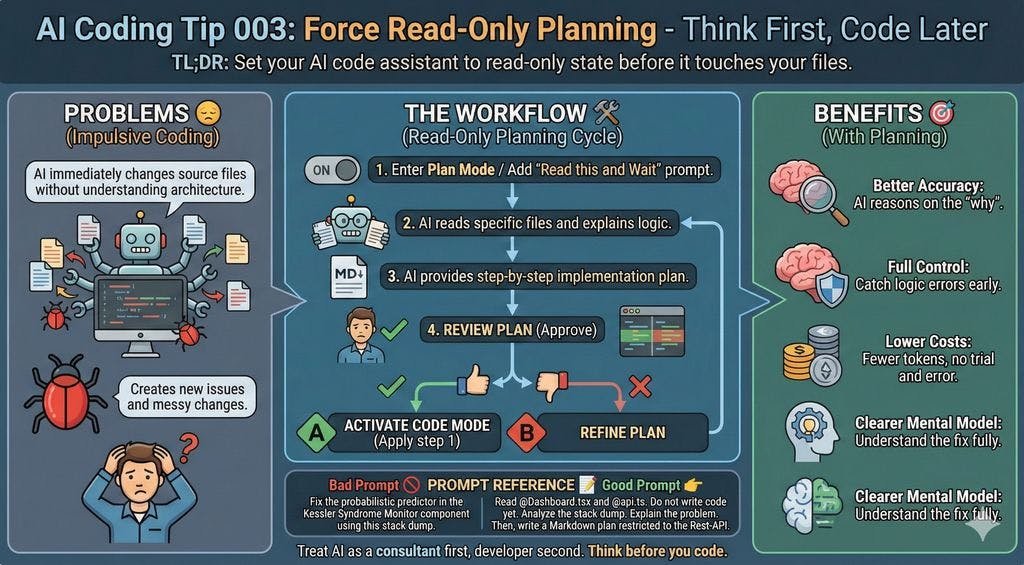
AI coding assistants often default to action mode – they want to immediately modify code when presented with a problem. While helpful, this impulsiveness frequently leads to misguided changes, architectural misunderstandings, and cleanup nightmares. The solution? Force read-only planning: Make your AI assistant analyze and plan before writing a single line of code.
The Impulsive Coding Problem
When you paste a stack trace into your AI tool without explicit constraints, it typically:
- Modifies unrelated files
- Assumes dependencies without checking package.json
- Creates cascading errors
- Generates unreadable diffs
These issues stem from the AI's "doing over thinking" bias – what we call impulsive coding. Unlike senior developers who analyze before acting, most AI models prioritize perceived helpfulness through immediate action.
Implementing Read-Only Planning

Follow this workflow:
Activate plan mode: Use built-in modes like
/planor/ask. If unavailable, start with:"Read [file1] and [file2]. Do NOT modify anything yet. Analyze this stack dump and explain the core problem."
Request a blueprint:
*"Create a step-by-step Markdown plan to resolve this, referencing only these components:
- REST API endpoints\
- Dashboard.tsx\
- KesslerMonitor module"*
Review and approve: Scrutinize the plan for hallucinations or incorrect assumptions.
Execute incrementally:
"Implement STEP 1 from your plan. Show changes in unified diff format."
Key Benefits
- Accuracy: Focused analysis reduces logical errors
- Control: Catch flawed approaches before code generation
- Efficiency: 30-50% fewer tokens by avoiding trial-and-error cycles
- Knowledge transfer: Understand the solution alongside the AI
Tool Comparison
| Tool | Read-Only Mode | Write Mode | Open Source |
|---|---|---|---|
| Aider | /ask |
/code |
Yes |
| GitHub Copilot | Ask mode | Edit mode | No |
| Continue.dev | /chat |
/edit |
Yes |
| Claude | Code review | Auto-execute | No |
When to Use This Approach
Ideal for:
- Architectural changes
- Bug fixes in complex systems
- Refactoring cross-dependent modules
Less useful for:
- Typo corrections
- Simple CSS tweaks
- Single-file utilities
The Senior Developer Mindset
This technique forces AI to emulate expert behavior: consultant first, coder second. By separating planning from execution, you:
- Reduce debugging time
- Maintain cleaner git histories
- Build shared mental models
- Prevent "solution sprawl"
"You wouldn't let a junior developer rebuild your payment gateway without a design review – treat AI with the same scrutiny."
Final Recommendation
Always start complex tasks with:
"Explain before you modify. Plan before you code."
This simple discipline transforms AI from a reckless coder into a valuable thought partner. The 5 minutes spent planning often saves hours of backtracking.
Maxi C is a senior engineer with 30 years of experience in software architecture and AI-assisted development. This article is part of the AI Coding Tips series.
Comments
Please log in or register to join the discussion