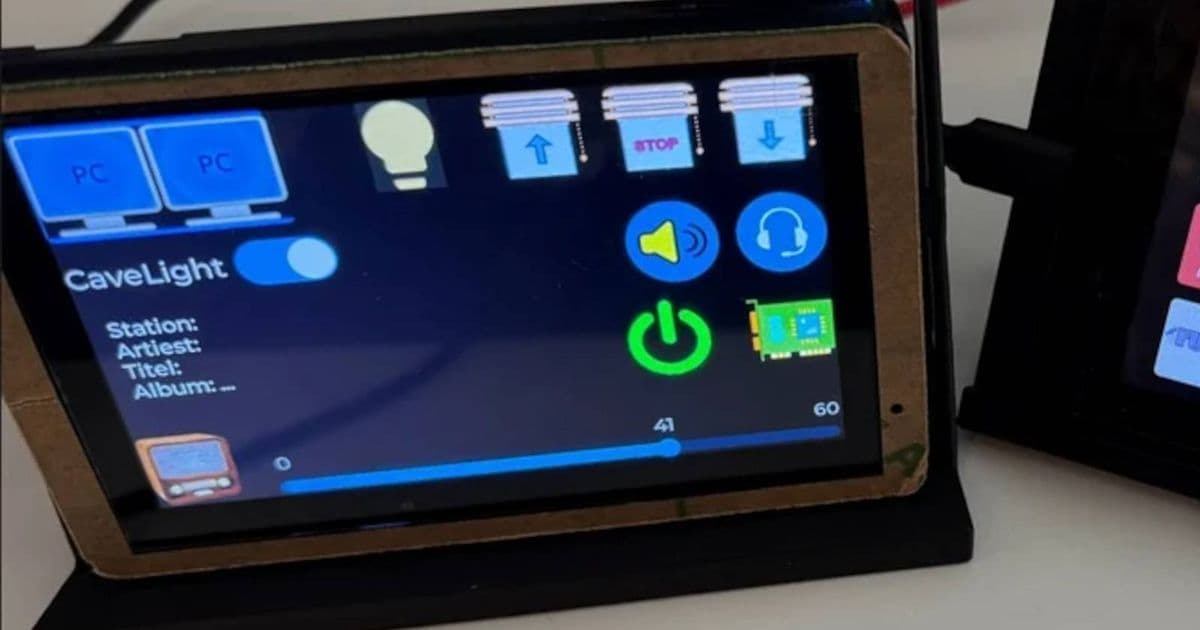
A new no-code tool for ESP32 smart displays aims to democratize IoT projects by eliminating firmware coding and complex setup.
So, when I came across someone working on a tool that allows people to create smart home displays without needing to use any code, I knew I had to check it out. And while it's not available for download yet, it has gotten so much positive feedback that the developer may actually release it for everyone to use.
The ESP32 Smart Display Problem
Over on the ESP32 subreddit, user Stokni posted what they've been working on in the hopes of getting feedback. In the post body, Stokni discusses the pain they've gone through editing smart home displays on ESP32s. Even worse, they sometimes had to go back to old code they made years ago and figure out what exactly they were thinking. Sometimes that alone was enough for them to shelve a project for good.
The ESP32 has become a go-to platform for DIY smart home projects, but the learning curve remains steep. Traditional approaches require:
- Writing C++ or MicroPython firmware
- Setting up MQTT brokers
- Configuring Node-RED flows
- Integrating with Home Assistant or other platforms
- Debugging connectivity issues
For many hobbyists, this complexity creates a barrier to entry that prevents them from bringing their ideas to life.
The No-Code Solution
The goal? Remove the code from the UI creation step, of course:
The goal is simple: Design the UI, bind actions directly, upload to the ESP32 display, and let it run standalone. Instead of wiring MQTT + Node-RED + custom firmware every time, you define actions directly inside the UI. It's a no-code workflow. Flash the base firmware once, and from that point on everything is done through the editor. No firmware coding. No manual MQTT / Home Assistant / Node-RED setup. Someone with zero embedded experience should be able to create a working smart display.
This approach fundamentally changes the development workflow. Rather than writing code that compiles to firmware, users interact with a visual editor that generates the necessary configuration and uploads it directly to the device.
How It Works
The system operates on a simple principle: flash once, customize forever. Here's the typical workflow:
- Initial Setup: Flash the base firmware to your ESP32 once
- Design Interface: Use the web-based editor to create your UI layout
- Bind Actions: Connect UI elements to specific functions or data sources
- Upload Configuration: Send the complete setup to the ESP32
- Run Standalone: The display operates independently without further coding
This eliminates the traditional development cycle where every change requires recompiling firmware and reflashing the device.
Community Response
The Reddit community has responded enthusiastically to the concept. Comments highlight several key benefits:
- Accessibility: "This is exactly what the ESP32 ecosystem needs to reach more people"
- Time Savings: "I've spent hours debugging MQTT connections that should be simple"
- Project Completion: "I have half-finished projects because I got stuck on the coding part"
Many users have expressed interest in providing feedback to help shape the final product before release.
Why This Matters for IoT Development
This tool represents a significant shift in how we approach embedded device development. By abstracting away the complexity of firmware development, it opens up IoT projects to a much broader audience.
Lowering the Barrier to Entry
Currently, creating a smart display requires knowledge of:
- Embedded C++ programming
- WiFi networking concepts
- MQTT protocol
- JSON data structures
- Hardware interfacing
The no-code approach reduces this to:
- Basic UI design principles
- Understanding of what data you want to display
- Simple drag-and-drop interactions
Accelerating Prototyping
For experienced developers, this tool can dramatically speed up prototyping. Instead of spending hours writing boilerplate code for basic displays, you can create functional prototypes in minutes. This allows for rapid iteration and testing of different UI concepts before committing to a final design.
Educational Value
For beginners, this tool serves as an excellent introduction to IoT concepts without the intimidation factor of programming. Users can learn about:
- How smart displays work
- Data binding and display concepts
- Basic IoT architecture
- Hardware-software interaction
Once comfortable with these concepts, they can gradually explore more advanced topics if desired.
Potential Use Cases
The applications for this technology are diverse:
Home Automation Dashboards: Create custom control panels for lights, thermostats, and security systems
Environmental Monitoring: Build displays showing temperature, humidity, air quality, and other sensor data Information Kiosks: Design public displays showing schedules, announcements, or real-time information Industrial Controls: Develop operator interfaces for monitoring machinery or processes Educational Projects: Teach IoT concepts without requiring programming knowledge
Technical Considerations
While the concept is compelling, several technical questions remain unanswered:
Performance: How well does the system handle complex UIs or frequent data updates?
Customization: What level of styling and theming is available?
Integration: Which data sources and protocols are supported out of the box?
Offline Capability: Can displays function without constant internet connectivity?
Security: How are authentication and data encryption handled?
These details will be crucial for determining the tool's practical utility.
The Future of No-Code IoT
This ESP32 smart display tool is part of a broader trend toward democratizing technology development. Similar no-code approaches are emerging in other areas:
- App Development: Tools like Adalo and Glide for mobile apps
- Web Development: Platforms like Webflow and Bubble for websites
- Automation: Zapier and Make for workflow automation
- Machine Learning: No-code AI platforms for model training
As these tools mature, we're likely to see an explosion of creative IoT projects from people who previously lacked the technical skills to bring their ideas to life.
Getting Involved
The developer is actively seeking feedback from the community. If you're interested in this tool, you can:
- Join the Discussion: Comment on the original Reddit post with your thoughts and feature requests
- Share Use Cases: Describe what you'd build with such a tool
- Provide Technical Input: Suggest integration options or technical improvements
- Test Early Versions: Volunteer to beta test when the tool becomes available
Conclusion
The no-code ESP32 smart display designer represents an exciting development in the IoT space. By removing the programming barrier, it has the potential to unlock creativity and innovation from a much wider audience.
While the tool isn't available yet, the enthusiastic community response suggests strong demand for such a solution. For anyone who's ever been frustrated by the complexity of ESP32 development or has an idea for a smart display but lacks the coding skills, this tool could be exactly what you've been waiting for.
As the developer continues to refine the concept based on community feedback, we may be witnessing the beginning of a new era in accessible IoT development. Keep an eye on this project—it could change how we think about creating connected devices.
Comments
Please log in or register to join the discussion