Microsoft Teams introduced AI‑driven voice isolation to filter background noise and improve meeting clarity. This article explains the technology, walks through setup and admin controls, compares it with similar features in Zoom and Google Meet, and evaluates pricing and migration implications for organizations considering a multi‑cloud meeting strategy.
What changed – AI‑powered voice isolation in Teams
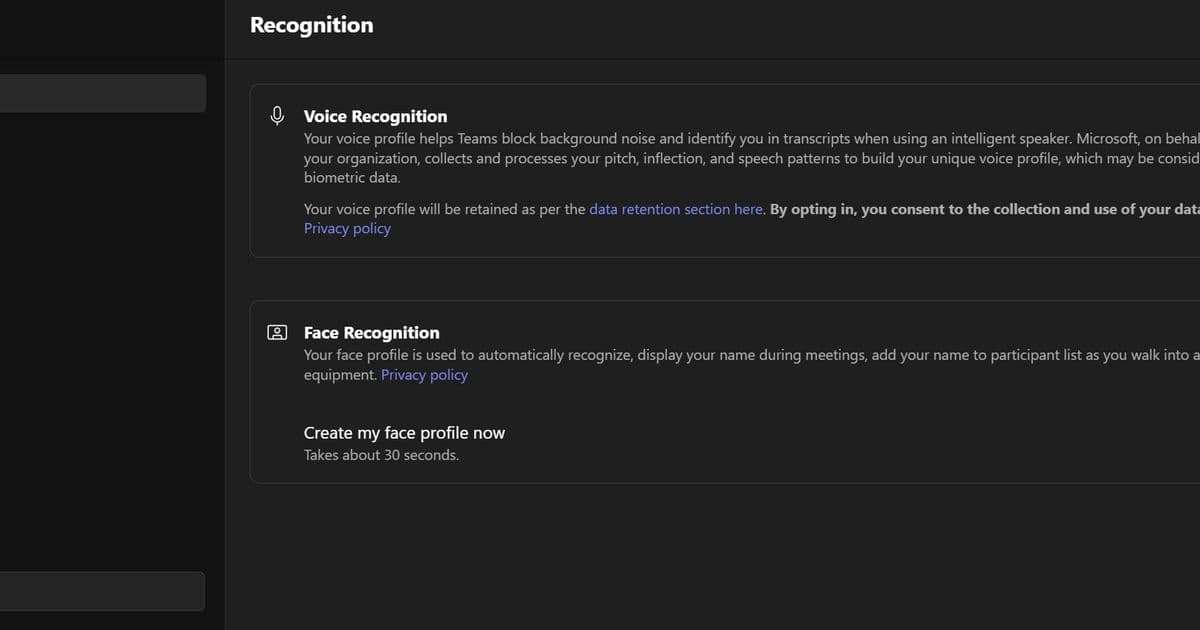
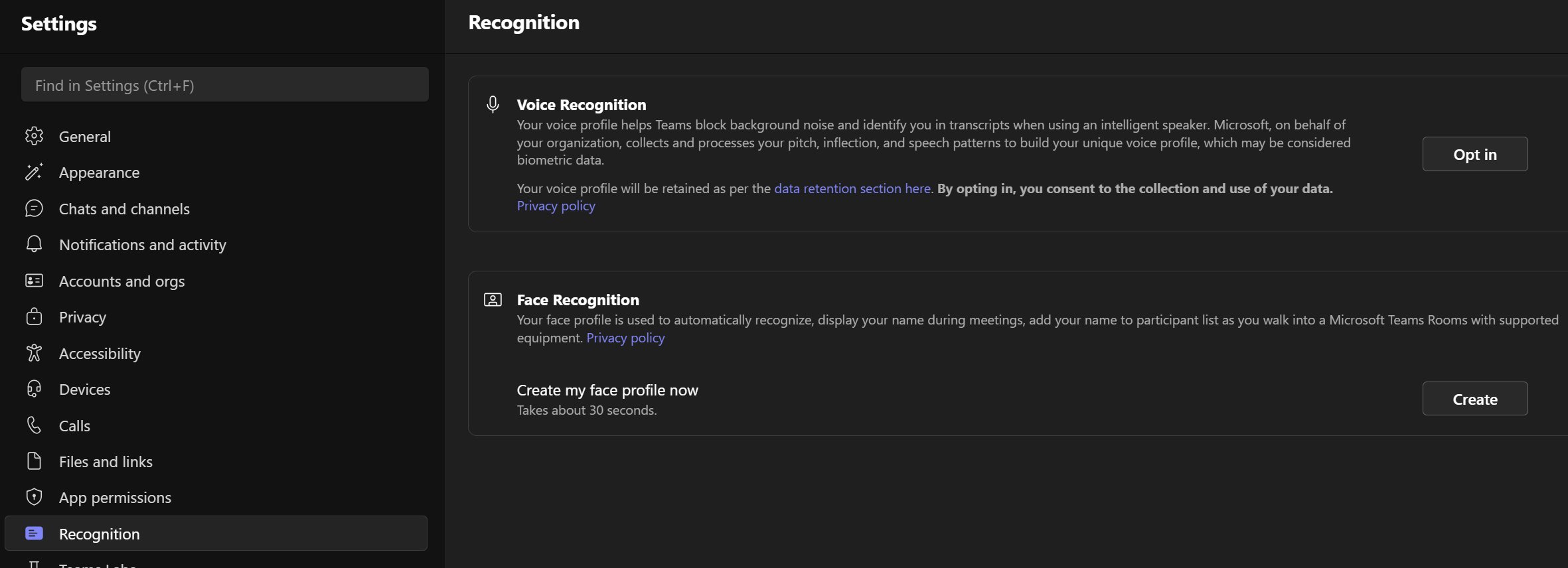
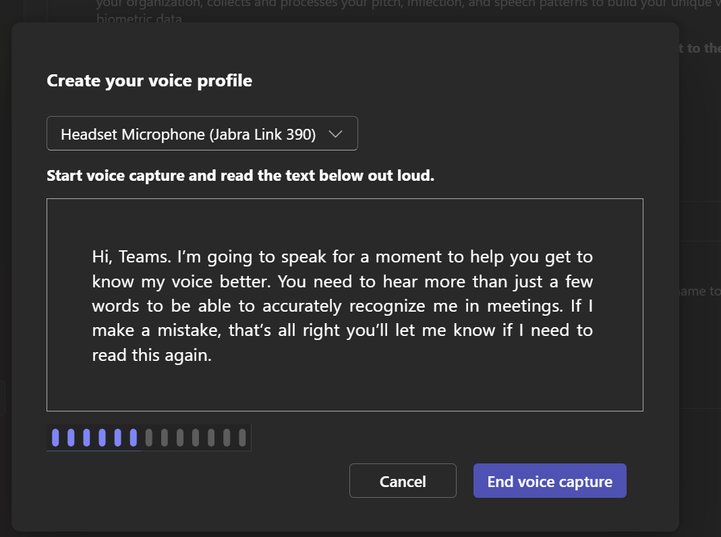
Microsoft rolled out voice isolation for Teams calls and meetings in early 2026. The feature uses a personalized deep‑learning model that runs locally on the user’s device to separate the speaker’s voice from ambient sounds. After a brief enrollment step – reading a short paragraph – the model learns the user’s pitch, inflection, and speech patterns. The profile never leaves the device unless the admin enables automatic updates, in which case Microsoft processes the audio only to improve the model for that user.
Key user‑facing changes:
- A new Recognition pane in Teams Settings where users can opt‑in and create a voice profile.
- Real‑time visual indicators that show when isolation is active.
- Admin‑level PowerShell policies to enable, disable, or enforce enrollment across the tenant.
The result is a cleaner audio stream that reduces the need for manual mute management and improves comprehension in noisy environments such as open‑plan offices, home workspaces, or shared conference rooms.
Provider comparison – Teams vs. Zoom vs. Google Meet
| Feature | Microsoft Teams (Voice Isolation) | Zoom (AI Noise Suppression) | Google Meet (Noise Cancellation) |
|---|---|---|---|
| Model type | Personalized on‑device deep model (user‑specific) | Global model applied to all participants | Global model, no per‑user training |
| Control granularity | Admin can toggle enrollment, passive enrollment, and isolation per policy (PowerShell) | Admin can set global suppression level (low/medium/high) via admin console | Admin can enable/disable at org level; no per‑user toggle |
| Data residency | Profile stored locally; optional cloud update with explicit consent | Audio snippets may be sent to Zoom’s cloud for model improvement (opt‑out) | Processing occurs in Google’s data centers; no local profile |
| Latency impact | Negligible – model runs on device CPU/GPU | Slight increase (≈150 ms) on low‑end devices | Minimal – runs on server side after upload |
| Pricing | Included in all Teams licenses (Free, Business Basic, E3/E5) | Available on Pro and Business plans; higher‑tier plans get "Enhanced Noise Suppression" at no extra cost | Included in Workspace Essentials and higher tiers |
| Migration considerations | No extra cost; requires PowerShell rollout and user enrollment; works with existing Teams meetings | Requires Zoom client update (v5.9+); may need re‑training for large orgs if opting for "Enhanced" tier | No client change; feature auto‑enabled for supported browsers and apps |
Why the differences matter
- Personalization: Teams’ approach gives each user a model tuned to their voice, which yields higher isolation quality in crowded rooms. Zoom and Meet rely on a one‑size‑fits‑all model, which can struggle with overlapping speech.
- Governance: Teams lets admins enforce enrollment policies, a crucial capability for regulated industries that must document audio handling. Zoom’s opt‑out model may raise compliance flags, while Google’s lack of per‑user control limits auditability.
- Cost: All three providers bundle basic noise suppression at no extra charge, but Teams does not require a higher‑tier license to unlock the personalized model. Organizations already on Microsoft 365 can adopt voice isolation without additional spend.
Business impact and migration strategy
Immediate productivity gains
- Reduced repeat requests: Participants spend less time asking speakers to repeat themselves, cutting average meeting length by an estimated 5‑7 % according to Microsoft’s internal studies.
- Lower fatigue: Cleaner audio reduces cognitive load, especially for remote workers who juggle multiple calls per day.
- Improved accessibility: Users with hearing impairments benefit from a clearer signal‑to‑noise ratio, supporting broader inclusion goals.
Cost‑benefit analysis
| Cost item | Teams (Voice Isolation) | Zoom (AI Noise Suppression) | Google Meet (Noise Cancellation) |
|---|---|---|---|
| License uplift | None (included) | May require Pro or Business tier for "Enhanced" | None (included) |
| Admin overhead | PowerShell rollout (≈2 hrs per 1,000 users) | Client update and policy communication | Minimal – feature auto‑enables |
| Training | Short user tutorial (5 min) | Similar | Similar |
| Expected ROI | Faster meetings, lower attrition, compliance peace of mind | Slightly better audio for large meetings | Basic improvement, no personalization |
Migration checklist for a multi‑cloud strategy
- Audit current meeting platforms – Identify which teams, Zoom rooms, or Google Meet links are in active use.
- Pilot voice isolation – Enable the feature for a representative user group (e.g., 5 % of the workforce) and collect feedback via a short survey.
- Define policy scope – Use PowerShell scripts to set
-VoiceIsolation Enabledon the relevant TeamsMeetingPolicy. For Zoom, configure the global suppression level in the admin portal. - Communicate enrollment steps – Publish a step‑by‑step guide (similar to the Microsoft Docs page) and embed a quick‑start video.
- Monitor metrics – Track average meeting duration, participant satisfaction scores, and any increase in support tickets related to audio.
- Iterate – If the pilot shows measurable gains, roll out organization‑wide and consider disabling the competing platform’s noise suppression to avoid double‑processing.
Pricing considerations in a hybrid environment
If your organization already pays for Zoom Business licenses for external partners, you can keep Zoom for outbound meetings while using Teams’ voice isolation for internal collaboration. The marginal cost of enabling the feature in Teams is essentially zero, but you should factor in the admin time required to manage policies across multiple tenants. A rough estimate:
- Admin labor: 0.5 FTE for a quarter (≈$12,000) to configure and support the rollout.
- License savings: Avoiding an upgrade to Zoom’s "Enhanced" tier for 2,000 internal users saves roughly $30 per seat per year → $60,000 annual saving.
- Net benefit: ≈$48,000 in the first year, plus intangible gains in meeting efficiency.
Final takeaways
- Microsoft Teams’ voice isolation delivers personalized, on‑device AI that outperforms generic noise suppression in noisy, shared environments.
- The feature is included in existing Teams licenses, requiring only policy configuration and a brief user enrollment step.
- Compared with Zoom and Google Meet, Teams offers stronger governance controls and a clearer compliance path, making it a compelling choice for regulated sectors.
- Organizations can adopt voice isolation without additional licensing costs, and the expected productivity gains often offset the modest admin overhead.
- For a multi‑cloud meeting strategy, enable Teams voice isolation for internal calls while maintaining Zoom or Meet for external partners, then monitor usage data to fine‑tune the balance.
Resources
- Create your Microsoft Teams recognition profile
- Overview of voice and face enrollment
- PowerShell cmdlets for Teams policies
- Zoom AI Noise Suppression documentation
- Google Meet noise cancellation overview
Comments
Please log in or register to join the discussion